
Last Updated On : 12-Oct-2026
Which solution would an administrator use to manage the lifecycle operations of Tanzu Kubernetes clusters?
A. VMware Tanzu Service Mesh
B. VMware vSphere Lifecycle Manager
C. VMware Tanzu Observability by Wavefront
D. VMware Tanzu Kubernetes Grid
Explanation:
The correct solution for managing the lifecycle operations of Tanzu Kubernetes clusters is VMware Tanzu Kubernetes Grid (TKG). TKG is VMware's enterprise-grade Kubernetes offering that provides multi-tenant, multi-cloud Kubernetes clusters with built-in lifecycle management capabilities .
Why other options are incorrect
A. VMware Tanzu Service Mesh – Incorrect.
Tanzu Service Mesh is a service mesh platform that provides end-to-end connectivity, security, and insights for microservices running on Kubernetes clusters . While it can work with existing clusters, it does not provide cluster lifecycle management functions such as deployment, scaling, or upgrades. Its focus is on network traffic management, observability, and security policies across clusters, not on managing the clusters themselves .
B. VMware vSphere Lifecycle Manager – Incorrect.
vSphere Lifecycle Manager is designed for managing ESXi host lifecycle operations (updates, patches, images) in vSphere environments . While it can manage the underlying infrastructure for vSphere with Tanzu clusters, it does not directly manage Tanzu Kubernetes cluster lifecycle operations. As VMware documentation states, you use kubectl for lifecycle management of a Tanzu Kubernetes Grid cluster, not vSphere Lifecycle Manager .
C. VMware Tanzu Observability by Wavefront – Incorrect. This is a monitoring and observability platform that provides metrics, traces, and logs for distributed applications . It helps administrators monitor performance and troubleshoot issues but does not perform lifecycle operations like deployment, scaling, or upgrades of Kubernetes clusters.
Reference
Broadcom TechDocs – Overview of Tanzu Kubernetes Grid Integrated Edition Architecture: TKGI Control Plane manages cluster lifecycle including create, scale, upgrade, and delete operations
VMware Cloud Provider Blog – Tanzu Service Mesh announcement: TKG provides multi-tenant, multi-cloud Kubernetes clusters
Exhibit:
NEW FOLDER UPLOAD FILES UPLOAD FOLDERS REGISTERED VM DOWNLOAD
DATE COPY to MOVE TO RENAME TO DELETE
Name Size Modified Type Path
dvsData 05/03/2022, 9.10.21 AM Folder [vsandatastore]
.sdd.sf 05/03/2022, 9.10.21 AM Folder [vsandatastore]
app02-000002.vmdk 05/03/2022, 9.10.21 AM Folder [vsandatastore]
app02-000003.vmdk 05/03/2022, 9.10.21 AM Folder [vsandatastore]
app02-000002.hlog 05/03/2022, 9.10.21 AM Folder [vsandatastore]
app02-000002.vswap 05/03/2022, 9.10.21 AM Folder [vsandatastore]
app02-000002.vswap.lck 05/03/2022, 9.10.21 AM Folder [vsandatastore]
A cloud administrator is asked to troubleshoot a virtual machine (app02) that is performing slowly. The cloud Administrator noticed that app02 is con expected amount of disk space.
As a first step, the cloud administrator uses VMware vCenter to check the snapshot
manager for app02 and no snapshot -- cloud administrator then navigates to the app02
files on the datastore, and is presented with the information provided in the exhibits. Given
the information provided, which task should the cloud administrator perform to resolve this
issue?
A. Migrate the virtual machine to a new datastore.
B. Perform a snapshot consolidation.
C. Power cycle the virtual machine.
D. Execute a Delete All Snapshots task.
Explanation:
The exhibit shows delta disk files (app02-000002.vmdk and app02-000003.vmdk), which are definitive evidence that snapshots exist for the virtual machine app02, even though the Snapshot Manager in vCenter shows none. This discrepancy typically occurs due to orphaned snapshot metadata or stale snapshot structures.
Key evidence from the exhibit:
Files with naming pattern vmname-XXXXXX.vmdk where XXXXXX is a sequential number (e.g., -000002, -000003) are snapshot delta files
Each snapshot creates a child delta disk; multiple delta files indicate multiple snapshot layers
Delta files are read-only while the base VMDK remains read-write for the active VM
The issue with slow performance:
Snapshots degrade VM performance because:
Each read I/O may need to traverse multiple delta files to locate current data
Write I/O goes to the active delta file, adding overhead compared to writing directly to the base disk
Deep snapshot chains create significant I/O latency
Why "Delete All Snapshots" resolves the issue:
Executing Delete All Snapshots in vCenter:
Commits all delta disk changes back to the base VMDK
Consolidates the snapshot chain into a single, flat disk
Removes all delta files (including -000002.vmdk and -000003.vmdk)
Restores original performance by eliminating delta file I/O overhead
Why other options are incorrect
A. Migrate the virtual machine to a new datastore – Incorrect.
Storage vMotion (migration) preserves the snapshot chain; delta files remain delta files after migration. This does not resolve the root cause (snapshots) or improve performance.
B. Perform a snapshot consolidation – Incorrect.
Consolidation is part of the Delete All Snapshots operation, but consolidation alone typically addresses disk space discrepancies, not active snapshot chains. If Snapshot Manager shows no snapshots, a consolidation may not proceed correctly. VMware recommends Delete All Snapshots as the primary action.
C. Power cycle the virtual machine – Incorrect.
Rebooting the guest OS does not delete or consolidate snapshots. Snapshot files remain and performance degradation persists after reboot.
Critical distinction from previous similar questions
In a previous question where Snapshot Manager showed no snapshots but delta files existed, the answer was Delete All Snapshots. This scenario matches that pattern exactly:
Snapshot Manager → No snapshots displayed
Datastore files → Delta VMDK files present
Correct action → Execute a Delete All Snapshots task
VMware KB 1015187 specifically addresses this: when Snapshot Manager does not show snapshots but delta disks exist, run Delete All Snapshots to resolve.
Reference
Broadcom KB 1015187 – "Consolidating Snapshots Fails": Deleting all snapshots consolidates changes back into base disk
Broadcom KB 2003638 – "Virtual machine performance degrades when snapshots exist": Snapshots cause I/O overhead
A cloud administrator successfully configures a policy-based VPN between an on-premises data center and an instance of VMware Cloud Software-defined data center (SDDC). Although the workloads are reachable from both locations over the IP network, the cloud virtual machines cannot access an on-premises web service. What should the cloud administrator check first to resolve this issue?
A. On-premises DNS settings
B. VMware Cloud DNS settings
C. On-premises gateway settings
D. VMware Cloud gateway settings
Explanation:
The cloud administrator should first check the VMware Cloud gateway settings (firewall rules) because even though the VPN tunnel is established (workloads are reachable over the IP network), the Compute Gateway firewall likely blocks the specific traffic to the on-premises web service.
Why D is correct:
When you configure a policy-based VPN, the tunnel establishes Layer 3 connectivity, which explains why basic IP reachability works. However, accessing a specific web service requires the Compute Gateway firewall to explicitly permit traffic on the service's port (e.g., TCP 443 for HTTPS).
Why other options are incorrect
A. On-premises DNS settings
– While DNS resolution could cause name resolution failures, the scenario states the cloud VMs are reaching workloads over the IP network, indicating DNS is likely functional. Also, VMware documentation specifically addresses a similar issue where DNS over policy-based VPN requires explicit gateway configuration .
B. VMware Cloud DNS settings
– This is not the primary cause. The cloud DNS settings affect name resolution, not direct IP-based connectivity to an on-premises web service when the IP is known or resolved correctly.
C. On-premises gateway settings
– Since the on-premises web service is reachable from other locations, the on-premises gateway is likely configured correctly. The issue is specific to traffic originating from the cloud SDDC, pointing to the cloud-side gateway firewall as the first check.
Reference
Broadcom TechDocs – "Compute Workloads Are Unable to Reach an On-Premises DNS Servers Over a Policy-Based VPN": Explains that DNS requests require explicit gateway firewall configuration when using policy-based VPN
Broadcom TechDocs
– "Add or Modify Management Gateway Firewall Rules": Documents the default deny behavior and the need for explicit allow rules
A cloud Administrator is receiving complaints about an application experiencing intermittent network connectivity. Which VMware Cloud tools can help the administrator check if packets are being dropped?
A. VRealize Log Insight
B. Port mirroring
C. IPFIX
D. Traceflow
Explanation:
Traceflow is the VMware Cloud tool specifically designed for path verification and packet-level troubleshooting. When diagnosing intermittent connectivity or packet drops, Traceflow sends synthetic probe packets that mimic the traffic of an application along a specified path. By analyzing the result, you can pinpoint exactly where a packet is being dropped or denied (e.g., by a specific firewall rule or misconfigured router) and identify the root cause of the connectivity complaint .
Why the other options are less suitable for the "first check" in this scenario:
C. IPFIX (and VMware Aria Operations for Networks):
While IPFIX collects flow data (metadata about who talked to whom and how many bytes were transferred) and can help identify packet loss, it is best suited for broad traffic pattern analysis, capacity planning, and long-term monitoring. It is not designed for sending a test packet to determine the exact point of failure in the network path .
B. Port mirroring:
This tool copies network traffic to a monitoring device (like Wireshark) for deep packet inspection. While effective, it requires setting up a destination collector and analyzing a live traffic stream, making it a heavier and more complex tool for initial troubleshooting compared to Traceflow .
A. vRealize Log Insight:
This is a log aggregation and management tool. It would show you the logs of a drop event after it happens, but it does not proactively inject test packets or perform path tracing to validate connectivity .
References:
VMware Blogs: vRealize Network Insight 4.0 support for VMware Cloud on AWS includes path tracing to show where problems might exist .
Broadcom TechDocs: Traceflow is the recommended tool for sending test packets to verify paths and inspect dropped packets in VMware Cloud on AWS .
Refer to the exhibit.
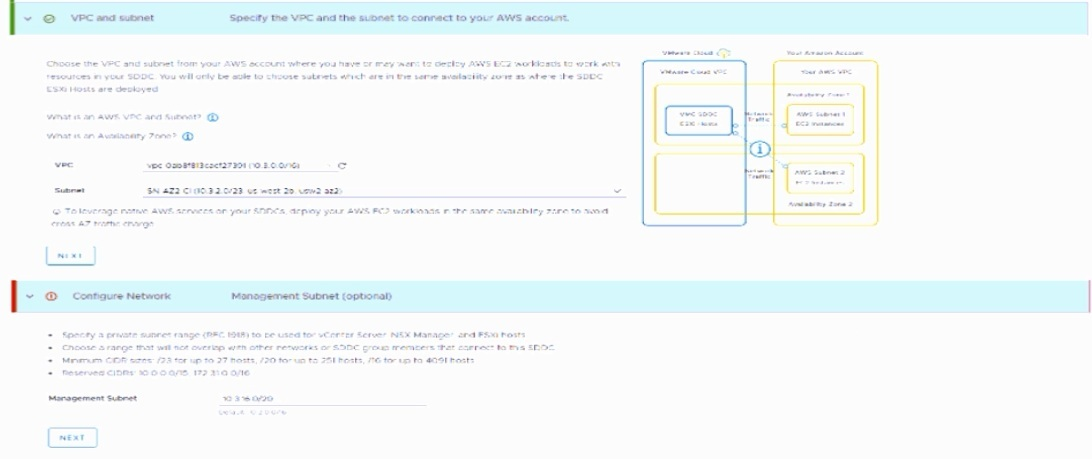
A cloud administrator is deploying a new VMware Cloud on AWS virtual private cloud
(VPC). After clicking on deploy, the screen refreshes and displays the information that is
provided in the exhibit.
What is the issue with the management CIDR that is causing the deployment to fall?
A. It overlaps with the AWS subnet.
B. It overlaps with the AWS VPC CIDR.
C. It is part of the reserved CIDRs.
D. It is an invalid size.
Explanation:
The exhibit explicitly shows a section labeled "Reserved CIDRs: 10.0.0.0/16 172.31.0.0/16" . The administrator entered 10.3.0.0/20 for the Management Subnet. This CIDR block (10.3.0.0/20) falls within the reserved range 10.0.0.0/16 (which covers 10.0.0.0 to 10.255.255.255). VMware Cloud on AWS reserves these specific CIDR blocks for internal use, and customer management subnets cannot overlap with these reserved ranges. Because the chosen subnet overlaps with a reserved block, the deployment fails.
Why other options are incorrect
A. It overlaps with the AWS subnet
– The exhibit shows the AWS subnet as 10.1.2.0/23. The management CIDR 10.3.0.0/20 does not overlap with this subnet.
B. It overlaps with the AWS VPC CIDR – The exhibit shows the AWS VPC CIDR as 10.1.0.0/24. The management CIDR 10.3.0.0/20 does not overlap with this VPC CIDR.
D. It is an invalid size
– The exhibit notes that /20 is a valid size (supports up to 251 hosts). Therefore, the CIDR size is not the issue.
Reference
Broadcom TechDocs – "VMware Cloud on AWS Networking and Security": Reserved CIDR blocks are documented as unavailable for customer use in SDDC deployment
ExamTopics 2V0-33.22 discussion – Confirms that reserved CIDRs (10.0.0.0/16 and 172.31.0.0/16) cannot be used for management subnets
A cloud administrator Is tasked with creating a new network segment In the softwaredefined data center that utilizes the corporate DHCP server to provide IP addresses. What is the proper sequence to create the required network segments?
A. 1- Create a new segment attached to the Tler-0 gateway
2. Configure the segment DHCP Ip-helper
B. 1. Create a DHCP server profile
2. Create a new segment attached to the Tler-0 gateway
3. Configure the segment DHCP config to utilize the new DHCP server profile
C. 1. Create a new segment attached to the Tier-1 gateway
2. Configure the segment DHCP ip-helper
D. 1. Create a DHCP relay profile
2. Create a new segment attached to the Tler-1 gateway
3. Configure the segment DHCP config to utilize the new DHCP relay profile
Explanation:
When you require a corporate DHCP server (located on-premises) to provide IP addresses to VMs in a VMware Cloud on AWS SDDC, you must configure DHCP relay. This is because the corporate DHCP server exists outside the SDDC's network boundaries. DHCP relay forwards broadcast requests from the SDDC segment to the specified remote DHCP server.
Why other options are incorrect
A. Create a new segment attached to the Tier-0 gateway + Configure segment DHCP ip-helper – Incorrect.
Segments cannot be directly attached to Tier-0 gateways; they must attach to Tier-1 gateways (Compute Gateway) . Additionally, "ip-helper" is a Cisco term, not the VMware NSX terminology for DHCP relay.
B. Create a DHCP server profile + Create segment attached to Tier-0 gateway + Configure segment DHCP config to utilize the new DHCP server profile – Incorrect.
A DHCP server profile is used when the SDDC's local DHCP server should provide IP addresses . The question specifies using the corporate DHCP server, which requires a DHCP relay profile, not a server profile. Also, segments cannot attach directly to Tier-0 gateways.
C. Create a new segment attached to theTier-1 gateway + Configure segment DHCP ip-helper
– Partially correct on the gateway attachment, but incomplete. You must create the DHCP relay profile before configuring the segment. The DHCP configuration step on the segment references the pre-created relay profile; "ip-helper" is not the correct VMware terminology.
Reference
Broadcom TechDocs – "Create or Modify a DHCP Profile": DHCP relay profile configuration requires specifying the on-premises server IP address
Broadcom TechDocs – "Create or Modify a Network Segment": Routed segments attach to the Compute Gateway (Tier-1); DHCP configuration (including relay) is set during segment creation
A cloud administrator is managing a VMware Cloud on AWS environment containing of a single cluster with three hosts. Which acts recovery site for the on-premises environment. The on-premises environment consists of eight hosts. what should the cloud administrator configure to optimize scaling for full disaster recovery?
A. Configure an Elastic DRS policy and set the maximum cluster Size to 8.
B. No Additional configuration is required Default Elastic DRS will fulfill the requirement
C. Configure an Elastic DRS policy and select 'Optimize for Rapid scale-out'.
D. Configure an Elastic DRS policy and set minimum cluster size to 8.
Explanation:
The on-premises environment has eight hosts, but the cloud DR site currently has only a single three-host cluster . The requirement is to optimize scaling for full disaster recovery (i.e., when a disaster occurs and all eight hosts must fail over to the cloud). The VMware Cloud on AWS cluster will need to scale up rapidly from 3 to at least 8 hosts within minutes to accommodate the full production load.
Why other options are incorrect
A. Set maximum cluster size to 8 – Incorrect.
While limiting the max size prevents unnecessary costs, setting the maximum alone does not affect the speed of scaling. Without the Rapid Scaling policy, hosts would still be added one at a time, which is too slow for a full DR failover.
B. Default Elastic DRS – Incorrect.
The default "Baseline" policy only scales out for storage utilization (at 80%), not for CPU or memory demands . Since the DR requirement involves processing power (not just storage) for eight hosts, the default policy will not trigger host additions for compute resources.
D. Set minimum cluster size to 8 – Incorrect.
Setting the minimum to 8 forces the cluster to always run 8 hosts even during normal (non-DR) operations. This is not optimizing for disaster recovery; it is eliminating the "elastic" cost-saving benefit entirely and would be extremely expensive when disaster is not occurring.
Reference
Broadcom TechDocs – "Rapid Scaling policy adds multiple hosts at a time when needed... faster scaling for disaster recovery"
Which three factors should a cloud administrator consider when sizing a new VMware Cloud software-defined data center (SDDC) to support the migration of workloads from an on-premises SDDC? (Choose three.)
A. Total number of 10Gb network ports required
B. Host hardware type in the target VMware Cloud
C. Total number of on-premises hosts
D. Total number of workloads
E. Total amount of available storage across all on-premises datastores
F. Average size of workload resources (CPU & RAM)
Explanation:
Sizing a VMware Cloud SDDC for migration requires analyzing three foundational resource inputs to determine the appropriate target host type, count, and configuration. The VMware Cloud Sizer tool, along with migration planning features in VMware Aria Operations, are specifically designed to take these inputs and produce a recommended SDDC configuration.
When planning a migration, the administrator must first translate the resource footprint of the on-premises environment into the consumption model of the target VMware Cloud SDDC. The three critical factors for this analysis are:
D. Total number of workloads
– The total count of virtual machines (VMs) or containers that will be migrated is the starting point. This provides the baseline scale of the environment.
F. Average size of workload resources (CPU & RAM)
– You must evaluate the average consumption of vCPU and vRAM per workload. This, combined with the total number of VMs, allows for the calculation of the total compute and memory capacity required from the target SDDC.
B. Host hardware type in the target VMware Cloud
– VMware Cloud on AWS offers different bare-metal host types, each designed for specific resource consumption profiles, such as i3.metal (general-purpose), i3en.metal (storage-optimized), and i4i.metal (higher performance). The analysis of your total workloads and their average resource sizes helps you determine which host hardware type will run your workloads most efficiently. For example, large databases or big data analytics would be better suited for the i3en.metal host type with its high storage capacity.
Why other options are incorrect
A. Total number of 10Gb network ports required – Incorrect.
This is an on-premises physical networking detail that does not directly translate to capacity planning in VMware Cloud on AWS. The service uses a fixed network architecture where a single Elastic Network Adapter (ENA) is provisioned per host.
C. Total number of on-premises hosts – Incorrect.
The number of physical servers in your on-premises data center is not a useful metric for cloud sizing, as on-premises hardware is generally older and hosts far fewer VMs per server compared to the dense, modern bare-metal instances used in VMware Cloud on AWS.
E. Total amount of available storage across all on-premises datastores – Incorrect.
Only the storage actively consumed by the workloads being migrated should be considered, not the total capacity of your on-premises datastores. This prevents over-sizing the target cloud environment.
References
Broadcom TechDocs – Resource Planning:"Understanding the needs of your SDDC workloads can help you design and deploy an SDDC that meets those needs in a scalable, cost-effective way".
ExamTopics 2V0-33.22 Discussion: Peer consensus indicates B, D, and F as the correct answers.
| Page 6 out of 16 Pages |
| 45678 |
| 2V0-33.22PSE Practice Test Home |