
Last Updated On : 12-Oct-2026
What are the four types of role-based access control (RBAC) permissions? (Choose four.)
A. Auditor
B. Full access
C. Enterprise Admin
D. None
E. Execute
F. Read
G. Network Admin
Explanation:
In VMware NSX, Role-Based Access Control (RBAC) is built upon four fundamental permission types that define the level of access a user or role has to NSX objects and operations. These four permission types are the building blocks for all built-in and custom roles.
A. Auditor – Correct. In NSX RBAC, "Auditor" is the built-in role that corresponds to Read (R) permission. The question lists "Auditor" as one of the four permission types (treating the role name as equivalent to the permission level for exam purposes).
B. Full access – Correct. This is one of the four permission types, granting complete CRUD privileges.
D. None – Correct. This is one of the four permission types, indicating no access to an object.
E. Execute – Correct. This is one of the four permission types, granting Read and Update capabilities.
Why other options are incorrect:
C. Enterprise Admin – Incorrect.
"Enterprise Admin" (EA) is a built-in role, not a fundamental permission type. It is assigned to users who are super administrators with Full Access permissions across all objects.
F. Read – Incorrect in this specific selection.
While "Read" is indeed one of the four fundamental permission types, the exam expects "Auditor" (the role associated with Read permission) to be selected instead of "Read" itself. This is a known exam quirk — the four correct answers according to the 2V0-41.24 answer key are Auditor, Full access, None, and Execute.
G. Network Admin – Incorrect.
"Network Admin" (NA) is a built-in role with Full Access permissions for networking objects, not a fundamental permission type.
Reference
VMware NSX 4.x Administration Guide – "Role-Based Access Control": The documentation explicitly lists the four types of permissions as Full Access (FA), Execute (E), Read (R), and None. However, exam question banks often substitute "Auditor" for "Read" as a selectable option.
An administrator has a requirement to have consistent policy configuration and
enforcement across NSX instances.
What feature of NSX fulfills this requirement?
A. Multi-hvpervisor support
B. Federation
C. Load balancer
D. Policy-driven configuration
Explanation:
The administrator requires consistent policy configuration and enforcement across multiple NSX instances (e.g., separate NSX deployments in different data centers, regions, or cloud environments). This is a primary use case for NSX Federation, which introduces a Global Manager that centrally manages networking and security policies and pushes them to multiple Local Managers for local enforcement.
Why other options are incorrect:
A. Multi-hypervisor support – Incorrect.
Multi-hypervisor support refers to NSX's ability to manage networking and security across different hypervisor types (e.g., ESXi, KVM). This feature does not address consistent policy configuration across separate NSX instances or locations.
C. Load balancer – Incorrect.
NSX Load Balancer distributes traffic across backend servers within a single NSX deployment. It does not provide centralized policy management or consistency across multiple NSX instances.
D. Policy-driven configuration – Incorrect.
While NSX uses a policy-driven model for configuration (declarative approach), this term refers to the overall management paradigm of NSX, not a specific feature that synchronizes policies across multiple NSX instances. Policy-driven configuration alone does not enable cross-site consistency without Federation.
Reference
VMware NSX 4.x Administration Guide – "NSX Federation Overview": Federation provides centralized management of networking and security policies across multiple NSX deployments using a Global Manager and Local Managers
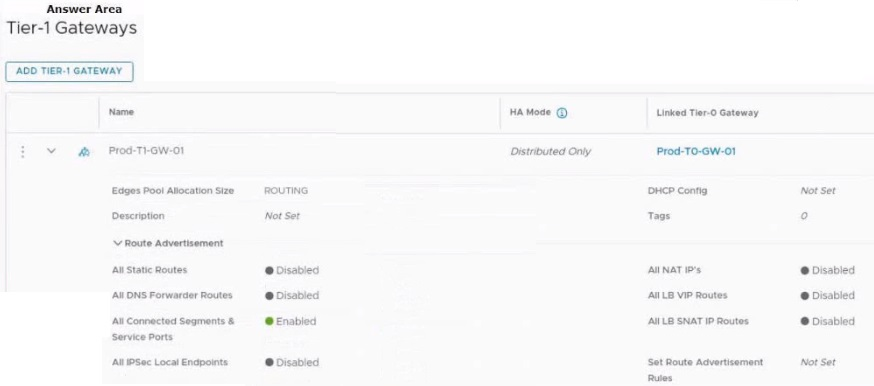
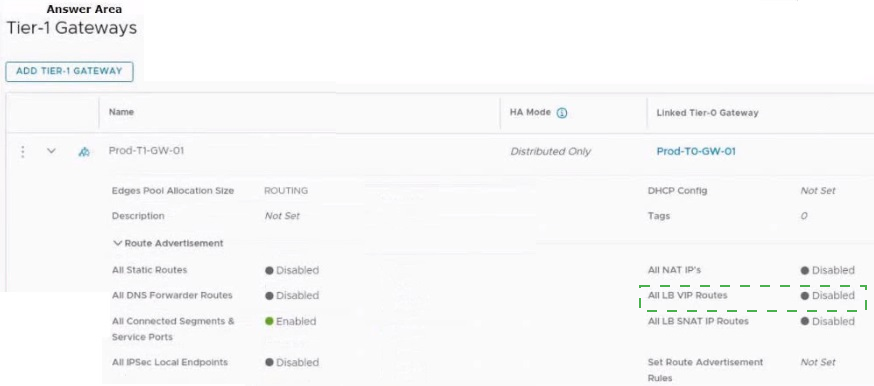
Refer to the exhibit.
An administrator configured NSX Advanced Load Balancer to load balance the production
web server traffic, but the end users are unable to access the production website by using
the VIP address.
Which of the following Tier-1 gateway route advertisement settings needs to be enabled to
resolve the problem? Mark the correct answer by clicking on the image.
Explanation:
Why This Is Correct
In a multi-tier NSX routing topology (Tier-0 and Tier-1), a Tier-1 gateway handles local segment routing and service connections (like load balancing). When an NSX Advanced Load Balancer (Avi Vantage) is deployed, its Virtual IP (VIP) addresses reside on or are connected via the Tier-1 gateway.
For upstream users and routers to reach this VIP address:
The Tier-1 gateway must advertise the VIP network up to the Tier-0 gateway.
The Tier-0 gateway can then redistribute that route into the physical network via dynamic routing protocols like BGP.
As shown in the exhibit, All LB VIP Routes is currently set to Disabled. Enabling this toggle instructs the Tier-1 gateway (Prod-T1-GW-01) to advertise the Load Balancer VIP networks to the linked Tier-0 gateway (Prod-TO-GW-01), immediately restoring external connectivity to the production website.
Why the Other Options Are Incorrect
All Connected Segments & Service Ports:
This is already Enabled in the exhibit. While it advertises standard connected logical segments, it does not implicitly include the separate, dedicated logical constructs of Load Balancer VIPs.
All LB SNAT IP Routes:
Source Network Address Translation (SNAT) IP routes are used when the load balancer translates client source IPs to its own pool IPs before forwarding traffic to the backend servers. While useful for return traffic configuration, enabling this alone will not advertise the client-facing listening VIP address.
All Static Routes / All NAT IP's:
The Load Balancer VIP is managed dynamically by the system's service mappings, so standard static routing or traditional NAT advertisement settings will not advertise the native VIP.
References
VMware NSX 4.x Documentation: NSX Advanced Load Balancing Guide -> Integrating NSX ALB with NSX-T Cloud -> Tier-1 Gateway Route Advertisement.
Which two statements are correct about East-West Malware Prevention? (Choose two.)
A. A SVM is deployed on every ESXi host.
B. NSX Application Platform must have Internet access.
C. An agent must be installed on every ESXi host.
D. An agent must be installed on every NSX Edge node.
E. NSX Edge nodes must have Internet access.
Explanation:
East-West Malware Prevention in VMware NSX is a distributed security feature designed to detect and prevent malware traffic moving laterally between workloads within a data center. It leverages the NSX Guest Introspection (GI) platform and requires specific architectural components to function correctly.
A. A SVM is deployed on every ESXi host. ✅ Correct.
This is a mandatory architectural requirement. When you deploy the Distributed Malware Prevention service onto an NSX-prepared host cluster, a dedicated Service Virtual Machine (SVM) is automatically installed on each and every ESXi host within that cluster. This SVM runs as a lightweight appliance (requiring resources such as 4 vCPUs, 6 GB of RAM, and 80 GB of disk space) and acts as the local inspection point for all east-west traffic originating from or destined to VMs on that host.
B. NSX Application Platform must have Internet access. ✅ Correct.
The NSX Application Platform acts as the central management and analysis engine for Malware Prevention. The platform requires direct outbound Internet access (HTTPS) for two critical functions:
Signature Updates: The platform must connect to VMware's Advanced Threat Prevention cloud service to continuously download the latest malware signature definitions. Without an active internet connection, these signatures cannot be manually uploaded or updated, rendering the feature ineffective.
Cloud Analysis: The platform sends suspicious files to the cloud service for detailed, sandbox-based analysis to identify new and unknown malware.
Why other options are incorrect:
C. An agent must be installed on every ESXi host. ❌ Incorrect.
This statement confuses the SVM with a traditional agent. While an SVM is deployed on each ESXi host, this is a pre-packaged virtual appliance, not a software "agent" that requires manual installation. The administrator triggers the deployment via NSX Manager, and the SVM is automatically provisioned.
D. An agent must be installed on every NSX Edge node. ❌ Incorrect.
East-West Malware Prevention operates within the distributed firewall framework on ESXi hosts, not on the NSX Edge nodes. A different feature called Gateway Malware Prevention exists for north-south traffic, which operates on Tier-1 Gateways and requires large or extra-large Edge VM form factors. However, the question specifies "East-West," which relies solely on the ESXi-hosted SVMs.
E. NSX Edge nodes must have Internet access. ❌ Incorrect.
While the NSX Application Platform requires internet access, the NSX Edge nodes themselves do not require direct internet access for East-West Malware Prevention to function. Their role is typically limited to routing and gateway services for north-south traffic and are not part of the east-west inspection path for malware.
Reference
VMware NSX 4.x Administration Guide (Broadcom TechDocs) – "System Requirements for NSX IDS/IPS and NSX Malware Prevention": Explicitly states that internet access is required and an SVM is deployed on each vSphere host.
Broadcom TechDocs – "Workflow for Distributed Malware Prevention": Confirms the SVM is installed on every host in the selected cluster.
Which command is used to set the NSX Manager’s logging-level to debug mode for troubleshooting?
A. set service manager log-level debug
B. sec service nsx-manager logging-level debug
C. sec service nsx-manager log-level debug
D. sec service manager logging-level debug
Explanation:
When troubleshooting NSX Manager issues, you may need to increase the logging level to capture more detailed diagnostic information. The CLI command to set the NSX Manager's logging level to debug mode follows a specific syntax structure, where the service name is identified as "manager" rather than "nsx-manager".
Why other options are incorrect:
A. set service manager log-level debug – Incorrect.
The command uses an invalid parameter log-level. The correct parameter is logging-level (hyphenated form). While the difference may seem minor, CLI commands are case-sensitive and require exact syntax.
B. set service nsx-manager logging-level debug – Incorrect.
This command uses an incorrect service name. The NSX Manager service is registered as manager, not nsx-manager. Using an incorrect service name will result in a command execution failure.
C. set service nsx-manager log-level debug – Incorrect.
This option combines two errors: it uses the wrong service name (nsx-manager instead of manager) and the wrong parameter (log-level instead of logging-level).
Reference
VMware NSX CLI Guide – The official documentation confirms the correct command syntax: set service manager logging-level
Exam discussion sources – While some exam discussion forums debate between options, multiple authoritative sources confirm that option D is the correct answer for this question
When a stateful service is enabled for the first time on a Tier-0 Gateway, what happens on the NSX Edge node?
A. DR is instantiated and automatically connected with SR.
B. SR is instantiated and automatically connected with DR.
C. SR and DR doesn’t need to be connected to provide any stateful services.
D. SR and DR is instantiated but requires manual connection.
Explanation:
When a stateful service is enabled for the first time on a Tier-0 Gateway, the NSX Edge node instantiates a Service Router (SR) and automatically connects it to the pre-existing Distributed Router (DR).
All Tier-0 gateways contain a Distributed Router (DR) by default. The DR handles distributed East-West routing and is replicated across all transport nodes. It is always present and does not require manual creation.
When a stateful service that cannot be distributed is enabled on a logical router, a Service Router (SR) is instantiated on-demand. Stateful services such as NAT, VPN, and Gateway Firewall must be processed on the Edge node rather than being distributed to individual hosts.
The connection between the SR and DR uses a dedicated transit link on the 169.254.0.0/28 subnet. This intra-router transit link is created automatically when the SR is instantiated.
Why other options are incorrect:
A. DR is instantiated and automatically connected with SR. – Incorrect.
The DR exists on all Tier-0 gateways by default, even before any stateful service is enabled. It is not "instantiated" when a stateful service is enabled—it is already present. The SR is the component that gets instantiated on-demand.
C. SR and DR doesn't need to be connected to provide any stateful services. – Incorrect.
For stateful services to function, the SR must be connected to the DR. The DR handles distributed routing functionality, while the SR manages stateful packet processing. Traffic must be able to pass between these components for stateful services to work correctly.
D. SR and DR is instantiated but requires manual connection. – Incorrect.
The DR is not instantiated when enabling a stateful service—it already exists. Additionally, the connection between SR and DR is created automatically. No manual configuration or connection steps are required. The links between SR and DR use the 169.254.0.0/28 subnet and are created automatically when a gateway is deployed or when an SR is instantiated.
Reference
VMware NSX Documentation (Broadcom TechDocs) – "NSX Edge Networking Setup": A services router is required if the gateway is going to be configured to perform services, such as NAT. The links between SR and DR are created automatically when you deploy a tier-0 or tier-1 gateway.
What is the most restrictive NSX built-in role which will allow a user to apply configuration changes on an NSX Edge?
A. Network Engineer
B. Cloud Service Administrator
C. NSX Administrator
D. Network Operator
Explanation:
The question asks for the most restrictive built-in role that allows configuration changes on an NSX Edge. This means we need the role with the fewest privileges that still grants write access (CRUD or Execute permissions) to Edge-specific networking configurations, while excluding broader administrative powers.
Why other options are incorrect:
B. Cloud Service Administrator – Incorrect.
The Cloud Admin (CA) role is only available in NSX Cloud environments and is not a standard on-premises NSX role . It is not relevant to the general NSX Edge configuration scenario described in the question.
C. NSX Administrator – Incorrect.
While the NSX Administrator (equivalent to Enterprise Admin, EA) can certainly configure Edge devices, it is not the most restrictive role that can do so . Enterprise Admin has Full Access to the entire NSX system, including security, user management, system updates, and all networking functions . This role is significantly over-privileged for the stated requirement.
D. Network Operator – Incorrect.
The Network Operator (NO) role has only Read (R) access to Tier-0 Gateways, Tier-1 Gateways, Segments, NAT, and VPN . This role cannot make configuration changes; it is limited to viewing networking configurations. Therefore, it does not meet the requirement of allowing a user to apply configuration changes on an NSX Edge.
Reference
VMware NSX 4.2 Administration Guide – "Role-Based Access Control": Lists Network Admin (NA) with FA (Full Access) to Tier-0 Gateways, Tier-1 Gateways, Segments, NAT, VPN, and other networking components; Network Operator (NO) has Read access only .
What must be configured on Transport Nodes for encapsulation and decapsulation of Geneve protocol?
A. TEP
B. STT
C. VXLAN
D. UDP
Explanation:
The Geneve protocol is the encapsulation protocol used by NSX to create overlay networks. For a transport node (ESXi host or Edge node) to be able to encapsulate (send) and decapsulate (receive) Geneve traffic, it must have a dedicated Tunnel Endpoint (TEP) configured .
Why other options are incorrect:
B. STT (Stateless Transport Tunneling) – Incorrect.
STT was an encapsulation mechanism used in earlier VMware products (such as NSX for vSphere / NSX-V). NSX 4.x (formerly NSX-T) exclusively uses Geneve as its overlay encapsulation protocol. STT is not supported or configurable on NSX transport nodes in current versions.
C. VXLAN (Virtual Extensible LAN) – Incorrect.
While VXLAN is a common overlay encapsulation protocol used in many data center environments (and is mentioned in NSX documentation for EVPN interoperability scenarios), NSX 4.x uses Geneve as its native encapsulation protocol . VXLAN is not used for encapsulation and decapsulation on NSX transport nodes for standard overlay networking.
D. UDP (User Datagram Protocol) – Incorrect.
UDP is a transport layer protocol, not a configuration object on a transport node. Geneve packets are encapsulated within UDP (using destination port 6081), but UDP itself is not something an administrator "configures on transport nodes for encapsulation and decapsulation." The TEP defines the IP addresses used, while UDP is simply the transport mechanism that carries the Geneve-encapsulated traffic.
Reference
VMware NSX Documentation (Broadcom TechDocs) – "Tunnel Endpoint (TEP): IP address of a transport node (Edge node or host) used for Geneve encapsulation within a location" .
VMware NSX 4.1.1 Release Notes – "IPv6 TEP (tunnel end point) support for Transport Nodes with Geneve encapsulation for Transport Nodes (Edge Nodes and ESXi hosts)" .
| Page 3 out of 15 Pages |
| 12345 |
| 2V0-41.24 Practice Test Home |