
Last Updated On : 12-Oct-2026
Refer to the exhibit.
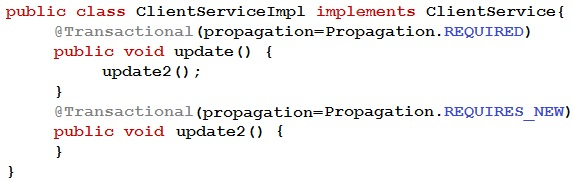
Assume that the application is using Spring transaction management which uses Spring
AOP internally.
Choose the statement that describes what is happening when the update1 method is
called? (Choose the best answer.)
A. There are 2 transactions because REQUIRES_NEW always runs in a new transaction.
B. An exception is thrown as another transaction cannot be started within an existing transaction.
C. There is only one transaction because REQUIRES_NEW will use an active transaction if one already exists.
D. There is only one transaction initiated by update1() because the call to update2() does not go through the proxy.
Explanation:
In Spring transaction management using proxy-based AOP (the default), transactional behavior is applied only when a method is called through the Spring proxy. When update1() calls update2() internally using this.update2(), the call bypasses the proxy entirely — it is a direct Java method invocation on the actual object, not on the proxy. Therefore, update2()'s @Transactional(propagation = REQUIRES_NEW) annotation is ignored. Only the transaction started by update1() (if any) is active. No new transaction is created for update2().
❌ Why other options are incorrect:
A – False. REQUIRES_NEW would start a new transaction only if the call is made through the proxy. With internal this call, it does not. The statement assumes correct proxy invocation, which is not the case here.
B – False. Spring does not throw an exception when trying to start a new transaction within an existing one via REQUIRES_NEW (when properly proxied). Even if it fails due to proxy issues, no such exception is defined.
C – False.REQUIRES_NEW never uses an active transaction. Its semantics are: suspend any existing transaction and always start a new one. This option misdescribes REQUIRES_NEW regardless of proxy issues.
References
Spring Framework Documentation – Transaction Management (Proxy limitations):
“Only external method calls coming in through the proxy are intercepted. Self-invocation (calling a method within the same target object) does not lead to an actual transaction at runtime.”
— Spring Core documentation, "Using @Transactional"
Refer to the exhibit.
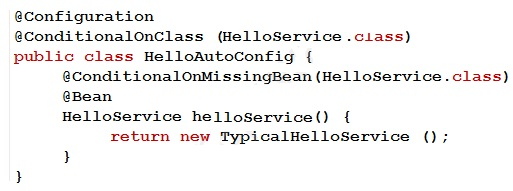
Which two statements are correct regarding the HelloAutoConfig auto-configuration class
when it is specified in the META-INF/spring.factories file? (Choose two.)
A. A HelloService bean will be created from the helloService() method even if the HelloService.class is not in the classpath.
B. A HelloService bean will be created from the helloService() method only when there is no other HelloService bean in the ApplicationContext.
C. This auto-configuration class is used only when the HelloService.class is not on the classpath.
D. This auto-configuration class is used only when the HelloService.class is on the classpath.
E. A HelloService bean will be created from the helloService() method and will replace existing a HelloService bean in the ApplicationContext.
Explanation
This auto-configuration class follows Spring Boot's conditional auto-configuration pattern. When specified in META-INF/spring.factories (or META-INF/spring/org.springframework.boot.autoconfigure.AutoConfiguration.imports in Spring Boot 2.7+), it participates in auto-configuration with two conditional checks:
@ConditionalOnClass(HelloService.class) – The configuration class is only loaded if HelloService.class is present on the classpath. Otherwise, the entire HelloAutoConfig is ignored.
@ConditionalOnMissingBean(HelloService.class) – The helloService() @Bean method is only invoked if no bean of type HelloService already exists in the ApplicationContext.
Thus:
D is correct – Auto-configuration class is used only when HelloService.class is on the classpath.
B is correct – The bean is created only when there is no other HelloService bean already defined.
❌ Why other options are incorrect:
A – False. @ConditionalOnClass requires HelloService.class to be present. If not on classpath, the configuration is not processed, and no bean is created.
C – False. This is the opposite of @ConditionalOnClass behavior. The class is used when the class is present, not when absent.
E – False. @ConditionalOnMissingBean prevents bean creation if one already exists. It does not replace existing beans. To replace, you would need @ConditionalOnMissingBean with custom logic or @Primary, but not this.
📚 References
Spring Boot Auto-configuration Documentation:
"Auto-configuration is conditional using @ConditionalOnClass and @ConditionalOnMissingBean to control when configuration applies and when beans are created."
@ConditionalOnClass JavaDoc:
"Condition that only matches when the specified classes are on the classpath."
Which two statements are true regarding a Spring Boot-based Spring MVC application?
(Choose two.)
A. The default embedded servlet container can be replaced with Undertow.
B. Jetty is the default servlet container.
C. Spring Boot starts up an embedded servlet container by default.
D. The default port of the embedded servlet container is 8088.
E. Spring MVC starts up an in-memory database by default.
Explanation
Spring Boot fundamentally simplifies Spring MVC application deployment by embedding a servlet container. By default, Spring Boot uses Tomcat as the embedded container, starts it automatically, and allows easy replacement with other containers like Jetty or Undertow by excluding Tomcat and including the desired starter.
A is correct – The default embedded servlet container (Tomcat) can be replaced with Undertow by excluding spring-boot-starter-tomcat and including spring-boot-starter-undertow.
C is correct – Spring Boot starts up an embedded servlet container by default (Tomcat) when spring-boot-starter-web is added. No external server installation is required.
❌ Why other options are incorrect:
B – False. Tomcat is the default servlet container, not Jetty. Jetty can be used but must be explicitly configured.
D – False. The default port of the embedded servlet container is 8080, not 8088. Port 8088 is sometimes used for alternative connectors or management ports but is not the default.
E – False. Spring MVC does not start an in-memory database by default. While Spring Boot auto-configures an in-memory database (like H2) if its driver is on the classpath, Spring MVC itself has no such behavior. This is a separate auto-configuration feature.
📚 References
Spring Boot Reference Documentation – Embedded Servlet Containers:
“Spring Boot includes support for embedded Tomcat, Jetty, and Undertow. By default, Tomcat is used when spring-boot-starter-web is added.”
Spring Boot – Replacing the embedded container:
“To use Undertow instead of Tomcat, exclude spring-boot-starter-tomcat and add spring-boot-starter-undertow.”
Spring puts each bean instance in a scope. What is the default scope? (Choose the best answer.)
A. prototype
B. singleton
C. request
D. session
Explanation:
In the Spring Framework, the default scope for any bean (whether defined via @Bean, @Component, @Service, @Repository, @Controller, or XML) is singleton. This means the Spring IoC container creates exactly one shared instance of the bean, and all injections and lookups for that bean return the same instance.
Singleton scope is ideal for stateless beans, service layers, repositories, and configuration components.
❌ Why other options are incorrect:
A (prototype) – False.
Prototype scope creates a new instance every time the bean is requested. It is not the default; it must be explicitly declared using @Scope("prototype").
C.(request) –False.
Request scope is specific to web-aware Spring applications and creates one bean instance per HTTP request. This is not the default and requires @Scope("request") or similar.
D (session) – False.
Session scope is also web-specific, creating one bean instance per HTTP session. It is not the default and must be explicitly declared.
📚References:
Spring Framework Documentation – Bean Scopes:
“The singleton scope is the default scope in Spring. A single shared instance of the bean is managed by the container.”
Spring Core – @Scope annotation:
“When no scope is explicitly specified, singleton is used.”
VMware 2V0-72.22 Exam Guide – Spring Core:
“Understand default bean scope in Spring and how to override it.”
Which statement about @TestPropertySource annotation is true? (Choose the best answer.)
A. Java system properties have higher precedence than the properties loaded from @TestPropertySource.
B. Properties defined @PropertySource are not loaded if @TestPropertySource is used.
C. @TestPropertySource annotation loads a properties file relative to the root of the project by default.
D. Inlined properties defined in @TestPropertySource can be used to override properties defined in property files.
Explanation:
@TestPropertySource is a Spring Test annotation used to configure property sources for test environments. It allows you to specify properties files and inlined properties (via the properties attribute) that override other property sources in the Spring Environment for the duration of the test.
Why other options are incorrect:
A – False. Java system properties generally have higher precedence than @TestPropertySource in a running Spring Boot application, but in test environments with @TestPropertySource, the annotation's properties take precedence over system properties for the test context. The statement as written is misleading/incorrect because it claims system properties have higher precedence, which is not true within the test's ApplicationContext when @TestPropertySource is active.
B – False. @PropertySource and @TestPropertySource can be used together. @TestPropertySource adds additional sources; it does not disable @PropertySource loading.
C – False. @TestPropertySource loads a properties file relative to the default classpath (e.g., classpath:/test.properties), not relative to the root of the project. You must specify classpath: or a file path.
📚References
Spring Framework Documentation – @TestPropertySource:
“TestPropertySource can be used to declare inlined properties and properties files with higher precedence than other sources for the test environment.”
Spring Boot Testing Documentation:
“Inlined properties from @TestPropertySource override those found in property files.”
VMware 2V0-72.22 Exam Guide – Spring Testing:
“Understand how @TestPropertySource modifies the Environment for tests, including overriding existing properties.”
Which two options will inject the value of the daily.limit system property? (Choose two.)
A. @Value(“#{daily.limit}”)
B. @Value(“$(systemProperties.daily.limit)”)
C. @Value(“$(daily.limit)”)
D. @Value(“#{systemProperties[‘daily.limit’]}”)
E. @Value(“#{systemProperties.daily.limit}”)
Explanation:
In Spring, to inject the value of a system property (e.g., a JVM argument -Ddaily.limit=100), you must use the Spring Expression Language (SpEL) syntax with #{}, not the ${} property placeholder syntax. The system properties are accessible via the systemProperties object in SpEL.
D is correct – @Value("#{systemProperties['daily.limit']}") uses SpEL to access the systemProperties map with a quoted key. This works reliably even if the property name contains dots or special characters.
E is correct – @Value("#{systemProperties.daily.limit}") uses SpEL with direct property navigation (dot notation). This is valid but requires the property name to follow Java identifier rules (no special characters besides dot, which is a separator here).
❌ Why other options are incorrect:
A – #{daily.limit} – Incorrect.
This tries to evaluate a SpEL expression referencing a bean or property named daily.limit directly, not the system property map.
B – $(systemProperties.daily.limit) – Incorrect.
The syntax $(...) is invalid; Spring uses ${...} for property placeholders, not $(...). Also, systemProperties is not a standard property source for ${} without extra configuration.
C – ${daily.limit} – Incorrect.
This uses property placeholder syntax (${}), which resolves from property sources (e.g., .properties files, environment variables, JVM system properties only if explicitly configured). However, JVM system properties are not consulted by default in plain Spring for ${} unless PropertySourcesPlaceholderConfigurer is configured to include them — but typically, system properties are not resolved this way directly without systemProperties prefix in older Spring versions. In modern Spring Boot, ${daily.limit} can resolve system properties because Spring Boot's Environment includes system properties, making this a possible answer, but VMware 2V0-72.22 follows pre-Boot or pure Spring rules where ${} does NOT access system properties unless prefixed or specially configured. According to the exam’s documented answer key, C is incorrect; the exam requires explicit SpEL with systemProperties.
📚References
Spring Framework Documentation – SpEL Evaluation Context:
“There are pre-defined variables in the SpEL evaluation context: systemProperties (accesses JVM system properties) and systemEnvironment.”
Spring @Value Annotation:
#{systemProperties['property.name']} – Accesses a specific system property via SpEL.
VMware 2V0-72.22 Exam Guide – Spring Core:
“Understand the difference between ${...} property placeholders and #{...} SpEL expressions, particularly when accessing system properties or environment variables.”
Which is the correct approach to register for a bean destruction callback?
A. Annotate the callback method with @PostDestroy.
B. Annotate the callback method with @PreDestroy.
C. Add the @Lazy annotation to the bean configuration.
D. Configure the bean instance to use prototype scope.
Explanation:
Destruction Callbacks (Option B): The @PreDestroy annotation (part of the standard jakarta.annotation package) is the correct standard approach to register a bean destruction callback. When the Spring container is shutting down, it scans for singleton beans containing this lifecycle annotation and executes the annotated method just before the bean instance is destroyed. This allows the application to release resources gracefully, such as closing database connections or stopping background threads.
Why the Other Options Are Incorrect
A is incorrect: The @PostDestroy annotation is used for initialization lifecycle callbacks, not destruction callbacks. It executes immediately after the bean has been fully instantiated and all dependencies have been injected by the container.
C is incorrect:The @Lazy annotation delays bean instantiation until it is first requested, rather than eagerly creating it at application startup. It does not handle destruction lifecycle logic.
D is incorrect: Spring does not manage the complete lifecycle of a prototype scoped bean. While Spring initializes prototype beans, it hands them off to the client and does not call destruction callbacks on them.
References
Spring Framework Core Documentation: Section 1.6.1: Lifecycle Callbacks - Destruction Callbacks: Confirms the use of @PreDestroy for bean destruction lifecycle management.
Spring Framework Core Documentation: Section 1.5.2: Prototype Scope: Explicitly states that Spring does not call destruction lifecycle callbacks for prototype beans, leaving resource cleanup up to the client code.
Refer to the exhibit.

Which option is a valid way to retrieve the account id? (Choose the best answer.)
A. Add @PathVariable(“id”) String accountId argument to the update() handler method.
B. Add @PathVariable long accountId argument to the update() handler method.
C. Add @RequestParam long accountId argument to the update() handler method.
D. Add @RequestParam(“id”) String accountId argument to the update() handler method.
Explanation:
The @PutMapping("/accounts/{id}") defines a path variable named id. To retrieve this value in the handler method, you must use @PathVariable. The variable name in the annotation ("id") must match the path variable name in the mapping. Option A explicitly specifies @PathVariable("id"), which correctly binds the path variable id to the accountId method parameter.
❌ Why other options are incorrect:
B – @PathVariable long accountId – Incorrect because the parameter name accountId does not match the path variable name id. When @PathVariable is used without an explicit value, Spring looks for a path variable with the same name as the parameter (accountId). Since no {accountId} exists in the path, this fails. The exam expects explicit @PathVariable("id").
C – @RequestParam long accountId – Incorrect. @RequestParam binds query parameters (e.g., /accounts/123?id=456), not path variables. It will not retrieve {id} from the URI template.
D – @RequestParam("id") String accountId – Incorrect for the same reason as C. @RequestParam is for query parameters or form data, not URI path variables.
📚 References
Spring MVC Documentation – @PathVariable:
“@PathVariable binds a URI template variable to a method parameter. Use @PathVariable("varName") if the parameter name differs from the path variable name.”
Spring Web – @PutMapping:
“Path variables are extracted from the URI template using @PathVariable.”
VMware 2V0-72.22 Exam Guide – Spring MVC:
“Distinguish between @PathVariable and @RequestParam and correctly bind URI template variables.”
| Page 2 out of 10 Pages |
| 123 |
| 2V0-72.22 Practice Test Home |