
Last Updated On : 12-Oct-2026
Which service provides the ability to backup and restore vSphere pods?
A. VKS
B. Contour
C. VM Service
D. ArgoCD
E. Velero
Explanation:
The Velero Plugin for vSphere is the designated backup and restore tool for workloads running as vSphere Pods within VMware Cloud Foundation 9.0. Official VMware documentation explicitly states:
"You cannot use Velero standalone with Restic to backup and restore vSphere Pods. You must use the Velero Plugin for vSphere installed on the Supervisor."
Velero Plugin for vSphere enables backup and restore of both stateless and stateful applications running on vSphere Pods. For stateful applications, the plugin creates snapshots of persistent volumes (PVs) alongside backing up Kubernetes metadata to an object store .
The backup workflow involves:
Running velero backup create
Uploading Kubernetes metadata to object storage
Creating volume snapshots asynchronously for persistent data
Why other options are incorrect:
A. VKS (vSphere Kubernetes Service) – VKS is the managed Kubernetes cluster service itself, not a backup tool. While VKS clusters can be backed up using Velero, VKS is not the backup service . VCF 9.0.1 introduced VKS Cluster Management (VKSM) for unified operations, but the actual backup capability still relies on Velero .
B. Contour – Contour is an ingress controller for Kubernetes, providing load balancing and traffic routing capabilities. It has no backup or restore functionality for vSphere Pods.
C. VM Service – The VM Service is used for provisioning and managing virtual machines on vSphere Supervisor clusters. It does not provide backup capabilities for Kubernetes pods .
D. ArgoCD – ArgoCD is a GitOps continuous delivery tool for Kubernetes applications. It manages application deployment and synchronization, not backup and restore operations.
Reference
Broadcom TechDocs – "Backup and Restore vSphere Pods Using the Velero Plugin for vSphere" – Explicitly documents Velero Plugin as the required tool for vSphere Pod backup
Broadcom TechDocs – "Install and Configure the Velero Plugin Version 1.8.x for vSphere" – Installation guide for the plugin on Supervisor
An administrator has been tasked with creating a Day 2 Operation which invokes vMotion migration on a virtual machine (VM). Which two steps are required? (Choose two.)
A. Drag and drop the User Interaction schema element.
B. Create a resource action.
C. Call the pre-defined Orchestrator workflow named Migrate virtual machine with vMotion.
D. Create an Orchestrator action.
E. Create an ABX action named Migrate virtual machine with vMotion.
Explanation
To create a Day 2 operation that invokes vMotion migration on a VM in VCF Automation 9, the administrator must define a resource action that executes the appropriate automation logic. VMware provides pre‑defined vRO (Orchestrator) workflows for common VM operations, including vMotion migration.
B. Create a resource action
– A resource action is the Day 2 operation that appears on a deployed resource (such as a VM) in the service catalog. It defines the workflow or action to run, the input parameters, and the resource types it applies to. Without a resource action, users cannot request the vMotion migration from the UI.
C. Call the pre-defined Orchestrator workflow named "Migrate virtual machine with vMotion"
– VCF Automation includes a library of built‑in vRO workflows. The workflow "Migrate virtual machine with vMotion" encapsulates all vCenter API calls needed to perform a live vMotion migration. The administrator configures the resource action to invoke this workflow, passing the target VM and destination host/cluster/ datastore as inputs. Using a pre‑defined workflow avoids the need to write custom code.
Why other options are incorrect:
A. Drag and drop the User Interaction schema element
– The User Interaction schema element is used when designing a custom vRO workflow to prompt users for input at runtime. It is not required when calling an existing pre‑defined workflow from a resource action. The pre‑defined vMotion workflow already handles inputs via the resource action's parameter form.
D. Create an Orchestrator action
– An Orchestrator action is a reusable script (JavaScript or other) that performs a discrete logic step within a workflow. Creating a new action is unnecessary because the pre‑defined vMotion workflow already contains all required logic. An action alone is not a Day 2 operation; it must be wrapped in a workflow and then a resource action.
E. Create an ABX action named "Migrate virtual machine with vMotion"
– ABX (Action‑Based Extensibility) actions are written in Python, Node.js, or PowerShell and run in a serverless container. While possible, ABX is not the standard method for vMotion migration. VMware provides a pre‑defined vRO workflow specifically for this use case, and ABX would require manually coding all vCenter API interactions, introducing unnecessary complexity and maintenance overhead.
Reference
Broadcom TechDocs – "Resource Actions" – Resource actions define Day 2 operations on deployments or resources
Broadcom TechDocs – "Add a Resource Action Using a vRealize Orchestrator Workflow" – Steps to create a resource action that calls a vRO workflow
In VMware Cloud Foundation (VCF) Automation, which construct within an AIIApps organization consists of one or more Supervisors and supplies compute, memory, storage, and network resources to the organization?
A. Region
B. Project
C. Cloud Zone
D. Cloud Account
Explanation:
Within an All Apps organization in VCF Automation 9, the construct that consists of one or more Supervisors and supplies compute, memory, storage, and network resources to the organization is the Region.
Official VMware documentation defines a Region as "a collection of compute, memory, storage, and networking resources that can span across vCenter instances" and explicitly states that "every All Apps Organization is mapped to one or more vSphere Supervisor via Regions" .
The hierarchy works as follows:
Organization → Maps to one or more Supervisor Clusters through Regions to provide resources available for assignment within vSphere Namespaces
Region → Consists of one or more Supervisor-enabled Clusters and aggregates compute, storage, memory, and networking resources from one or more zones
Provider administrators allocate infrastructure resources to All Apps organizations using regional quotas, while organization administrators distribute the allocated infrastructure to different projects using namespaces.
Why other options are incorrect:
B. Project
– A Project resides within an Organization and is used to manage users, resources, and access to IaaS services at scale. Projects do not consist of Supervisors; rather, they contain vSphere Namespaces that consume resources from the Region's Supervisor clusters.
C. Cloud Zone
– A zone represents one or multiple vSphere clusters that provide compute, memory, and storage resources. Zones are components within a Region, not the construct that supplies resources to an entire organization. A Region aggregates multiple zones.
D. Cloud Account
– A cloud account provides authentication and endpoint connectivity (e.g., to vCenter, AWS, Azure) for infrastructure access. It is not a resource-supplying construct within an All Apps organization. Cloud accounts are managed at the provider level and are not the mechanism that maps Supervisors to organizations.
Reference
Broadcom TechDocs – "Understanding VCF Automation All Apps Organization Multi Tenancy Model" – Defines Region as collection of Supervisor-enabled Clusters mapping Organizations to resources
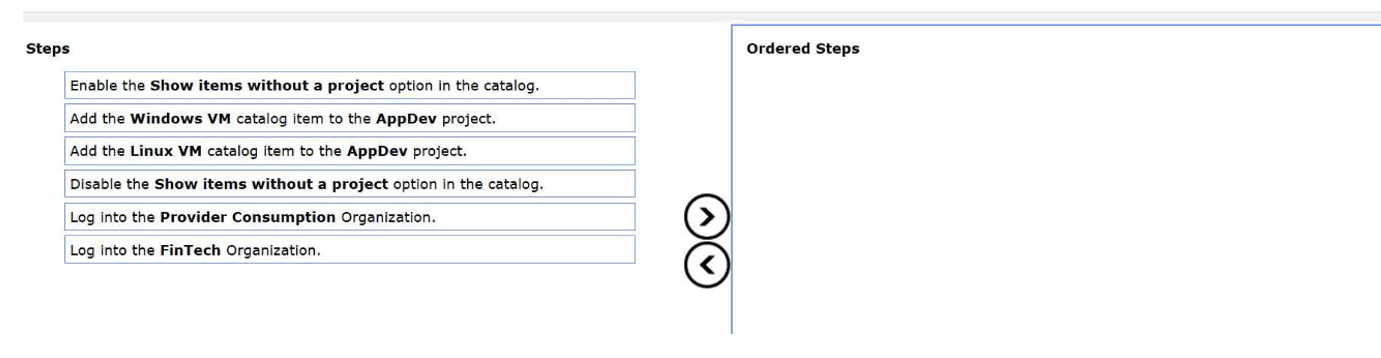
An administrator has been tasked with sharing a catalog item from the VMware Cloud
Foundation (VCF) Automation Provider Consumption Org (PCO) to the FinTech
organization.
The following information has been provided:
The are two catalog items, Linux VM and Windows VM
The Linux VM catalog item should be shared project called AppDev.
Drag and drop three steps from the Steps list to the Ordered Steps list on the right to
complete the objective. (Choose three.)
Explanation:
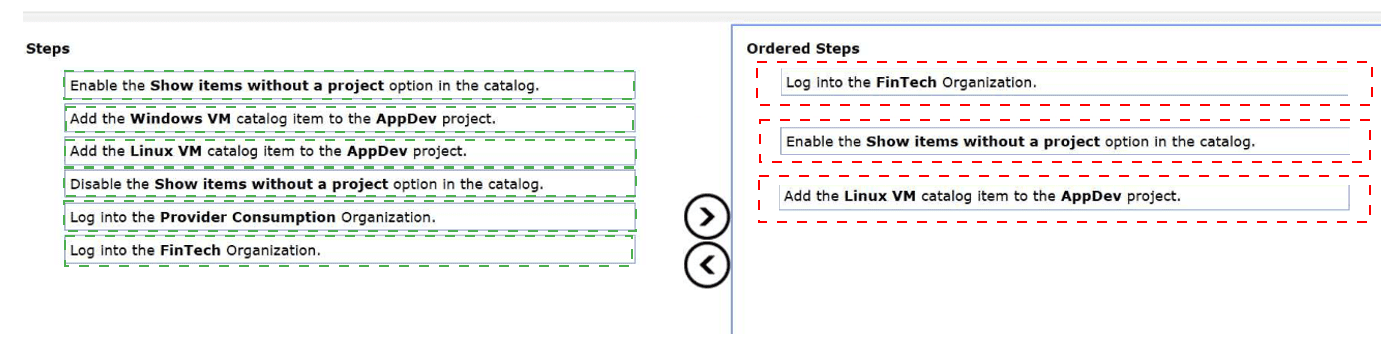
In a multi-tenant VCF Automation environment, sharing global resources from a Provider Consumption Organization (PCO) to a specific tenant organization (like FinTech) follows a structured entitlement process.
Step 1: Contextual Access
The administrator must first Log into the FinTech Organization. Configuration of catalog visibility and project entitlements is performed within the context of the tenant organization that will be consuming the resource. While the item originates from the PCO, the "sharing" or "assignment" of that item to a local project must happen where that project exists—in this case, within the FinTech tenant's workspace.
Step 2: Catalog Visibility
By default, the Service Broker catalog only displays items that are already associated with a project. When an item is shared from the PCO, it initially exists in the tenant organization as an unassigned resource. To see and interact with these shared resources, the administrator must Enable the "Show items without a project" option in the catalog settings. This exposes the "Linux VM" and "Windows VM" items that have been made available by the provider but are not yet entitled to any specific FinTech users.
Step 3: Project Entitlement
The final step is to create a functional entitlement by Adding the Linux VM catalog item to the AppDev project. Projects are the primary boundary for RBAC and resource consumption. By explicitly adding the catalog item to the AppDev project, the administrator ensures that only members of that project can see and deploy the Linux VM, fulfilling the requirement to restrict that specific item to that specific group.
Analysis of Incorrect Steps
Log into the Provider Consumption Organization:
While the provider shares the items to the tenants from here, the actual task of assigning those items to a local project (AppDev) is a tenant-level administrative task.
Add the Windows VM catalog item to the AppDev project:
The requirements explicitly state that the Linux VM should be shared with the AppDev project. Adding the Windows VM would violate the specific design intent provided in the prompt.
Disable the Show items without a project option:
Disabling this would hide the unassigned PCO items, making it impossible for the administrator to select them and add them to the AppDev project during the configuration phase.
References
VMware Cloud Foundation 9.0 Automation Guide: Service Broker Catalog Management.
VMware Aria Automation Documentation: Sharing Resources Across Organizations and Projects.
The product development team is rolling out several new application stacks and require a
self-service option to deploy their applications quickly and consistently. The requirements
are:
• Present only approved application configurations.
• No manual configuration within a blueprint.
Which VMware Cloud Foundation (VCF) Automation approach meets these requirements?
A. Publish pre-approved blueprints to a catalog and allow the team to choose infrastructure options such as compute cluster and storage policy during deployment.
B. Publish all available blueprints to a catalog so team members can choose what is required and adjust configurations as needed at request time.
C. Integrate VCFA with a Git repository containing blueprint YAML files and train the team to update infrastructure parameters properly before committing changes.
D. Publish pre-approved blueprints with all required inputs preconfigured to a catalog so team members can deploy them directly.
Explanation
The two key requirements are:
Present only approved application configurations → Only pre-approved blueprints should be visible.
No manual configuration within a blueprint → Users should not have to input parameters, select infrastructure options, or modify anything at request time.
Option D satisfies both requirements directly:
Pre-approved blueprints ensure only approved configurations are available in the catalog.
All required inputs preconfigured means the blueprint has no manual configuration fields. Team members deploy the application stack as a single click, with all compute, storage, network, and application parameters already set. This delivers the fastest, most consistent self-service experience.
Why other options are incorrect:
A. Publish pre-approved blueprints but allow the team to choose infrastructure options (compute cluster, storage policy) during deployment
– While the blueprints are pre-approved, requiring users to manually select compute cluster and storage policy violates "no manual configuration within a blueprint". This introduces potential for inconsistency and human error.
B. Publish all available blueprints and allow team members to choose what is required and adjust configurations as needed
– This violates both requirements: not all blueprints are approved, and manual configuration is explicitly allowed. This approach provides maximum flexibility but zero consistency or guardrails.
C. Integrate VCFA with a Git repository containing blueprint YAML files and train the team to update infrastructure parameters before committing changes
– This approach requires developers to manually edit YAML and understand infrastructure parameters, which is the opposite of "no manual configuration". Git integration is valuable for version control and CI/CD, but it does not meet the requirement for a simple, self-service catalog with pre-configured options.
Reference
Broadcom TechDocs – "Creating a Catalog Item from a Blueprint" – Catalog items can be published with pre-configured inputs, allowing one-click deployment without user input
Broadcom TechDocs – "Blueprint Inputs" – Inputs can be set as readOnly or configured with default values to prevent manual changes during deployment
The administrator is tasked with configuring hard tenancy in VMware Cloud Foundation (VCF) Automation. Which statement reflects how multi-tenancy is configured?
A. VMApps organizations enable hard tenancy within VCF Automation.
B. VCF Automation 9 does not support multi-tenancy. That's on the roadmap for VCFA 10.
C. Namespaces enable hard tenancy within VCF Automation.
D. Namespace Classes enable hard tenancy construct within VCF Automation.
E. AIIApps organizations enable hard tenancy within VCF Automation.
Explanation
In VMware Cloud Foundation (VCF) Automation 9, hard tenancy refers to secure, isolated environments where each organization (tenant) operates with strict resource and access boundaries. The official documentation states that "each organization operates in a secure and isolated environment where users can access only allocated services and resources" .
Why other options are incorrect:
A. VMApps organizations enable hard tenancy
– While VMApps organizations provide isolation, they are intended for legacy VMware Aria Automation 8.x users transitioning to VCF 9.0 . They are self-contained with infrastructure management built-in, not the primary model for hard tenancy. Provider administrators do not allocate resources to VMApps organizations; the organization administrator defines their own infrastructure .
B. VCF Automation 9 does not support multi-tenancy
– This is false. VCF Automation 9 explicitly supports multi-tenancy through Organizations, as documented extensively .
C. Namespaces enable hard tenancy
– Namespaces (vSphere Namespaces and VKS Namespaces) are resource boundaries within a project, not the tenancy boundary. The VCF Automation Project is the tenancy layer; namespaces sit below it .
D. Namespace Classes enable hard tenancy
– Namespace Classes define resource footprints (CPU, memory, storage) that developers can claim within a project . They do not create the organizational isolation that defines hard tenancy.
Reference
Broadcom TechDocs – "Organization Management" – Defines organizations as secure, isolated environments for multi-tenancy
VMware Blog – "The Hierarchy of Modern Infrastructure" – Confirms VCF Automation Project as primary tenancy boundary
A VMware Cloud Foundation (VCF) Automation administrator manages two organizations:
• Finance is a VMApps Organization.
• Development is an AllApps Organization.
When creating a new project in the Development organization, the administrator notices
that the available network options differ from those seen in the Finance organization.
Which two factors explain this difference? (Choose two.)
A. VMApps Organizations provide access to Supervisor networks while AllApps Organizations restrict networking to isolated VPC networks.
B. AllApps Organizations support only ephemeral Kubernetes ingress networks, so persistent routed networks are not available.
C. Both Organization types use the same network options, but AllApps Organizations require enabling DHCP before routed networks are visible.
D. VMApps Organizations rely on traditional vSphere-backed or NSX-backed networks for virtual machine connectivity.
E. AllApps Organization networking includes VPC-based networks.
Explanation
The difference in available network options between a VMApps Organization and an AllApps Organization stems from their fundamentally different networking architectures in VCF Automation 9.
D. VMApps Organizations rely on traditional vSphere-backed or NSX-backed networks for VM connectivity
– VMApps organizations are designed for existing vRealize Automation 8.x users transitioning to VCF 9.0 with minimal disruption . They support:
Infrastructure management within the organization (cloud accounts, cloud zones, profiles)
Traditional network profiles backed by vSphere port groups or NSX segments
Networking constructs familiar from vRA 8.x, where VMs connect directly to pre-defined network segments
E. AllApps Organization networking includes VPC-based networks
– AllApps organizations use a modern, cloud-native networking model based on Virtual Private Clouds (VPCs). Key characteristics:
VPCs provide isolated, software-defined network environments
Each VPC includes built-in networking services like load balancers, NAT gateways, and DHCP
Workloads (VMs, Kubernetes pods) connect to VPC subnets, not directly to vSphere port groups or NSX segments
This aligns with public cloud models (AWS VPC, Azure VNet)
Why other options are incorrect:
A. VMApps Organizations provide access to Supervisor networks while AllApps Organizations restrict networking to isolated VPC networks
– This is backwards. AllApps organizations are built on Supervisor clusters and use VPCs, while VMApps organizations do not inherently use Supervisor networking . Both can access Supervisor networks; the difference is the abstraction layer presented to users.
B. AllApps Organizations support only ephemeral Kubernetes ingress networks, so persistent routed networks are not available
– False. AllApps organizations support persistent routed networks through VPCs. VPC subnets and associated routing tables are persistent, not ephemeral.
C. Both Organization types use the same network options, but AllApps Organizations require enabling DHCP before routed networks are visible
– False. The organizations use fundamentally different networking models. DHCP is automatically provided within AllApps VPCs and is not a prerequisite for seeing routed networks.
Reference
Broadcom TechDocs – "Organization Management" – Defines differences between AllApps and VMApps organizations
Broadcom TechDocs – "VMApps Organizations in VCF Automation" – Describes traditional network profiles and infrastructure models
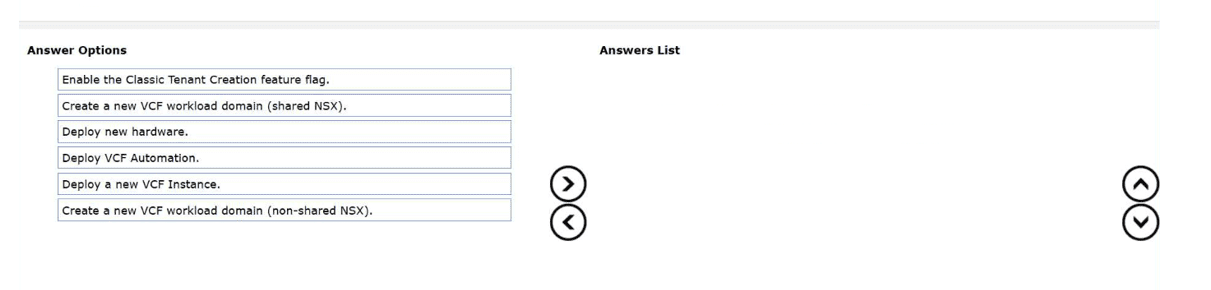
An administrator has been tasked with creating a new organization for VM Apps within an
existing VMware Cloud Foundation (VCF) Fleet with minimal operational overhead.
The existing VCF fleet already has an organization for All Apps configured.
Drag and drop the three actions from the Answer Options to the Answers List, in any order,
that the administrator needs to perform to complete the objective (Choose three.)
Explanation:
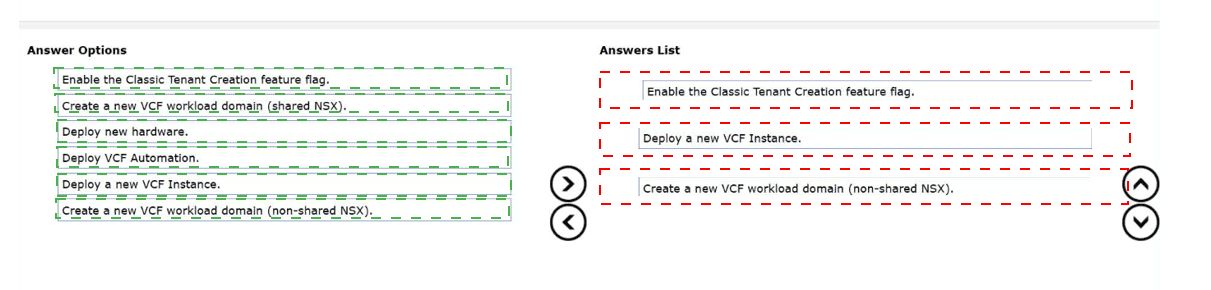
In VCF 9.0 and the modern VCF Fleet architecture, organizations are typically classified as All Apps (modern, Kubernetes-integrated) or VM Apps (traditional VM-centric). Managing these within a unified fleet requires specific lifecycle and configuration steps.
Enable the Classic Tenant Creation feature flag:
By default, modern VCF Automation interfaces prioritize the "All Apps" organization type, which leverages advanced services like Tanzu. To create a dedicated VM Apps organization—often referred to as a "Classic" tenant—the administrator must enable the corresponding feature flag in the management portal. This unlocks the legacy tenant creation workflows required for organizations that do not need the full Supervisor cluster integration.
Deploy a new VCF Instance:
A VCF "Fleet" allows for the centralized management of multiple VCF instances. While a single instance can host multiple organizations, the prompt specifies the goal of creating this organization with "minimal operational overhead" within a fleet. In many scaled architectures, deploying a new VCF instance within the fleet provides a clean management boundary for a different organization type (VM Apps vs. All Apps) while still being governed by the same global automation and provider layers.
Create a new VCF workload domain (non-shared NSX):
To ensure strict segregation and minimal interference between different organization types, a non-shared NSX workload domain is essential. For VM Apps organizations, having a dedicated NSX instance (non-shared) ensures that network policies, edge clusters, and routing configurations are isolated from the All Apps organization. This reduces the complexity of managing overlapping IP spaces or security requirements that might exist between modern containerized workloads and traditional VM applications.
Analysis of Incorrect Options
Create a new VCF workload domain (shared NSX):
Using a shared NSX instance increases operational complexity and overhead when trying to separate VM Apps and All Apps organizations, as it requires more complex multi-tenant network configurations.
Deploy new hardware:
While hardware is necessary, VCF is designed to utilize existing capacity within a fleet where possible. The prompt focuses on the administrative actions within the software-defined stack rather than physical racking and stacking.
Deploy VCF Automation:
The prompt states that the fleet "already has an organization for All Apps configured," implying that the VCF Automation service is already deployed and operational. Redeploying it would be redundant and maximize, rather than minimize, operational overhead.
References
VMware Cloud Foundation 9.0 Fleet Management Guide.
VMware Aria Automation Multi-Tenancy: Classic vs. Modern Organizations.
| Page 2 out of 8 Pages |
| 123 |
| 3V0-21.25 Practice Test Home |