
Last Updated On : 12-Oct-2026
Install, Configure, Administrate the VMware Solution
An administrator has been tasked with making changes to a VMware Cloud Foundation (VCF) Workload
Domain cluster that is configured with NFS for both Principal storage and Supplemental storage.
The cluster has the following configuration:
• There are 3 x ESX host servers.
• There are 3 x NFS Datastores allocated to host Virtual Machines workloads.
• There is a single NFS Datastore allocated for hosting ISO files.
The administrator has the following concerns with the existing configuration:
• Every time a new Virtual Machine is deployed to the Workload Domain, the administrator must choose
which datastore should be used.
• When reviewing the Datastores in VCF Operations:
One of the datastores has no Virtual Machines running in it.
The other two datastores have an imbalance of Virtual Machines and this is causing resource
contention. The administrator has the following requirements: • Virtual Machines must be placed
automatically on the most appropriate datastore based on utilization. • Migration recommendations on
Virtual Machine placement should be made when one datastore reaches 50% utilization. • Virtual
Machines must only be migrated to another datastore after being approved by an administrator. What
four actions must the administrator take to meet all of the requirements? (Choose four.)
A. Configure the Datastore Cluster to set the Storage DRS storage space threshold to 50%.
B. Configure the Datastore Cluster to set the Storage DRS storage space utilization difference to 50%.
C. Create a new Datastore Cluster using all three NFS Datastores allocated to host Virtual Machines workloads.
D. Configure the Datastore Cluster to use Fully Automated Storage DRS.
E. Ensure all three NFS Datastores are available to each ESX host server.
F. Configure the Datastore Cluster to use Manual Storage DRS.
G. Create a new Datastore Cluster using all four available Datastores.
Explanation:
This question tests the administrator's ability to correct resource imbalances and automate placement within a VCF Workload Domain using Storage DRS (SDRS). It requires grouping identical workload datastores, ensuring proper host presentation, setting explicit capacity utilization triggers, and selecting the appropriate automation level based on administrative approval policies.
✅ Correct Option:
A. Configure the Datastore Cluster to set the Storage DRS storage space threshold to 50%.
The requirements state that migration recommendations must be generated when a datastore hits 50% utilization. Configuring the Storage DRS space utilization threshold specifically to 50% ensures that the SDRS engine evaluates the cluster and alerts the administrator as soon as any single datastore reaches this exact capacity.
C. Create a new Datastore Cluster using all three NFS Datastores allocated to host Virtual Machines workloads.
To solve the issue of manual datastore selection and resource imbalance, the three active VM workload datastores must be aggregated into a single logical Datastore Cluster. The ISO datastore must be excluded from this cluster because it serves a different functional purpose and should not hold running VM workloads.
E. Ensure all three NFS Datastores are available to each ESX host server.
For a Datastore Cluster to function reliably and allow safe VM migrations or automated placements, uniform storage connectivity is required. Every ESXi host within the VCF Workload Domain cluster must have simultaneous access to all three participating NFS datastores to prevent dead-ends or access loss during placement.
F. Configure the Datastore Cluster to use Manual Storage DRS.
The prompt explicitly dictates that Virtual Machines must only be migrated to another datastore after being approved by an administrator. Choosing Manual mode ensures that Storage DRS runs its algorithms and populates clear placement and migration recommendations but waits for explicit administrative sign-off before executing them.
❌ Incorrect options:
B. Configure the Datastore Cluster to set the Storage DRS storage space utilization difference to 50%.
Setting the space utilization difference to 50% would mean SDRS only reacts if the capacity gap between the most filled and least filled datastore exceeds 50%. This does not satisfy the requirement to trigger migration recommendations the moment an individual datastore reaches 50% total utilization.
D. Configure the Datastore Cluster to use Fully Automated Storage DRS.
Fully Automated SDRS allows vSphere to automatically execute initial placements and migrate running virtual machines between datastores without any human intervention. This directly violates the strict corporate constraint stating that no VM migrations can happen without manual approval from an administrator.
G. Create a new Datastore Cluster using all four available Datastores.
Including the dedicated ISO datastore inside the VM Datastore Cluster is an architectural error. The ISO repository holds static media files and is not configured for highly active, low-latency VM disk workloads; mixing it into the cluster would cause SDRS to mistakenly place active virtual machines on it.
🔧 Reference:
⇒ VMware vSphere Storage Guide
→ Confirms how to configure Datastore Clusters, set Storage DRS capacity thresholds, and implement Manual vs. Automated migration recommendations based on business rules.
An administrator is deploying a vSphere Supervisor Cluster on a VMware Cloud Foundation (VCF)
Workload Domain that uses NFS storage. As part of the configuration, the administrator must define separate
storage policies for container images, ephemeral volumes, and persistent volumes within the vSphere
Namespace.
The solution must align with vSphere Storage Policy Based Management (SPBM) and Broadcom TechDocs
recommendations for supported Supervisor configurations.
Which configuration meets these requirements?
A. Create three SPBM storage policies that all reference the same shared NFS datastore. Assign these policies respectively to container images, ephemeral volumes, and persistent volumes when enabling Workload Management to logically isolate the volume types within a single datastore.
B. Use datastore clusters to automatically balance storage consumption for container and persistent volumes, and rely on vSphere DRS to place ephemeral data dynamically across datastores.
C. Create three distinct SPBM storage policies mapped to shared NFS datastore(s). Assign the policies to the corresponding storage options for container images, ephemeral volumes, and persistent volumes.
D. Define one default storage policy and allow the Supervisor control plane to automatically create subpolicies for container and persistent workloads during namespace provisioning.
Explanation:
This question tests your understanding of vSphere Storage Policy Based Management (SPBM) configuration for vSphere Supervisor Clusters with Tanzu. The administrator must create separate storage policies for container images, ephemeral volumes, and persistent volumes, and assign them to the corresponding storage options when enabling Workload Management on a VCF Workload Domain using NFS storage.
✔️ Option C (Correct):
Creating three distinct SPBM storage policies mapped to shared NFS datastore(s) is correct because vSphere with Tanzu requires separate storage policies for control plane VMs, pod ephemeral disks, and container image cache when configuring the Supervisor Cluster. Each policy represents datastore(s) and manages storage placement for specific workload types. Container images, ephemeral volumes, and persistent volumes each have different storage requirements and lifecycle characteristics. Assigning distinct policies to the corresponding storage options ensures proper placement and management of each workload type according to Broadcom TechDocs recommendations for supported Supervisor configurations.
❌ Option A (Incorrect):
Creating three SPBM storage policies that all reference the same shared NFS datastore is incorrect because while logically isolating volume types within a single datastore is possible, the option's phrasing suggests the policies don't provide actual separation. The key requirement is to create distinct policies that map to datastores and assign them to corresponding storage options. Simply referencing the same datastore in three policies doesn't align with best practices for different storage classes. The policies should represent different storage capabilities or classes (Bronze, Silver, Gold) rather than just three labels for the same datastore.
❌ Option B (Incorrect):
Using datastore clusters to automatically balance storage consumption and relying on vSphere DRS is incorrect because vSphere with Tanzu and Supervisor Clusters require explicit SPBM storage policies, not DRS-based automatic placement. DRS doesn't manage Kubernetes storage objects like ephemeral disks, container images, or persistent volumes. SPBM is the required framework for integrating with shared datastores (VMFS, NFS, vSAN, vVols) and managing placement of control plane VMs, pod ephemeral disks, container images, and persistent volumes. Automatic DRS placement doesn't provide the policy-driven storage management required for Supervisor Cluster configurations.
❌ Option D (Incorrect):
Defining one default storage policy and allowing the Supervisor control plane to automatically create subpolicies is incorrect because vSphere with Tanzu requires administrators to create storage policies before enabling the Supervisor Cluster. The control plane doesn't automatically create subpolicies for container and persistent workloads during namespace provisioning. Each storage type (control plane VMs, ephemeral disks, container image cache, persistent volumes) needs explicit policy assignment. The vSphere administrator must define storage policies describing different storage requirements and classes of services, then assign them to vSphere Namespaces.
🔧 Reference:
→ vSphere with Tanzu Storage
Confirms that storage policies represent datastores and manage placement of control plane VMs, pod ephemeral disks, container images, and persistent volumes
→ Change Storage Settings on Supervisor Cluster
Confirms administrators configure SPBM storage policies when enabling Supervisor Cluster for control plane, ephemeral disks, and container image cache
An administrator reports that after rebooting one host in a vSAN cluster configured with Data-at-Rest
Encryption using an external Key Management Server (KMS), the host shows all vSAN disk groups as
unmounted.
The KMS is online and reachable from all hosts.
In vCenter, the host displays the following event:
“Failed to retrieve encryption key from KMS.”
Key ID:
All other hosts in the cluster remain healthy and show “Encryption: Enabled.”
Why did the encryption key retrieval fail for this host?
A. The host’s trust relationship or certificate with the KMS is invalid or missing.
B. The cluster requires a Deep Rekey operation to restore access to the encrypted disks.
C. The vCenter Server has not been restarted to refresh the encryption key cache.
D. The TPM on the host failed to unlock the data encryption keys.
Explanation:
This question tests the administrator's understanding of how vSAN Data-at-Rest Encryption authenticates with an external KMS. The scenario isolates the issue to a single host after a reboot, while the KMS is reachable and all other hosts are healthy — pointing directly to a host-level trust or certificate problem, not a cluster-wide or KMS-side failure.
✅ Correct Option:
A. The host's trust relationship or certificate with the KMS is invalid or missing.
In vSAN encryption with an external KMS, each ESXi host must maintain its own trusted certificate relationship with the KMS to independently retrieve encryption keys. After a reboot, if the host's KMS certificate is expired, missing, or revoked, the host cannot authenticate and key retrieval fails. Since only this host is affected and the KMS is online, the trust/certificate relationship is the definitive root cause.
❌ Incorrect Options:
B. The cluster requires a Deep Rekey operation to restore access to the encrypted disks.
A Deep Rekey operation re-encrypts data with a new Key Encryption Key (KEK) and is used proactively for key rotation — not for troubleshooting key retrieval failures on a single host. It would not resolve a certificate or trust issue and is irrelevant when only one host fails while others remain healthy.
C. The vCenter Server has not been restarted to refresh the encryption key cache.
vCenter Server does not cache or distribute encryption keys to ESXi hosts in external KMS configurations. Each host communicates directly and independently with the KMS. Restarting vCenter would have no impact on a host's ability to retrieve its encryption key from the KMS server.
D. The TPM on the host failed to unlock the data encryption keys.
TPM (Trusted Platform Module) is used in vSphere Native Key Provider scenarios to protect encryption keys locally. In an external KMS configuration, the host does not rely on TPM to unlock data encryption keys. TPM failure is irrelevant to external KMS-based key retrieval workflows in vSAN.
🔧 Reference:
⇒ VMware vSAN Data-at-Rest Encryption – KMS and Host Trust → Confirms each ESXi host must establish and maintain its own trusted certificate with the external KMS to retrieve encryption keys independently after reboot.
⇒ VMware vSphere Security Guide – Encrypting vSAN with External KMS → Validates that key retrieval failures on individual hosts are caused by missing or invalid KMS trust relationships, not cluster-wide or vCenter-level issues.
An administrator is responsible for managing a VMware Cloud Foundation (VCF) Private Cloud.
The following information has been provided about the environment:
• There are 3 customer datacenters, Site A, Site B and Site C.
• The datacenter at Site A runs all Production Services.
• The datacenter at Site B has reached capacity and there is no space for additional physical hardware.
• The datacenter at Site C has been commissioned to replace Site B, because there is more rack space and
power capacity to cater for future demand.
The administrator has been tasked with identifying the networking requirements for a new VMware vSAN
Stretched Cluster with the following requirements:
• The solution will deploy a total of 10 new ESX host servers to create a VMware vSAN Stretched Cluster.
• The solution must deploy appropriate networking to ensure minimal disruption from issues with Spanning
Tree Protocol (STP).
Drag and drop the correct vSAN Site Type, Networking Type and Round Trip Latency (RTT) within the
boxes provided to complete the high-level diagram.
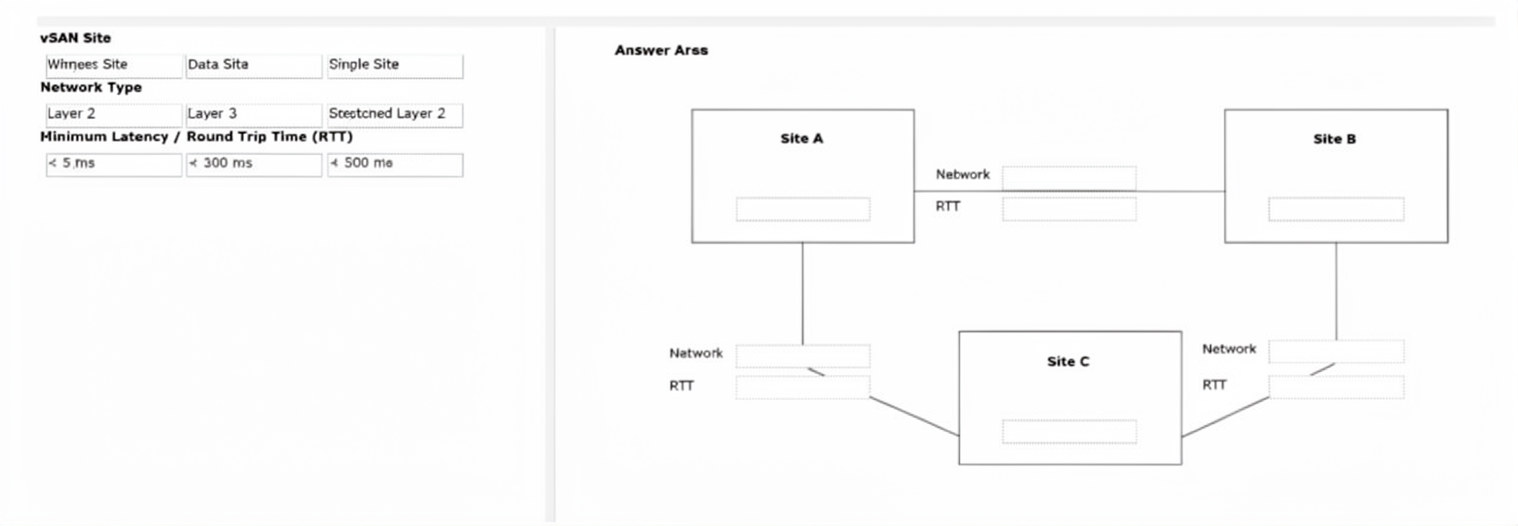
Explanation:
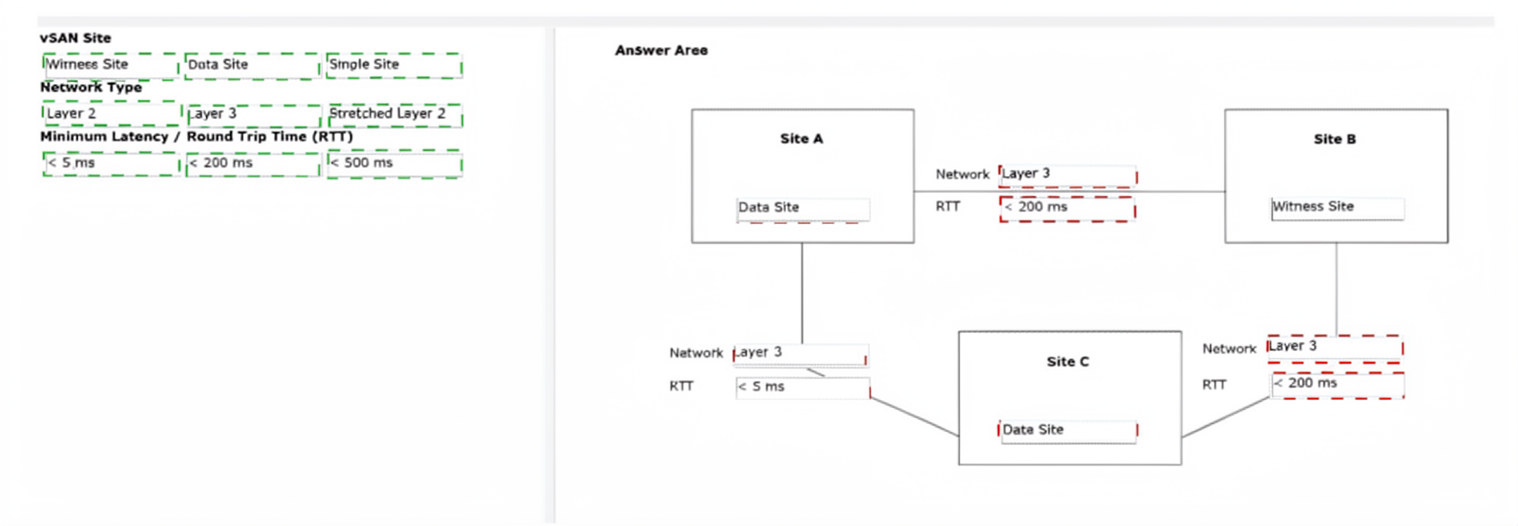
The question requires configuring a vSAN Stretched Cluster across three sites using 10 new ESXi hosts while minimizing STP issues. Site A hosts production workloads and Site C provides capacity, making them the two data sites. Site B, at capacity with no room for hosts, is ideal for the Witness.
✅ Correct Options:
Site A → Data Site (with hosts), Network Type: Layer 3, RTT: < 5 ms (to Site C)
Site A and Site C serve as the two data sites hosting the ESXi hosts. Layer 3 networking between them with < 5 ms RTT supports synchronous replication for the stretched cluster.
Site B → Witness Site, Network Type: Layer 3, RTT: < 200 ms (to both Site A and Site C)
Site B hosts only the Witness appliance (lightweight). Layer 3 with < 200 ms RTT to each data site meets witness communication requirements.
Site C → Data Site (with hosts), Network Type: Layer 3, RTT: < 5 ms (to Site A), < 200 ms (to Site B)
Site C acts as the second data site with multiple hosts for capacity and future growth. Layer 3 networking avoids STP issues.
❌ Incorrect options:
(These would violate stretched cluster rules or site roles.)
Placing Witness at Site A or C, using Layer 2 between data sites, or exceeding latency limits (e.g., >5 ms between data sites) would fail deployment or performance requirements.
🔧 Reference:
→ vSAN Stretched Cluster Design Considerations
Details data site RTT < 5 ms and witness RTT < 200 ms.
→ vSAN Stretched Cluster Networking
Recommends Layer 3 to minimize STP impact.
During maintenance on hosts in a four-node vSAN cluster, a host is placed in maintenance mode with the
“Ensure Accessibility” option.
All VMs are running with the Default Storage Policy (RAID-1, FTT=1) which has not been modified from the
default settings.
While one of the hosts in the cluster is down for firmware upgrade, a second host in the cluster loses network
connectivity.
How will the cluster be affected?
A. Data is permanently lost for affected objects.
B. All VMs remain accessible; vSAN automatically rebalances to the other hosts.
C. vSAN rebuilds missing components immediately on remaining hosts.
D. Some VMs become inaccessible until one of the affected hosts return to service.
Explanation:
This question tests understanding of vSAN maintenance mode behavior and fault tolerance. With the default vSAN storage policy of RAID-1 and FTT=1, objects can tolerate only a single host, disk, or network failure. When one host is placed in maintenance mode using Ensure Accessibility and a second host subsequently becomes unavailable, some object components may no longer have the required quorum, causing VM accessibility issues.
🟢 Correct Option:
D. Some VMs become inaccessible until one of the affected hosts return to service.
The Ensure Accessibility option keeps objects accessible during maintenance but does not create additional replicas. With RAID-1 and FTT=1, vSAN can tolerate only one failure. Once a host is in maintenance mode and another host loses connectivity, some objects may lose quorum because multiple components become unavailable. As a result, affected VMs can become inaccessible until connectivity is restored or the maintenance host returns to service.
🔴 Incorrect Options:
A. Data is permanently lost for affected objects.
The scenario describes temporary host unavailability rather than permanent device or host loss. The object components still exist on the unavailable hosts. Therefore, data is not permanently lost and can become available again when one of the affected hosts returns.
B. All VMs remain accessible; vSAN automatically rebalances to the other hosts.
The Ensure Accessibility mode does not trigger full data evacuation or create additional replicas before maintenance. Since RAID-1 with FTT=1 only tolerates a single failure, losing a second host can cause quorum loss, making some VMs inaccessible despite remaining hosts being operational.
C. vSAN rebuilds missing components immediately on remaining hosts.
vSAN does not immediately rebuild components when a host enters maintenance mode with Ensure Accessibility selected. Rebuild operations are subject to timers and available resources. In this scenario, the second host failure occurs before sufficient redundancy can be restored, leading to potential object unavailability.
🔧 Reference:
⇒ vSAN Maintenance Mode Options
Confirms the behavior of Ensure Accessibility and how object availability is maintained during host maintenance.
⇒ vSAN Object Availability and Failures to Tolerate Policies
Explains RAID-1, FTT=1 behavior, quorum requirements, and object accessibility during host failures.
An administrator is tasked with setting up immutable snapshots for recovery in case of a cyber-attack.
Which two limitations apply when configuring immutable snapshots? (Choose two.)
A. The Virtual Machine cannot be part of multiple protection groups.
B. The protection group cannot have more than 7 snapshot schedules.
C. Virtual machine hardware cannot be changed on VM having immutable snapshots.
D. Virtual Machine hardware must be at least version 10.
E. The protection group cannot be both replicated and immutable.
Explanation:
This question tests knowledge of vSAN Data Protection immutable snapshots. Immutable snapshots are designed to protect recovery points from modification or deletion, helping organizations recover from ransomware and cyber-attacks. Because the snapshots must remain unchanged, VMware enforces specific restrictions on protected VMs and protection groups to preserve the integrity of the recovery data.
🟢 Correct Option:
A. The Virtual Machine cannot be part of multiple protection groups.
A VM configured with immutable snapshot protection can belong to only one protection group. Allowing membership in multiple protection groups could create conflicting retention policies, schedules, and immutability settings. Restricting a VM to a single protection group ensures consistent management of protected recovery points and maintains predictable recovery operations.
🟢 Correct Option:
C. Virtual machine hardware cannot be changed on VM having immutable snapshots.
When immutable snapshots exist, VM hardware reconfiguration operations are restricted. Changes such as adding or removing virtual devices could affect the consistency of protected recovery points. VMware therefore prevents hardware modifications while immutable snapshots are present, ensuring that recovery data remains valid and protected against accidental or malicious changes.
🔴 Incorrect Options:
B. The protection group cannot have more than 7 snapshot schedules.
There is no VMware limitation restricting immutable protection groups to a maximum of seven snapshot schedules. Snapshot scheduling limits are determined by overall product capabilities and configuration guidelines rather than by immutability requirements.
D. Virtual Machine hardware must be at least version 10.
Immutable snapshot functionality is not tied to VM hardware version 10. The feature is managed through vSAN Data Protection and protection-group policies, making the virtual hardware version requirement stated in this option incorrect.
E. The protection group cannot be both replicated and immutable.
Replication and immutability address different protection objectives. VMware does not require these capabilities to be mutually exclusive, and a protection group can support replication-related features while maintaining immutable recovery points.
🔧 Reference:
⇒ vSAN Data Protection Administration Guide
Describes immutable snapshots, protection groups, and operational restrictions for protected virtual machines.
⇒ vSAN Data Protection - Immutable Protection Group Restrictions
Confirms restrictions associated with immutable protection groups and protected VM configurations.
An administrator has been tasked with recommending a principal storage type for a new cluster within an
existing VMware Cloud
Foundation (VCF) Workload Domain.
The following information has been provided:
• The customer has a 25GbE capable network.
• The customer has an existing 3rd party storage solution that supports connectivity by either FibreChannel
and NFS
• The new cluster will consist of two host servers that will be recycled from a previous project.
• Each of the host servers have the following configuration:
o One 500GB Enterprise-grade SSD drive.
o Two 2-Port IOGbE network cards.
• There is no budget for additional hardware.
Which approach should the administrator recommend for the principal storage type?
A. Fibre Channel
B. NFS v4.1
C. NFS v3
D. Fibre Channel over Ethernet
Explanation:
This question tests knowledge of VMware Cloud Foundation 9.0 principal storage requirements for a minimum configuration. The key constraints are only 2 hosts and no budget for additional hardware. Standard hyperconverged storage (like vSAN) or Fibre Channel typically requires at least 3 hosts. NFS v3 is the only option supported for this minimal scenario .
✔️ Option C (NFS v3):
VCF 9.0 supports NFS v3 as a principal storage solution for clusters, including minimal configurations with only 2 hosts . Since the customer has an existing NFS-capable array and only two recycled hosts, NFS v3 fits the hardware constraints (no need for additional shared storage hardware) and meets the connectivity requirement via 10GbE .
❌ Option A (Fibre Channel):
While Fibre Channel is supported as principal storage in VCF 9.0, it typically requires a minimum of 3 hosts . Additionally, the hosts provided lack Fibre Channel HBAs (only 10GbE network cards are listed), and the budget does not allow for purchasing new adapters.
❌ Option B (NFS v4.1):
NFS v4.1 is supported, but primarily as a supplemental storage type for workload domains, not as principal storage for new clusters in automated greenfield deployments . Given the customer requires principal storage for this new cluster, NFS v3 is the more compatible and straightforward choice.
❌ Option D (Fibre Channel over Ethernet):
FCoE is not listed as a supported principal storage model for workload domains in VCF 9.0 . It also requires specific hardware convergence (Converged Network Adapters) not present in the provided server configuration and would fail to meet the deployment requirements.
🔧 Reference:
→ Broadcom TechDocs: Storage Models – Confirms NFS v3 supports principal storage for management domains and VI workload domains.
→ VMware Blog: VCF 9 Now Ready For All Storage – Details support for NFS v3 as principal storage in greenfield deployments.
The security team has notified the VMware Cloud Foundation (VCF) Storage Administrator of a new security
vulnerability that must be patched immediately. The vSAN Cluster uses vSphere Lifecycle Manager images.
After updating the image with the patch, what method should the administrator use to apply this patch with
the least amount of disruption to the cluster?
A. Enable the suspend to memory feature in the host remediation settings for the baselines.
B. Enable the Quick Boot setting in the host remediation settings for the images.
C. Disable the Quick Boot feature in the host remediation settings for the images.
D. Disable HA admission control in the host remediation settings for the baselines.
Explanation:
This question tests the administrator's knowledge of optimizing the host remediation lifecycle within a vSAN cluster managed by vSphere Lifecycle Manager (vLCM) images. It evaluates methods to minimize host reboot times and operational disruptions during critical security patching cycles.
✅ Correct Option:
B. Enable the Quick Boot setting in the host remediation settings for the images.
Quick Boot allows supported ESXi hosts to restart the hypervisor software without going through the physical hardware and BIOS/UEFI self-test (POST) sequence. Enabling this setting under vLCM image remediation drastically shortens host downtime, ensuring the vSAN cluster is patched quickly with the absolute least amount of disruption.
❌ Incorrect options:
A. Enable the suspend to memory feature in the host remediation settings for the baselines.
The cluster in this scenario is explicitly configured to use vSphere Lifecycle Manager images, rendering any remediation settings or adjustments tied to legacy VUM baselines completely irrelevant. Furthermore, suspend-to-memory features do not bypass the hardware boot cycle for full hypervisor-level security patches.
C. Disable the Quick Boot feature in the host remediation settings for the images.
Disabling Quick Boot forces every ESXi host in the vSAN cluster to undergo a complete cold reboot, including physical hardware initializations and memory checks. This significantly extends the remediation window for each host, increasing the overall time the cluster operates in a degraded or maintenance state.
D. Disable HA admission control in the host remediation settings for the baselines.
Modifying vSphere High Availability (HA) admission control configuration is a cluster-level resilience setting rather than a host boot optimization tool. Additionally, adjusting baseline-specific options will have zero functional effect on a cluster whose lifecycle is governed entirely by a unified vLCM image.
🔧 Reference:
⇒ VMware vSphere Lifecycle Manager Guide
→ Validates that Quick Boot is an image-based remediation setting designed to reduce ESXi upgrade downtime by skipping hardware re-initialization.
| Page 2 out of 10 Pages |
| 123 |
| 3V0-23.25 Practice Test Home |