
Last Updated On : 12-Oct-2026
Troubleshoot and optimize the VMware Solution
vSAN encounters a noncompliant Virtual Machine and is able to locate a full replica of 55% of the votes for
the noncompliant objects.
What action will vSAN do with the Virtual Machine?
A. Automatically recover the noncompliant objects and mark the Virtual Machine as compliant.
B. Power off the Virtual Machine.
C. Mark the Virtual Machine as inaccessible as vSAN is not able to locate more than 60% of the votes for the objects.
D. Mark the Virtual Machine as orphaned.
Explanation:
This question tests your understanding of vSAN behavior when encountering noncompliant VM objects with partial replica availability. When vSAN can locate either a full replica or more than 50% of votes for noncompliant objects, it forwards I/O operations to the available replica and automatically recovers corrupted objects if the cluster has sufficient resources to rebuild them.
✔️ Option A (Correct):
Automatically recovering the noncompliant objects and marking the VM as compliant is correct because vSAN can locate a full replica AND 55% of votes (which exceeds the 50% threshold). When vSAN cannot locate a full replica but CAN locate more than 50% of votes, it forwards I/O operations to the available replica. If the cluster contains enough resources, vSAN automatically recovers corrupted objects even when the failure is permanent. Since 55% exceeds the 50% minimum requirement for object accessibility, vSAN can rebuild the missing components and restore compliance.
❌ Option B (Incorrect):
Powering off the Virtual Machine is incorrect because vSAN only powers off or marks a VM as inaccessible when it cannot locate a full replica OR more than 50% of votes for the object. Since vSAN found 55% of votes (which exceeds the 50% threshold), the VM remains accessible and I/O operations continue through the available replica. VMs are only powered off when they become completely inaccessible due to insufficient votes, not when noncompliance exists with partial replica availability above the quorum threshold.
❌ Option C (Incorrect):
Marking the Virtual Machine as inaccessible is incorrect because the threshold for inaccessibility is NOT 60% - it's 50% of votes. The option states "vSAN is not able to locate more than 60% of the votes," which is factually wrong. vSAN can locate 55% of votes, which exceeds the actual 50% threshold required for availability. Since 55% > 50%, the VM remains accessible with I/O forwarded to the available replica, and vSAN will automatically rebuild the missing components.
❌ Option D (Incorrect):
Marking the Virtual Machine as orphaned is incorrect because orphaned status occurs specifically when the VM .vmx file is not accessible due to VM Home Namespace corruption, not when objects are noncompliant. Orphaned VMs have their configuration files unavailable, whereas noncompliant VM objects still exist but don't meet storage policy requirements. Since vSAN located 55% of votes and can access the object replica, the VM is neither corrupted nor orphaned. The objects are simply noncompliant and will be recovered automatically.
🔧 Reference:
→ Virtual Machine Appears as Noncompliant, Inaccessible or Orphaned in vSAN
Confirms that if vSAN cannot locate a full replica or more than 50% of votes, VM becomes inaccessible; with sufficient resources, vSAN automatically recovers corrupted objects
An administrator is tasked with configuring the vSAN File Service to deliver NFS file shares for an Edge
environment.
Which three are required to deliver the service? (Choose three.)
A. Create a dedicated port group for vSAN File Services in the DVS.
B. If using an NSX-based network, ensure that MAC Learning is enabled.
C. MAC Learning and Forged Transmits are disabled.
D. Jumbo frames are enabled on the network and the DVS port group.
E. Hosts connected to a DVS version 6.6.0 or later.
F. vSAN Witness functionality is enabled on each VMkernel.
Explanation:
This question tests the administrator's knowledge of the prerequisite network and infrastructure requirements for enabling vSAN File Services in an Edge environment. vSAN File Service requires specific DVS configurations, NSX compatibility settings, and minimum versioning to deploy and serve NFS file shares correctly across the environment.
✅ Correct Options:
A. Create a dedicated port group for vSAN File Services in the DVS.
vSAN File Services requires a dedicated DVS port group to handle file service agent (FSA) traffic separately from other vSAN or management traffic. This dedicated port group provides the network path for NFS share access and is a mandatory configuration step before enabling the vSAN File Service on the cluster.
B. If using an NSX-based network, ensure that MAC Learning is enabled.
When vSAN File Services is deployed on an NSX-backed network, MAC Learning must be enabled on the DVS port group. File Service Agents use virtual IPs with unique MACs that NSX must learn dynamically. Without MAC Learning enabled, network traffic to file shares will be dropped or misdirected, causing NFS accessibility failures.
E. Hosts connected to a DVS version 6.6.0 or later.
vSAN File Services has a minimum DVS version requirement of 6.6.0. This version introduced the necessary port group capabilities and network features that File Service Agents depend on for proper operation. Hosts connected to older DVS versions are not supported and will prevent successful File Services enablement and deployment.
❌ Incorrect Options:
C. MAC Learning and Forged Transmits are disabled.
This is the opposite of the actual requirement. For vSAN File Services, Forged Transmits must be enabled on the port group to allow File Service Agents to send traffic using virtual IP addresses. Disabling both MAC Learning and Forged Transmits would break NFS file share connectivity entirely.
D. Jumbo frames are enabled on the network and the DVS port group.
Jumbo frames (MTU 9000) are a performance optimization, not a mandatory requirement for vSAN File Services. The service can be deployed and function correctly on standard MTU 1500 networks. While recommended in high-throughput environments, it is not listed as a prerequisite for enabling File Services in VMware's official documentation.
F. vSAN Witness functionality is enabled on each VMkernel.
vSAN Witness functionality on VMkernel adapters is specific to Stretched Cluster and Two-Node configurations for quorum purposes. It has no relevance to vSAN File Services deployment or NFS share delivery. Enabling witness functionality on each VMkernel is neither required nor related to File Services configuration.
🔧 Reference:
⇒ VMware vSAN File Services Configuration Guide → Confirms prerequisites including dedicated DVS port group, MAC Learning for NSX environments, and minimum DVS version 6.6.0 for vSAN File Services deployment.
⇒ VMware vSAN File Services and NSX Networking Requirements → Validates MAC Learning and Forged Transmits enablement requirements when deploying vSAN File Services on NSX-based network infrastructure.
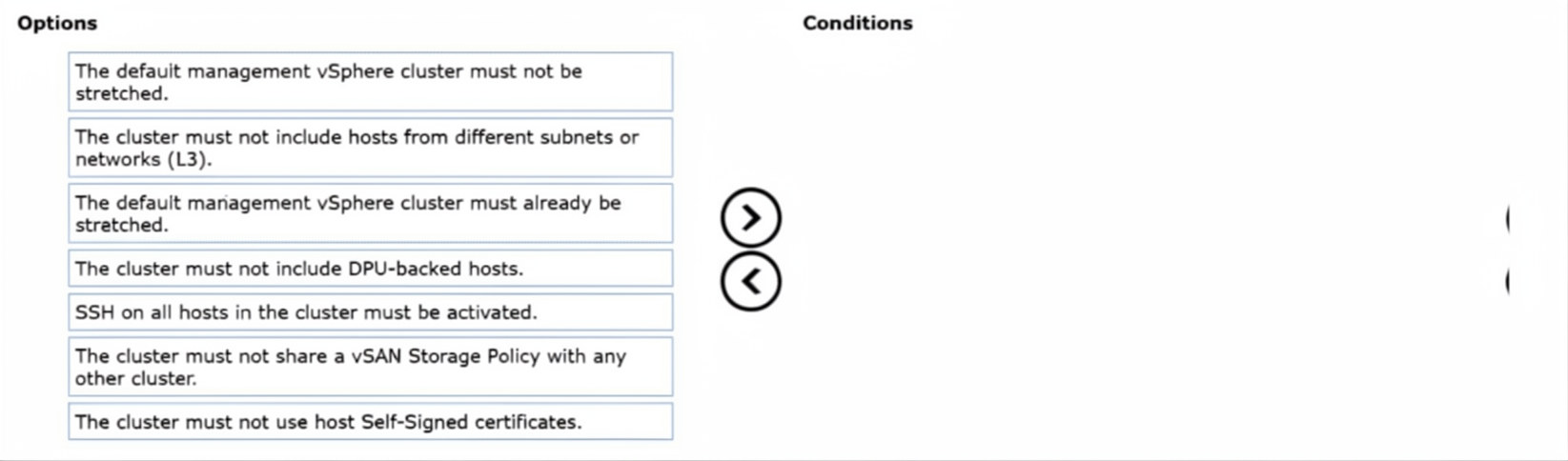
An administrator is tasked with stretching a vSAN cluster in a VMware Cloud Foundation (VCF) Workload
Domain across two availability zones within a region. Both availability zones contain an equal number of
hosts.
What four Conditions must also be met in order to stretch the cluster?
Drag and drop the four correct options from the Options list on the left and place them into the Conditions on
the right in any order. (Choose four.)
Explanation:
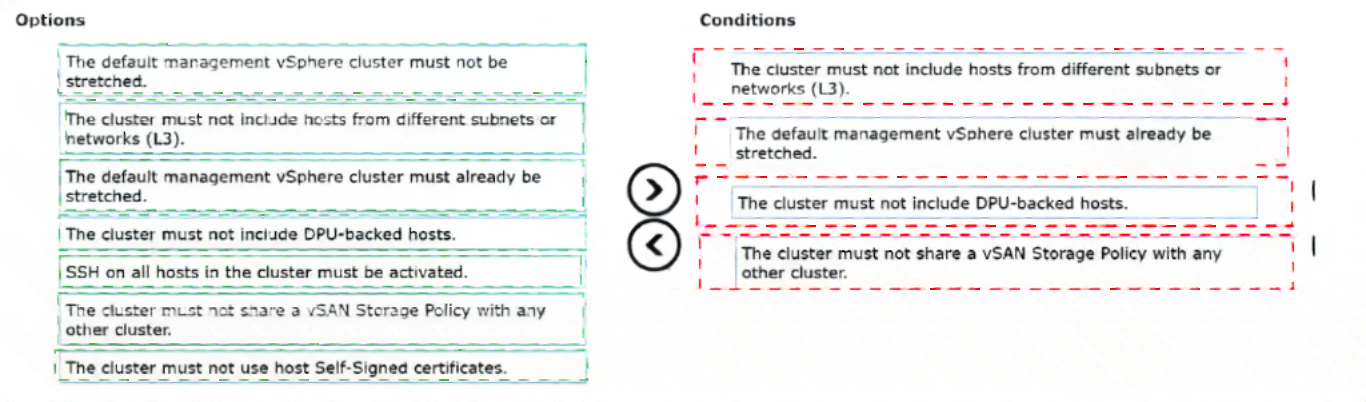
This question tests the prerequisites for stretching a vSAN cluster across two availability zones in a VCF Workload Domain. Equal host distribution per site is already given; these four additional conditions must be satisfied.
✅ Correct Options:
The cluster must not include hosts from different subnets or networks (L3).
Stretched vSAN clusters in VCF require consistent L2/L3 networking design between sites. Hosts from different subnets can break vSAN stretched cluster communication and fault domain configuration.
The default management vSphere cluster must already be stretched.
For VI Workload Domains, the management domain cluster must be stretched first. This ensures NSX control plane and management components remain available during site events.
The cluster must not include DPU-backed hosts.
DPU-backed hosts are not supported in stretched vSAN clusters in VCF due to compatibility and networking constraints with the stretched topology.
The cluster must not share a vSAN Storage Policy with any other cluster.
Each stretched cluster must use its own dedicated vSAN storage policy. Sharing policies with other clusters is not allowed during stretch operations.
❌ Incorrect options:
The default management vSphere cluster must not be stretched.
This is the opposite of the requirement. The management cluster must be stretched before stretching a workload domain cluster.
SSH on all hosts in the cluster must be activated.
SSH enablement is not a prerequisite for stretching a vSAN cluster.
The cluster must not use host Self-Signed certificates.
Certificate type (self-signed vs. CA-signed) is not a blocking condition for vSAN cluster stretching.
🔧 Reference:
→ Stretching vSAN Clusters in VMware Cloud Foundation
Lists exact prerequisites and limitations for stretching workload domain clusters.
An administrator is troubleshooting a vSAN performance issue. In the vSAN cluster performance charts there
is a high latency on the vSAN cluster.
What is a possible cause of the performance issue?
A. The Virtual Machines are using PVSCSI controllers.
B. Jumbo frames are enabled on the VMkernel adapters.
C. Erasure Coding is disabled in the storage policy.
D. There is congestion in one or more disk groups.
Explanation:
This question tests knowledge of vSAN performance troubleshooting. High cluster latency in vSAN performance charts often indicates that storage resources are unable to process I/O requests efficiently. One of the most common causes is congestion within disk groups, where queued operations increase response times and negatively impact overall cluster performance.
🟢 Correct Option:
D. There is congestion in one or more disk groups.
Disk group congestion occurs when storage devices become overloaded with read or write operations, causing I/O requests to queue and increasing latency. vSAN performance charts frequently expose this condition through elevated latency metrics. When one or more disk groups are congested, the entire cluster can experience slower storage performance, making this a likely root cause of the observed high latency.
🔴 Incorrect Options:
A. The Virtual Machines are using PVSCSI controllers.
PVSCSI controllers are recommended for high-performance workloads because they reduce CPU overhead and support greater I/O throughput. Their use generally improves storage efficiency rather than causing high vSAN cluster latency.
B. Jumbo frames are enabled on the VMkernel adapters.
Jumbo frames are commonly used in vSAN environments to improve network efficiency and reduce protocol overhead. When configured consistently across the network, they do not create storage latency issues and are not a typical cause of high vSAN latency.
C. Erasure Coding is disabled in the storage policy.
Disabling Erasure Coding results in RAID-1 style mirroring rather than RAID-5 or RAID-6 protection. While this affects capacity utilization, it does not inherently cause elevated latency or disk group congestion within the vSAN cluster.
🔧 Reference:
⇒ vSAN Monitoring and Troubleshooting Guide - Performance Metrics
Explains how latency and congestion metrics are used to identify storage performance bottlenecks in vSAN clusters.
⇒ vSAN Performance Service and Congestion Analysis
Describes vSAN performance monitoring, including disk group congestion and its impact on cluster latency.
The Windows team is planning to deploy a Windows Server Failover Cluster. This requires a disk shared
between all members of the cluster.
Which two options are available to fulfill this requirement on a vSAN ESA cluster? (Choose two.)
A. vSAN iSCSI target
B. LSI SCSI controller per disk
C. Raw Device Mapping
D. NFS v4.1
E. Paravirtual SCSI controller with physical bus sharing
Explanation:
This question tests knowledge of how to provide shared storage for a Windows Server Failover Cluster (WSFC) on a vSAN ESA cluster. WSFC requires a disk that can be accessed simultaneously by all cluster nodes with SCSI-3 Persistent Reservations for arbitration . On vSAN, this requirement can be met through two distinct methods: exposing storage via the vSAN iSCSI target service, or configuring native vSAN virtual disks with the correct controller settings .
✔️ Option A (vSAN iSCSI target):
The vSAN iSCSI target service enables both virtual and physical workloads to access vSAN datastores as block storage. Official VMware documentation explicitly confirms that vSAN iSCSI targets support Windows Server Failover Clustering (WSFC) . This method allows WSFC nodes to discover and connect to shared LUNs using standard iSCSI initiators, with each LUN protected by vSAN storage policies.
✔️ Option E (Paravirtual SCSI controller with physical bus sharing):
For native vSAN shared disks, VMware documentation specifies that shared disks must be accessed through a SCSI controller with SCSI Bus Sharing set to Physical . The recommended controller type for shared disks in WSFC configurations is the VMware Paravirtualized (PVSCSI) controller . This configuration enables SCSI-3 Persistent Reservations, which WSFC requires to arbitrate access to clustered disk resources .
❌ Option B (LSI SCSI controller per disk):
While LSI Logic SAS controllers are supported for boot disks in WSFC configurations, they are not the recommended controller type for shared disks. Furthermore, using a separate controller per disk does not fulfill the requirement for a disk shared between all cluster members—the same disk must be attached to all nodes via a controller with physical bus sharing.
❌ Option C (Raw Device Mapping):
Raw Device Mapping (RDM) is not a typical native vSAN configuration. For vSAN environments, shared VMDKs (Clustered VMDKs) are the native method, not RDMs . Additionally, the vSAN iSCSI target service explicitly does not support migrations using RDM .
❌ Option D (NFS v4.1):
NFS datastores are not supported for WSFC configurations. Multiple official sources list NFS datastores as an unsupported scenario for WSFC on vSphere . WSFC requires block-level storage with SCSI-3 Persistent Reservations, which NFS as a file-level protocol cannot provide.
🔧 Reference:
→ Broadcom KB 326884: Best practices for using vSAN iSCSI targets – Confirms vSAN iSCSI target supports Windows Server Failover Cluster (WSFC).
→ Broadcom TechDocs: Shared Storage Clusters on vSAN – Documents requirement for SCSI controller with Physical bus sharing for WSFC.
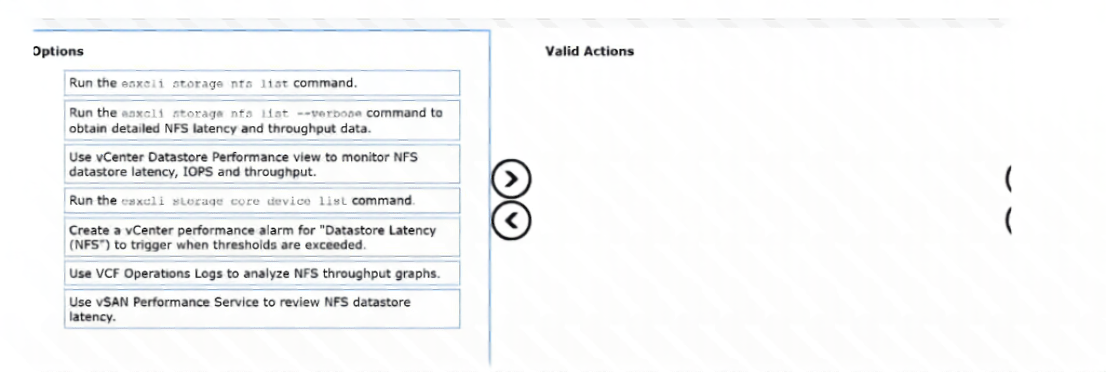
An administrator needs to monitor an external NFS datastore attached to a VMware Cloud Foundation (VCF)
cluster to confirm that it meets latency and throughput targets.
Drag and drop the three correct options to monitor NFS performance from the Options list on the left and
place them into the Valid Actions on the right in any order. (Choose three.)
Explanation:
This question tests an administrator's knowledge of the operational tools and CLI utilities available to monitor and alert on external Network File System (NFS) datastore behavior within a VCF cluster. It requires selecting valid vSphere and command-line actions that accurately report latency, throughput, and capacity metrics for file-based principal or supplemental storage.
✅ Correct Option:
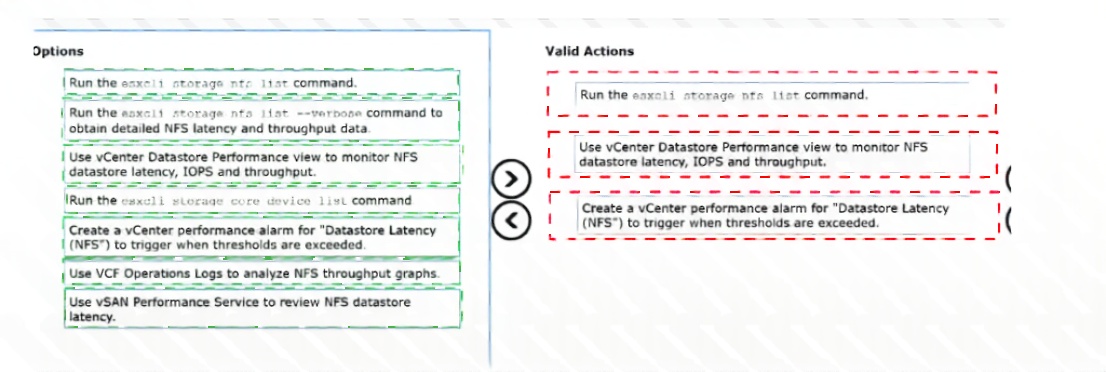
Run the esxcli storage nfs list command.
This option is correct because the esxcli storage nfs list command is a valid local ESXi shell utility. It allows an administrator to quickly view a list of currently mounted NFS volumes on a specific host along with their connection statuses and basic share details, serving as a baseline diagnostic action.
Use vCenter Datastore Performance view to monitor NFS datastore latency, IOPS and throughput.
This choice is correct because the native vCenter Server Performance tab provides complete real-time and historical graphical tracking for storage metrics. It allows administrators to closely inspect the input/output operations per second (IOPS), overall read/write throughput, and localized latency spikes specifically across any attached NFS datastores.
Create a vCenter performance alarm for "Datastore Latency (NFS)" to trigger when thresholds are exceeded.
This option is correct because setting proactive vCenter performance alarms is the industry-standard method for continuous infrastructure oversight. Configuring a specialized alarm targeting NFS datastore latency thresholds ensures the storage administration team is flagged immediately whenever performance metrics degrade past operational limits.
❌ Incorrect options:
Run the esxcli storage nfs list --verbose command to obtain detailed NFS latency and throughput data.
This command variation is invalid because the native ESXi CLI toolset does not feature a --verbose modifier for the esxcli storage nfs list namespace. Attempting to execute this syntax inside the shell returns a command error rather than providing deep latency or throughput telemetry.
Run the esxcli storage core device list command.
This action is incorrect because the esxcli storage core device list command is strictly designed to query and display properties for local or SAN block-based storage devices (such as SCSI LUNs, local SSDs, or NVMe paths). It does not track or map logical network shares or remote file systems like NFS.
Use VCF Operations Logs to analyze NFS throughput graphs.
This selection is inaccurate because VCF Operations (formerly vRealize Operations) visualizes structural metrics, trends, and throughput analytics using dashboards and structured performance graphs, not through text-based log streams. Log tracking is handled by Log Insight, which is separate from graph-based metrics analysis.
Use vSAN Performance Service to review NFS datastore latency.
This configuration step is incorrect because the vSAN Performance Service is architecturally restricted to tracking native vSAN storage components, objects, and disk groups. It cannot capture, process, or display performance telemetry or network latency measurements for an externally attached third-party NFS datastore.
🔧 Reference:
⇒ VMware vSphere Monitoring and Performance Guide
→ Confirms valid configuration paths for building performance alarms and using the native vCenter performance tracking charts to oversee file-system storage arrays.
An administrator is tasked with enabling vSAN Data Protection.
Which action is required to enable vSAN Data Protection?
A. Enable vSAN advanced options
B. Deploy VMware Live Recovery (VLR)
C. Deploy Data Services Manager
D. Deploy vSphere Replication
Explanation:
This question tests the prerequisite for enabling vSAN Data Protection in VMware Cloud Foundation 9.0, which provides snapshot-based local protection and optional replication.
✅ Correct Option:
B. Deploy VMware Live Recovery (VLR)
vSAN Data Protection is powered by and integrated with the VMware Live Recovery appliance. Deploying the VLR OVA is the required action to activate the service, after which administrators can create protection groups for immutable snapshots and replication directly from the vSphere Client.
❌ Incorrect options:
A. Enable vSAN advanced options
Advanced options are not required to enable vSAN Data Protection. This feature operates through the dedicated Live Recovery service.
C. Deploy Data Services Manager
Data Services Manager is used for database-as-a-service capabilities and is unrelated to vSAN Data Protection.
D. Deploy vSphere Replication
vSphere Replication is a separate legacy replication tool. vSAN Data Protection uses its own integrated replication engine through VMware Live Recovery.
🔧 Reference:
→ Using vSAN Data Protection
Requires deployment of the VMware Live Recovery / Snapshot Service appliance.
→ vSAN Data Protection in VMware Cloud Foundation
Confirms deployment of the VMware Live Recovery appliance to enable the service.
An administrator has been tasked with deploying vSAN Data Protection in a VMware Cloud Foundation
(VCF) Workload Domain. The administrator deploys the VMware Live Recovery OVA and logs into the
management interface to start the Configure Appliance process, but the appliance fails to register with
vCenter.
What are two possible causes the administrator can check to resolve the issue? (Choose two.)
A. The vSAN Data Protection appliance was deployed to a non-vSAN datastore.
B. The vCenter Server user account was created locally on the VCSA Photon OS level.
C. The vCenter Server user account used for registration does not have the required permissions.
D. The appliance is using DHCP IP addresses for management.
E. The forward and reverse DNS resolution between the appliance and vCenter Server are not properly configured.
Explanation:
This question tests your understanding of vSAN Data Protection (VMware Live Recovery) appliance registration troubleshooting. When the appliance fails to register with vCenter after deploying the OVA, the most common causes are DNS resolution issues (forward and reverse DNS must be properly configured) and insufficient user permissions for the account used during registration.
✔️ Option C (Correct):
The vCenter Server user account used for registration not having the required permissions is a valid cause because the Snapshot Service Appliance requires specific vCenter permissions to register and function properly. The account must have administrative privileges to register the appliance plugin with vCenter Server. If the user account lacks the necessary permissions (such as Global.Plugin, Storage.vsan, or Administrator roles), the registration process will fail even with correct network and DNS configuration. The authentication will fail silently or produce permission error messages, which is why checking the credentials and verifying proper role assignment is a critical troubleshooting step.
✔️ Option E (Correct):
Forward and reverse DNS resolution not being properly configured is a critical cause because the Snapshot Service Appliance requires proper A/PTR DNS records to register with vCenter Server. The appliance must resolve the vCenter FQDN correctly, and vCenter must be able to resolve the appliance's IP address back to its hostname. Without proper forward (A record) and reverse (PTR record) DNS resolution, the appliance cannot authenticate or communicate properly with vCenter Server. DNS replication delays can also cause this issue if DNS records haven't propagated to all DNS servers that vCenter queries.
❌ Option A (Incorrect):
Deploying the vSAN Data Protection appliance to a non-vSAN datastore is incorrect because while vSAN Data Protection provides protection for vSAN VMs, the appliance itself can be deployed to any accessible datastore (including non-vSAN datastores like NFS or VMFS). The appliance deployment location doesn't affect its ability to register with vCenter. The registration failure is typically caused by DNS or permission issues, not datastore type. The appliance manages vSAN snapshots regardless of where the appliance VM itself is deployed.
❌ Option B (Incorrect):
The vCenter Server user account being created locally on the VCSA Photon OS level is incorrect because this is not a typical cause of appliance registration failure. User accounts for vCenter authentication are managed through vCenter's Single Sign-On (SSO) identity sources (local users, Active Directory, LDAP), not directly at the Photon OS level. Even if technically possible to create a Photon OS user, it wouldn't be used for vCenter API authentication during appliance registration. Registration uses SSO credentials, making this option irrelevant to the actual authentication mechanism.
❌ Option D (Incorrect):
The appliance using DHCP IP addresses for management is incorrect because while static IP addresses are recommended for production appliances, using DHCP does not prevent the appliance from registering with vCenter Server. The registration process communicates over the network using whatever IP address (DHCP or static) the appliance has been assigned. DHCP assignment itself doesn't cause registration failures unless there are secondary issues like IP address changes or DNS not resolving the DHCP-assigned address. The primary causes are DNS records and permissions, not the IP addressing method.
🔧 Reference:
→
vSAN Data Protection Plugin Not Visible
Confirms that the issue occurs when vCenter FQDN configured during deployment does not resolve correctly from the appliance, requiring proper DNS resolution
| Page 3 out of 10 Pages |
| 234 |
| 3V0-23.25 Practice Test Home |