
Last Updated On : 12-Oct-2026
What is the purpose of a network policy in a Kubernetes cluster?
A. Creates and operates workload clusters natively in vSphere Supervisor.
B. Defines how pods communicate with each other and other network endpoints.
C. Provides routing capability for inbound pod traffic.
D. Allows external access to a port opened on each worker node through the Kubernetes network proxy.
Explanation:
A Kubernetes Network Policy is a specification that defines how groups of pods are allowed to communicate with each other and with other network endpoints. It implements ingress (incoming) and egress (outgoing) rules at Layer 3/4, acting as a firewall for pods. Network Policies enforce application-level segmentation and security within the cluster.
Why other options are incorrect:
A (creates and operates workload clusters natively):This describes the vSphere Supervisor or Tanzu Kubernetes Grid Service, not a Network Policy.
C (provides routing capability for inbound pod traffic): This describes Ingress (HTTP/S routing), not a Network Policy.
D (allows external access to a port on each worker node): This describes a NodePort Service, not a Network Policy.
Reference:
Kubernetes Documentation – "Network Policies" – A Network Policy specifies how groups of pods are allowed to communicate. VMware VKS fully supports standard Kubernetes Network Policies when using NSX-T or Antrea as the CNI.
What statement describes Cluster API?
A. It is a native Kubernetes certificate management controller that adds certificates and certificate issuers as resource types in Kubernetes clusters.
B. It is a specialized toolset to bring declarative cluster creation, configuration, and management in the Kubernetes ecosystem.
C. It enables pod networking and enforces network Kubernetes policies.
D. It is responsible for scanning language-specific packages in container images, such as Java, Python, Go, and others.
Explanation:
Cluster API (CAPI) is a Kubernetes sub-project that provides declarative APIs for provisioning, upgrading, and operating Kubernetes clusters across multiple infrastructure providers (vSphere, AWS, Azure, etc.). It uses Kubernetes-style resource definitions (Cluster, Machine, MachineDeployment) to manage cluster lifecycle, making cluster operations as declarative as application deployments.
Correct Option:
B. It is a specialized toolset to bring declarative cluster creation, configuration, and management in the Kubernetes ecosystem –
This is accurate because Cluster API extends Kubernetes through custom resource definitions (CRDs) and controllers. It enables infrastructure-as-code for Kubernetes clusters themselves. Operations like scaling worker nodes, upgrading control planes, or rotating certificates become declarative API objects, reducing operational complexity.
Incorrect Options:
A. It is a native Kubernetes certificate management controller that adds certificates and certificate issuers as resource types –
This describes cert-manager, an external project (not part of Kubernetes or Cluster API). Cert-manager automates X.509 certificate issuance and renewal. Cluster API does not manage certificates for workloads; it may generate cluster certificates during provisioning but is not a certificate management controller.
C. It enables pod networking and enforces network Kubernetes policies –
This describes Container Network Interface (CNI) plugins like Antrea, Calico, or Cilium. Cluster API does not implement pod networking; it delegates networking to CNI providers after cluster creation. Network policy enforcement is entirely outside Cluster API's scope.
D. It is responsible for scanning language-specific packages in container images, such as Java, Python, Go, and others –
This describes image vulnerability scanners (e.g., Trivy, Clair, Grype) often integrated into CI/CD pipelines or container registries. Cluster API has no image scanning capabilities; it focuses solely on cluster lifecycle management, not container content analysis.
Reference:
Cluster API Official Documentation – "What is Cluster API?" (https://cluster-api.sigs.k8s.io/). Also referenced in VMware Tanzu Kubernetes Grid documentation: Cluster API is the underlying technology for declarative cluster management across vSphere, AWS, and Azure. VMware uses Cluster API for TKG cluster lifecycle operations.
An administrator upgrades a VMware Cloud Foundation (VCF) Supervisor and the upgrade fails. Order the steps the administrator should take to determine the cause of the failure.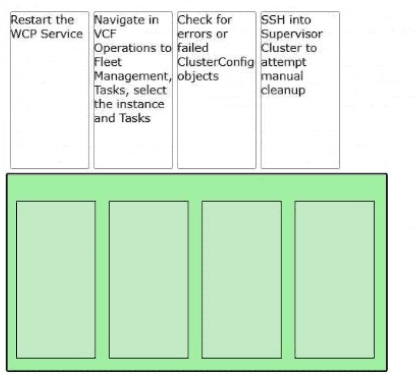
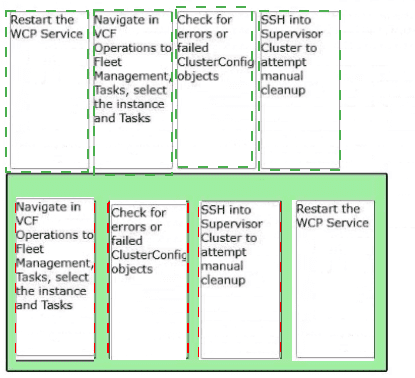
Explanation:
Navigate in VCF Operations to Fleet Management, Tasks, select the instance and Tasks:
This is the first step to identify which specific sub-task in the upgrade workflow failed within the VCF management plane.
Check for errors or failed ClusterConfig objects:
Once the task is identified, checking the ClusterConfig objects provides technical details on whether the failure is related to state mismatch or resource configuration.
SSH into Supervisor Cluster to attempt manual cleanup:
If the automated process is stuck due to orphaned resources or stale configurations, manual intervention via the command line on the Supervisor nodes is required.
Restart the WCP Service:
As a final step to clear the "failed" state and re-initialize the Workload Management (WCP) agent, the service is restarted to pick up the changes or retry the configuration.
Technical Breakdown
VCF Fleet Management:
In VCF 9.0, Fleet Management provides a centralized view of all Supervisors. Starting here allows the admin to see if the error is localized or environmental.
ClusterConfig Objects:
These are Kubernetes Custom Resources within the Supervisor that define the desired state. When an upgrade fails, these objects often show a status field with the specific reason for the "Degraded" or "Failed" state.
WCP (Workload Control Plane) Service:
This service runs on vCenter and is responsible for communicating with the Supervisor. Restarting it is a common remediation to "unstick" an upgrade process after manual cleanup has been performed.
References
VMware Cloud Foundation 9.0 Operations Guide: Troubleshooting Workload Management Upgrades.
vSphere with Tanzu Diagnostics and Troubleshooting: Monitoring Task Progress in Fleet Management.
What three controllers maintain the lifecycle of VMware vSphere Kubernetes Service (VKS) clusters? (Choose three.)
A. Container Network Interface
B. Virtual Machine Service
C. Cloud Provider Plug-in
D. Container Storage Interface
E. Cluster API
Explanation:
In VMware Cloud Foundation (VCF) 9.0, the vSphere Kubernetes Service (VKS) uses a declarative model to manage the lifecycle of workload clusters. The "Lifecycle" refers to the automated provisioning, scaling, patching, and deletion of these clusters. This process is governed by three primary controllers:
B. Virtual Machine Service:
This controller is responsible for managing the lifecycle of the actual Virtual Machines that serve as the Kubernetes nodes (Control Plane and Worker nodes). It translates Kubernetes-style YAML requests into vSphere VM actions.
C. Cloud Provider Plug-in:
Also known as the vSphere Cloud Provider (vCP), this controller integrates the VKS cluster with the underlying vSphere infrastructure. It handles the lifecycle of infrastructure-specific resources, such as ensuring load balancers and node networking remain consistent with the cluster state.
E. Cluster API (CAPI):
This is the core foundational controller for lifecycle management. It provides the high-level orchestration, using a management cluster (the Supervisor) to manage the lifecycle of "child" workload clusters as custom resources.
Why the Other Options are Incorrect
A. Container Network Interface (CNI):
While essential for networking within a pod (such as Antrea or NSX), the CNI handles network connectivity for containers, not the structural lifecycle (creation/deletion) of the Kubernetes cluster itself.
D. Container Storage Interface (CSI):
The CSI (specifically the vSphere CSI) manages the lifecycle of persistent volumes. While it handles how storage is attached to the cluster, it does not manage the lifecycle of the cluster nodes or the control plane.
References
VMware Cloud Foundation 9.0 Design Guide: vSphere with Tanzu Architecture and Components.
vSphere 8.x/9.0 Workload Management Documentation: Understanding Cluster API and the VM Service.
What three components run in a VMware vSphere Kubernetes Service (VKS) cluster? (Choose three.)
A. Cloud Provider Implementation
B. Container Network Implementation
C. Cloud Provider Interface
D. Container Storage Interface
E. Cloud Storage Implementation
F. Container Network Interface
Explanation:
A. Cloud Provider Implementation
– The vSphere Cloud Provider runs in the VKS cluster as a controller (e.g., vsphere-cloud-controller-manager). It integrates the cluster with the underlying vSphere infrastructure, enabling node lifecycle management, load balancer services (Type LoadBalancer), and storage placement.
B. Container Network Implementation
– A concrete networking implementation (e.g., Antrea, Calico) runs inside the VKS cluster as agent pods (daemonsets). These enforce network policies and enable pod-to-pod communication across nodes.
D. Container Storage Interface (CSI)
– The vSphere CSI driver (e.g., vsphere-csi-controller, vsphere-csi-node) runs in the VKS cluster as pods. It provisions persistent volumes (PVs) from vSphere datastores and attaches them to pods.
Why other options are incorrect
C. Cloud Provider Interface
– Not a standard Kubernetes term. The correct term is Cloud Provider Implementation (the actual controller running in the cluster).
E. Cloud Storage Implementation
– Not a standard term. Kubernetes uses CSI as the standard interface; there is no separate "Cloud Storage Implementation" component.
F. Container Network Interface (CNI)
– This is a specification/interface, not a runnable component. The implementation of CNI runs in the cluster (which is Option B), not the interface itself.
Reference:
VMware TechDocs – "VKS Cluster Components" – A VKS cluster runs the Cloud Provider implementation, a CNI implementation, and the CSI driver as in-cluster controllers and agents.
What component is used to provision VMware vSphere Kubernetes Service (VKS) service mesh workload clusters?
A. Harbor
B. Cert-manager
C. Carvel
D. Cluster API
Explanation:
The component used to provision VMware vSphere Kubernetes Service (VKS) workload clusters—including those that host a service mesh like Istio—is Cluster API. VKS exposes Cluster API (CAPI) as a foundational lifecycle management layer, providing declarative, Kubernetes-style APIs for cluster creation, configuration, scaling, and management .
The CAPV (Cluster API Provider vSphere) controller, which is enabled through the Supervisor, is specifically responsible for managing the lifecycle of VKS clusters. It handles the provisioning of control plane and worker node VMs, ensuring the cluster matches the desired state defined in the YAML manifest .
Why other options are incorrect
A. Harbor:
A private container image registry. It stores container images but does not provision infrastructure or Kubernetes clusters.
B. Cert-manager:
A certificate management controller for issuing and renewing TLS certificates inside a cluster. It operates within an existing cluster and does not provision the cluster itself.
C. Carvel:
A suite of tools for building and deploying applications (e.g., imgpkg for relocating images). It is used for packaging and installation but not as the core provisioning engine for VKS workload clusters.
Reference:
Broadcom TechDocs: "The Cluster API provides declarative, Kubernetes-style APIs for cluster creation, configuration, and management... CAPV is a component of VKS and is responsible for managing the life cycle of VKS clusters"
An administrator is tasked with enabling a Supervisor cluster in VMware Cloud Foundation (VCF).
Arrange the steps below In the correct order to complete the process of enabling a Supervisor In the environment.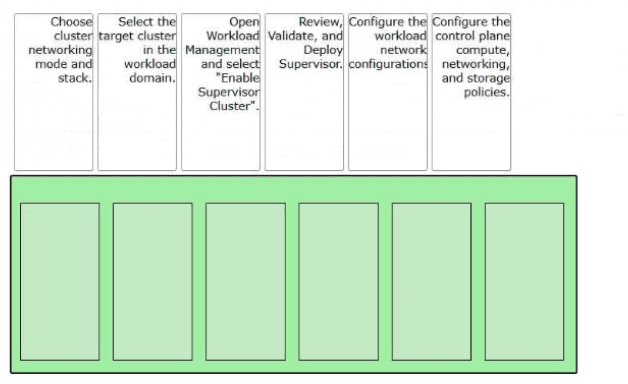
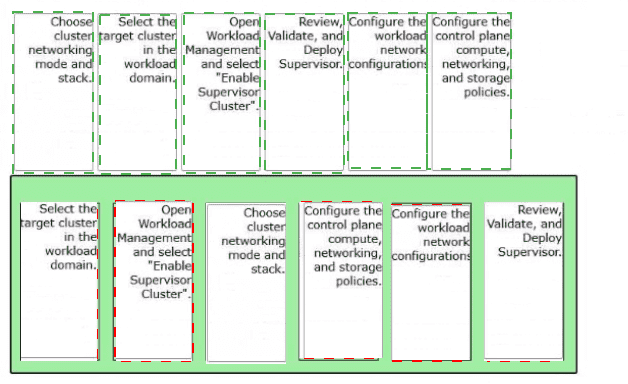
Explanation:
Technical Breakdown/B>
Resource Selection:
Before any configuration occurs, the administrator must identify the specific vSphere cluster within a VCF workload domain that has the necessary resources (CPU, RAM, and storage) to host the Supervisor.
Networking Mode & Stack:
This is a critical early step where you determine if the Supervisor will use NSX (common in VCF) or vSphere Distributed Switch (vDS) networking, which dictates how Load Balancers and Pod networking are handled.
Control Plane Configuration:
This defines the "size" of the three Supervisor Control Plane VMs (Tiny, Small, Medium, or Large) and assigns the storage policies that ensure the control plane remains highly available.
Workload Network:
This step configures the IP address ranges (CIDRs) for the services and pods that will run on the cluster, ensuring no overlap with the existing management or corporate network.
Final Validation:
VCF performs a series of automated checks to ensure that the MTU settings, load balancer reachability, and storage permissions are correct before the automated deployment of the Control Plane VMs begins.
References
VMware Cloud Foundation 9.0 Guide: Enabling Workload Management on a Workload Domain Cluster.
vSphere with Tanzu Configuration Guide: Workflow for Setting Up a Supervisor.
How should an administrator enable autoscaling for a vSphere Kubernetes Service (VKS) cluster?
A. Update the NodePool YAML to enable the autoscaling feature.
B. Create a VKS cluster with autoscaler annotations.
C. Create a NodePool with autoscaling enabled.
D. Install the Cluster Autoscaler (standard package) for the cluster environment.
Explanation:
In VMware vSphere Kubernetes Service (VKS), autoscaling is not enabled by default and is not configured directly on a NodePool or via cluster creation parameters alone. The correct workflow involves two distinct steps:
1.Configure the cluster for autoscaling by adding annotations to the machineDeployments section in the cluster YAML specification. The annotations are cluster.x-k8s.io/cluster-api-autoscaler-node-group-min-size and cluster.x-k8s.io/cluster-api-autoscaler-node-group-max-size .
2.Install the Cluster Autoscaler standard package on the VKS cluster using either kubectl or VCF CLI. The cluster autoscaler is a standard package provided by VMware that runs as a deployment in the kube-system namespace and manages node scaling based on pod scheduling demands .
The question asks "How should an administrator enable autoscaling" — the enabling action is installing the Cluster Autoscaler package.
Why other options are incorrect:
A. Update the NodePool YAML to enable the autoscaling feature
— There is no autoscaling: enabled field on a NodePool. Annotations configure min/max size, but do not enable autoscaling by themselves .
B. Create a VKS cluster with autoscaler annotations
— Annotations alone do not enable autoscaling. They define the scaling range, but the Cluster Autoscaler controller must still be installed to act on those annotations .
C. Create a NodePool with autoscaling enabled
— VKS does not have a native "autoscaling enabled" flag on NodePools. The Cluster Autoscaler package is the required component .
References:
VMware TechDocs: "Standard Packages for VKS Clusters" — Cluster Autoscaler is listed as a supported package that must be installed .
VMware TechDocs: "Install Cluster Autoscaler Using Kubectl" — Complete workflow: annotate cluster, then install the package
| Page 2 out of 11 Pages |
| 1234 |
| 3V0-24.25 Practice Test Home |