
Last Updated On : 12-Oct-2026
Refer to the exhibit.
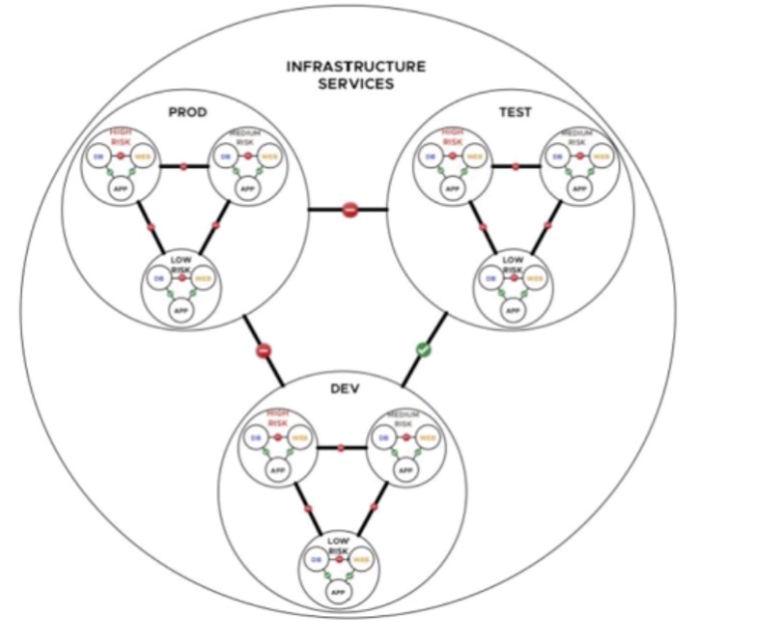
A financial company is adopting micro-services with the intent of simplifying network
security. An NSX architect is proposing a NSX segmentation logical design. The architect
has created a diagram to share with the customer.
Which design choice provides less management overhead?
A. Create one firewall rule per application tier.
B. Create one security policy per level of security.
C. Create one firewall rule per level of security.
D. Create a security policy based on IP groups.
Explanation:
In NSX, a security policy is a container for multiple firewall rules applied to a specific security group. Grouping rules by level of security (e.g., HIGH, LOW) rather than by application tier or per rule reduces management overhead. When security requirements change for a given level (e.g., HIGH), the architect updates one policy, and all workloads tagged as HIGH (across PROD, DEV, TEST) inherit the change automatically. This avoids duplicate rules across environments, simplifies audits, and aligns with micro-segmentation best practices.
Why Other Options Are Incorrect:
A. One firewall rule per application tier
– Leads to rule explosion as tiers and applications grow. Adding a new tier requires creating and maintaining new rules, increasing overhead.
C. One firewall rule per level of security
– While similar in grouping, managing individual rules without policies creates fragmentation. Policies allow bundling of related rules (e.g., HIGH policy contains allow/deny rules), reducing administrative effort.
D. Security policy based on IP groups
– IP-based policies require ongoing maintenance when workloads scale or change IP addresses (common in dynamic micro-services environments). NSX supports dynamic security groups (e.g., VM names, tags), making IP groups obsolete and high-overhead.
References:
VMware NSX 4.x Security Guide – "Security policies help organize rules by functional groups such as compliance tier or environment level; applying policies by security level reduces rule count."
NSX Design Guide – Segmentation – "Organize policies by security level (High, Medium, Low) to minimize operational overhead across multiple application tiers."
A company is planning to deploy NSX to provide a multi-tenant environment for their
customers. The solutions architect is responsible for designing the network services
to ensure that each tenant's traffic is isolated and secure.
Which of the following NSX features should the solutions architect use to achieve
this goal?
A. Load Balancing
B. VLAN
C. NAT
D. Distributed Firewall
Explanation:
To achieve tenant traffic isolation and security in a multi-tenant NSX environment, the Distributed Firewall (DFW) is the primary feature. DFW operates at the hypervisor kernel level and enforces security policies on east-west traffic between workloads. By creating security groups per tenant and applying DFW rules that deny cross-tenant traffic by default (while allowing intra-tenant communication), the architect ensures complete logical isolation. DFW scales linearly with each ESXi host and does not introduce a centralized bottleneck, making it ideal for multi-tenant designs.
Why Other Options Are Incorrect:
A. Load Balancing
– Distributes application traffic across backend servers. It does not provide traffic isolation or security between tenants. Load balancers operate at L4/L7 and are unaware of tenant boundaries unless combined with other features.
B. VLAN
– Provides Layer 2 segmentation but scales poorly in multi-tenant clouds (4094 VLAN limit). NSX overlays (Geneve) are preferred for tenant isolation; VLAN alone cannot secure east-west traffic across different tenants sharing the same physical infrastructure.
C. NAT
– Translates IP addresses for external connectivity. NAT does not isolate tenant traffic; it merely hides internal IPs. Tenants could still communicate if routing allows, making NAT ineffective as an isolation mechanism.
References:
VMware NSX 4.x Security Guide – "Distributed Firewall provides granular segmentation for multi-tenant environments, enabling deny-by-default cross-tenant policies."
NSX Design Guide – Multi-Tenancy – "Use Distributed Firewall with NSX Projects to isolate tenant traffic at the workload level without performance penalty."
A Solutions Architect is designing an NSX solution for a customer. Which of the following would be an example of a logical design for this project?
A. A set of instructions for installing and configuring the NSX software.
B. A detailed diagram of the interfaces for the NSX Edge components in the data center.
C. A high-level overview of the NSX solution, including objectives of the implementation.
D. A detailed description of the NSX configuration, including VLAN and IP address assignments.
Explanation:
In the NSX design lifecycle (Conceptual → Logical → Physical), the Logical Design bridges the gap between high-level business requirements and detailed technical configurations. It describes what the system will do and how components logically interact, without specifying physical hardware, IP addresses, or installation steps.
Why Other Options Are Incorrect
A. Set of instructions for installing and configuring NSX software – This describes a deployment guide or runbook, not a logical design. Logical design is conceptual/architectural, not procedural.
B. Detailed diagram of interfaces for NSX Edge components – This describes a physical design or low-level design (LLD). Interface specifics (e.g., VLAN IDs, IP assignments, physical port mappings) belong to the physical design phase.
D. Detailed description of NSX configuration including VLAN and IP assignments – This is physical/low-level design. Logical design avoids such implementation details and remains technology-agnostic where possible.
References
VMware NSX Design Methodology – Conceptual, Logical, Physical – Logical design defines "how the system works at a functional level, including components and their relationships, but not physical implementation details."
NSX Design Guide v4.x – "The logical design translates requirements into an architectural blueprint, including component types, connectivity patterns, and high-level security policies."
Which three VMware guidelines are recommended when designing VLANs and subnets for a single region and single availability zone?(Choose three.)
A. Use the RFC1918 IPv4 address space for these subnets and allocate one octet by region and another octet by function.
B. Use the RFC2460 IPv6 address space for these subnets and allocate one set by region and another set by function.
C. Use only /16 subnets to reduce confusion and mistakes when handling IPv4 subnetting.
D. Use only /24 subnets to reduce confusion and mistakes when handling IPv4 subnetting.
E. Use the IP address of the floating interface for Virtual Router Redundancy Protocol (VRRP) or Hot Standby Routing Protocol (HSRP) as the gateway.
Explanation
When designing network infrastructure under VMware Validated Designs (VVD) and VMware Cloud Foundation (VCF) reference architectures, standardizing IP allocation reduces operational complexity and human error:
Option A aligns with VMware's best practices for predictable, scalable IP management. By leveraging the standard private IPv4 space ($10.0.0.0/8$, $172.16.0.0/12$, or $192.168.0.0/16$), designers structure addresses systematically (e.g., $10.X.Y.0/24$, where $X$ represents the specific Region/Availability Zone and $Y$ represents the specific function like Management, vMotion, or vSAN).
Option D reflects the VMware standard sizing recommendation for management and infrastructure subnets (such as Host Management, vMotion, vSAN, and Edge TEPs). Standardizing on a $/24$ netmask provides a clean, easily recognizable boundary ($254$ usable hosts), which minimizes subnetting math errors while offering plenty of IP headroom for a single availability zone cluster.
Option E ensures high availability for physical upstream network gateways. Physical switches connected to the ESXi hosts deploy first-hop redundancy protocols like VRRP or HSRP. Hosts must be configured to point to the shared virtual/floating IP address rather than a single switch's physical interface IP to guarantee network uptime during a switch failover.
Why Other Options Are Incorrect
B is incorrect: RFC 2460 is the baseline specification for IPv6, but allocating it "by octet" is technically invalid since IPv6 uses hexadecimal blocks (hextets), not decimal octets. Furthermore, enterprise VMware core infrastructure designs overwhelmingly default to RFC1918 structured IPv4 address spaces for management fabrics.
C is incorrect: Using a $/16$ mask for all subnets is an inefficient and architecturally dangerous design practice. A $/16$ subnet allows for over $65,000$ hosts, which would lead to massive broadcast domains, high network noise, and severe security isolation challenges if applied uniformly across functions like vMotion or vSAN.
References
VMware Cloud Foundation (VCF) Design Guide / Reference Architecture: Section on Network Design - IP Addressing and Subnetting. Outlines the standardization of $/24$ subnets and hierarchical structural allocation using RFC 1918 private spaces.
A global bank has decided to overhaul its network infrastructure and adopt VMware
NSX to enhance security and streamline management. The bank handles sensitive
financial data and has a massive customer base, making it a potential target for
cyber threats. Therefore, security is of paramount importance in this project.
A Network Solutions Architect is tasked with developing an NSX security design that
incorporates security policy methodologies and adheres to NSX security best
practices. They must ensure the micro-segmentation of network components,
implement distributed firewalling, and create security policies that align with the
bank's data protection requirements.
When considering NSX security VMware practices for the bank's deployment, what
aspect is essential for enhancing the security posture?
A. Avoid the use of distributed firewalls as they can complicate the network design.
B. Implement a Zero Trust model and enforce policies at the Gateway level.
C. Implement a Zero Trust model and enforce policies at the workload level.
D. Deploy NSX in a single, large segment for simplicity.
Explanation:
For a bank handling sensitive financial data, Zero Trust is essential—no traffic is trusted by default, regardless of source. NSX enables Zero Trust through micro-segmentation, which enforces security policies at the workload level (individual VM or container) using the Distributed Firewall (DFW) embedded in each hypervisor. DFW inspects east-west traffic between workloads inside the data center, preventing lateral movement of threats. Policies follow the workload during vMotion, providing granular control based on VM attributes (tags, names) rather than just IP addresses. This workload-level enforcement is the foundation of a strong security posture in NSX.
Why Other Options Are Incorrect
A. Avoid distributed firewalls
– Opposite of best practice. Distributed firewalls are the core enabler of micro-segmentation; avoiding them leaves east-west traffic completely unprotected.
B. Zero Trust at Gateway level
– Gateway Firewall secures only north-south traffic (in/out of data center). It cannot inspect east-west traffic between internal workloads, leaving lateral movement undetected.
D. Single large segment
– Creates a flat network with no internal segmentation. Once breached, an attacker can move freely to any workload, violating micro-segmentation requirements.
References
VMware vDefend Blog – "Distributed Firewall is embedded in hypervisor, delivering scale-out microsegmentation—a critical component of Zero Trust"
NSX Microsegmentation Guide – DFW rules enforced at vNIC level, enabling workload-level security that follows VMs during vMotion
A global media organization is planning to deploy VMware NSX to manage their
network infrastructure. The organization needs a unified networking and security
platform that can handle their geographically dispersed data centers while providing
high availability, seamless workload mobility, and efficient disaster recovery. A
Solutions Architect is tasked with designing a multi-location NSX deployment that
addresses requirements.
Given the organization's needs, how should the Solutions Architect design the multilocation
NSX deployment?
A. Deploy NSX in a single location and use VPNs to connect the other locations to the primary site.
B. Deploy NSX independently in each location and manage each location separately.
C. Deploy NSX Federation to manage local NSX Managers in each location.
Explanation
The organization requires a unified platform across geographically dispersed data centers with high availability, seamless workload mobility, and efficient disaster recovery. NSX Federation is specifically designed for this use case.
NSX Federation introduces a Global Manager (GM) cluster that provides centralized management and policy enforcement across multiple locations, while each site retains its own Local Manager (LM) for local control plane operations. This architecture delivers several key capabilities:
Centralized Management – Network and security policies are configured once from the Global Manager and pushed to all Local Managers, ensuring consistency across locations
Stretched Networking – Logical segments and Tier-0/Tier-1 gateways can span multiple sites, enabling workloads to maintain IP addresses during disaster recovery or migration
Disaster Recovery Integration – NSX Federation works with Site Recovery Manager (SRM) to protect and recover workloads across sites with preserved network and security policies
High Availability – Global Managers can be deployed in Active/Standby clusters across regions, with standby taking over if the primary region fails
Key requirements for NSX Federation include inter-site latency under 150ms RTT and RTEP VLANs for overlay tunnel communication between sites.
Why Other Options Are Incorrect
A. Deploy NSX in a single location and use VPNs to connect other locations
– This creates a hub-and-spoke model with a single point of failure. VPNs provide only connectivity, not centralized policy management, consistent security enforcement across sites, or seamless workload mobility with IP preservation. DR would require complex manual intervention.
B. Deploy NSX independently in each location and manage each separately
– This forces the organization to configure and maintain network and security policies independently at every site, leading to configuration drift, increased operational overhead, inconsistent security posture, and no built-in disaster recovery orchestration across locations.
References
VMware Cloud Foundation Design Guide – NSX Federation enables centralized management, consistent policy enforcement, workload mobility, and simplified disaster recovery across multiple VCF instances
NSX Federation Architecture – Global Manager provides centralized control; Local Managers in each site synchronize configuration and state for global objects
A Network Solutions Architect is tasked with designing an optimized and highperforming
NSX solution, keeping in mind the need for DPU-based acceleration. The
architect needs to consider the use of Geneve Offload, Receive Side Scaling (RSS),
Geneve Rx Filters, SSL Offload, and the effects of Multi-TEP, MTU size, and NIC
speed on throughput. Furthermore, the architect also needs to consider the key performance factors for compute nodes and NSX Edge nodes.
As the company's traffic continues to surge, there's a requirement to ensure NSX
Edge nodes can handle the increasing load.
Which of the following factors should primarily be considered for performance
optimization?
A. The NSX Edge VM node size
B. The available storage for the cluster
C. The number of ESXi hosts
D. The number of NSX Edge Node uplinks
Explanation:
When NSX Edge nodes must handle increasing traffic loads, the NSX Edge VM node size (form factor) is the primary performance factor to consider. NSX Edge VMs are available in four sizes: Small, Medium, Large, and Extra Large. Each size provides different vCPU and memory allocations that directly determine throughput capacity:
Medium: 4 vCPUs / 8 GB RAM – Suitable for L2-L4 features with throughput under 2 Gbps
Large: 8 vCPUs / 32 GB RAM – Supports L2-L4 features with 2–10 Gbps throughput and L7 load balancing (SSL offload)
Extra Large: 16 vCPUs / 64 GB RAM – Supports multiple Gbps for L7 load balancer and VPN
The node size determines Data Plane Development Kit (DPDK) core count, which processes data path traffic. For example, Large Edge VMs (four DPDK cores) can process approximately 20 Gbps aggregate throughput, with each DPDK core handling ~5 Gbps. Vertical scaling (increasing node size) adds CPU and memory for packet processing.
DPU-based acceleration complements node sizing by offloading infrastructure functions like NSX Networking and Distributed Firewall to Data Processing Units (DPUs), reducing CPU overhead.
Why Other Options Are Incorrect
B. Available storage for the cluster
– Storage capacity affects logging, metrics, and VM provisioning, not data plane throughput or packet processing performance for Edge nodes.
C. Number of ESXi hosts
– Host count impacts distributed workload capacity and aggregation, not Edge node performance. Edge nodes run independently as VMs on specific hosts.
D. Number of NSX Edge Node uplinks
– While uplinks (pNICs) influence throughput, they are secondary to node size. Adding uplinks without scaling the node size may not increase performance if CPU/memory are constrained.
References:
Broadcom NSX Edge VM System Requirements – Defines Small, Medium, Large, Extra Large form factors with vCPU, memory, and throughput specifications
Azure VMware Solution NSX Performance – Large Edge VM (four DPDK cores) supports ~20 Gbps; scaling requires increasing node size (Scale-UP)
What is a design justification for a solution with 3 NSX Manager nodes deployed in a 4 ESXi cluster Management Cluster?
A. Compute consumption guarantees NSX Manager nodes can be run on the same ESXi host.
B. Single point of failure on Control Plane and Management Plane will be mitigated.
C. NSX Management Plane and Control Plane will be reduced to a single point of failure.
D. NSX Controllers are separated from NSX Managers allowing 6 ESXi servers to host them.
Explanation:
Deploying three NSX Manager nodes in a cluster is a VMware best practice for production environments to provide high availability for both the Management Plane (API, UI, configuration) and the Central Control Plane (logical switch/routing state propagation). With a three-node cluster, a single node failure does not impact operations because the remaining two nodes maintain quorum and continue serving management and control plane functions.
Why 4 ESXi hosts are required for 3 Manager nodes: VMware explicitly requires at least four physical ESXi hosts in the management cluster when deploying three NSX Manager nodes. This allows for anti-affinity rules (keeping each Manager on a different host) plus one additional host as a failover spare for vSphere HA. If an ESXi host fails, vSphere HA restarts the affected NSX Manager on the spare host, preserving the three-node cluster.
Why Other Options Are Incorrect
A. Compute consumption guarantees NSX Manager nodes can be run on the same ESXi host
– This is incorrect and violates VMware design recommendations. Anti-affinity rules explicitly require Managers to run on different ESXi hosts to prevent a single host failure from affecting multiple Managers.
C. NSX Management Plane and Control Plane will be reduced to a single point of failure
– This describes the opposite of what a three-node cluster achieves. A single-node deployment creates a single point of failure; a three-node cluster eliminates it.
D. NSX Controllers are separated from NSX Managers allowing 6 ESXi servers
– This is incorrect. In NSX-T/NSX 4.x, the Central Control Plane runs inside the NSX Manager nodes—they are not separate appliances. The 4-host requirement is for Manager HA, not for separating Controllers.
References
Broadcom NSX Manager Cluster Requirements – Production environments require three-node cluster; three Managers must be placed on different hosts; four hosts required for vSphere HA failover
VMware Cloud Foundation Design – Three NSX Manager nodes deployed for high availability; anti-affinity requires four physical hosts
| Page 2 out of 7 Pages |
| 123 |
| 3V0-42.23 Practice Test Home |