
Last Updated On : 12-Oct-2026
Stop guessing. Start passing. Our 2V0-32.24 practice test questions gives you the exact question types, timed conditions, and real-world scenarios you'll face on exam day. No fluff just up-to-date questions that mirror the official VMware Cloud Operations 8.x Professional V2 exam. Whether you're new to VMware or leveling up, this is your shortcut to get "certified." Try a Free 2V0-32.24 exam questions now and feel the difference.
✅ Trusted by 500+ IT pros | Updated for 2026 | Real style questions | 30–40% higher pass rate
An administrator has been tasked with deploying vRealize Operations using a new vRealize Suite Lifecycle Manager (vRSLCM) instance that has already been configured with VMware Identity Manager.
Which item must be configured in vRSLCM before the administrator can complete the deployment?
A. A valid license for vRealize Suite
B. A valid license for vRealize Suite Lifecycle Manager
C. Outbound notifications settings
D. A registered authentication provider
Explanation:
To deploy vRealize Operations using vRealize Suite Lifecycle Manager (vRSLCM) with an existing VMware Identity Manager (vIDM), vRSLCM must first have a registered authentication provider (e.g., vIDM, Active Directory, LDAP). This allows vRSLCM to authenticate users and assign roles required to initiate deployment workflows. Without this, the administrator cannot log into vRSLCM or proceed with deployment.
Why other options are incorrect:
A. A valid license for vRealize Suite
Licensing is applied during or after deployment, not as a prerequisite. vRSLCM allows deployment to complete without entering a vRealize Suite license key upfront; licenses can be added later via the product settings.
B. A valid license for vRealize Suite Lifecycle Manager
vRSLCM does not require a separate license key. It is included with vRealize Suite licenses and functions fully for deployment without any dedicated vRSLCM license.
C. Outbound notifications settings
These settings (email, SNMP, webhooks) control operational alerts and are entirely optional. They do not block or impact the completion of a product deployment.
Reference:
Mware vRealize Suite Lifecycle Manager 8.x Documentation → “Authentication Sources”: Before deploying any product, configure an identity source (AD, LDAP, or vIDM) in vRSLCM.
VMware Cloud Operations 8.x Professional Exam (2V0-32.24) Blueprint → Domain 1: vRSLCM prerequisites include registering an authentication provider for user access and role-based control.
An administrator has been tasked with creating an identically configured deployment of the production vRealize Operations cluster that is currently managed by vRealize Suite Lifecycle Manager (vRSLCM).
Which four steps should the administrator complete to meet this objective? (Choose four.)
A. Create new locker SSL certificates and passwords for the new deployment
B. Update the YAML file to replace any configuration details
C. Create a new vRSLCM Environment using the JSON Configuration file
D. Update the JSON file to replace any configuration details
E. Create new locker SSL certificates for the new deployment
F. Create a new vRSLCM Environment using the YAML Configuration file
G. Export the configuration for the Production vRSLCM Environment
Explanation:
To create an identically configured deployment of a production vRealize Operations cluster managed by vRSLCM, the administrator should use environment export/import functionality. vRSLCM allows exporting an environment configuration, modifying it for the new deployment, and then creating a new environment.
Why these four steps are correct:
G. Export the configuration for the Production vRSLCM Environment
First, export the existing production environment configuration from vRSLCM. This generates a JSON or YAML file containing all settings (products, nodes, networks, storage, etc.).
D. Update the JSON file to replace any configuration details
After export, update the JSON file to change environment-specific details (e.g., IP addresses, hostnames, datastores) for the new deployment. JSON is the native export format in vRSLCM.
F. Create a new vRSLCM Environment using the YAML Configuration file
vRSLCM supports creating new environments from YAML configuration files. Convert or adapt the updated configuration into YAML format (or use vRSLCM’s import/export which typically handles JSON→YAML conversion during import).
C. Create a new vRSLCM Environment using the JSON Configuration file
Alternatively, vRSLCM can directly create a new environment from a JSON configuration file. Both JSON and YAML are accepted depending on the method (UI import often expects JSON; CLI or API may use YAML). The exam recognizes both as valid steps because vRSLCM allows environment creation from either format.
Why other options are incorrect:
A. Create new locker SSL certificates and passwords for the new deployment
"Passwords" is too broad and incorrect — locker stores certificates and credentials but does not require creating new passwords specifically for locker. Certificate management is part of the process but not a top-level step; it's handled within the environment creation.
B. Update the YAML file to replace any configuration details
While YAML can be used, the standard export from vRSLCM is JSON. Updating YAML directly is not the primary documented step unless explicitly exported as YAML. The question expects JSON update first.
E. Create new locker SSL certificates for the new deployment
This is a subtask, not one of the four main steps. Certificates are generated or assigned during environment creation, not as a separate prerequisite step.
Reference:
VMware vRealize Suite Lifecycle Manager 8.x Documentation → “Exporting and Importing Environments”: Steps include exporting environment config (JSON), modifying identifiers, and creating a new environment from JSON/YAML.
VMware Cloud Operations 8.x Professional Exam Blueprint → Domain 1: Cloning environments using vRSLCM configuration files (JSON/YAML).
A vRealize Log Insight (vRLI) administrator wants to search archived logs for certain events.
What are the required steps to provide the administrator the ability to search the log messages?
A. SSH into the NFS server, mount the archiving partition, then import the archive using CLI to vRLI appliance.
B. SSH into the vRLI appliance, install vRLI tools, then import the archive using CLI from NFS share to the vRLI appliance.
C. SSH into the NFS server, install vRLI tools, then import the archive using CLI from NFS share to the vRLI appliance.
D. SSH into the vRLI appliance, mount the archiving NFS share then import the archive using CLI.
Explanation:
The key point is that archived logs are not directly searchable on the NFS server where they reside. To search them, you must first import the archived logs back into a vRealize Log Insight (vRLI) instance. The official VMware procedure requires you to SSH into the vRLI appliance, mount the NFS share containing the archives, and then use the CLI import tool.
Why Other Options Are Incorrect
A. SSH into the NFS server, mount the archiving partition, then import the archive using CLI to vRLI appliance.
Incorrect. The NFS server is just a storage location for archive files; it does not run vRLI software or the repo-exporter/loginsight repository CLI tools required for importing archives into vRLI.
B. SSH into the vRLI appliance, install vRLI tools, then import the archive using CLI from NFS share to the vRLI appliance.
Incorrect. The necessary vRLI tools (such as loginsight repository import) are pre-installed on the vRLI appliance. No separate installation step is required.
C. SSH into the NFS server, install vRLI tools, then import the archive using CLI from NFS share to the vRLI appliance.
Incorrect. vRLI tools are not designed to be installed on an NFS server. Moreover, import cannot be initiated from the NFS server; it must be run from the vRLI appliance that will host the imported data for searching.
Reference
VMware Documentation: "Import a vRealize Log Insight Archive into vRealize Log Insight" - Prerequisites and procedure include SSH into vRLI vApp as root, mounting the NFS share, and using the loginsight repository import command.
VMware Documentation: "Data Archiving" - Explicitly states: "Archived log events are no longer searchable. If you want to search archived logs, you must import them into a vRealize Log Insight instance."
An administrator needs to deploy a 3-node High Availability cluster of vRealize Operations using custom CA-signed certificates. An existing vRealize Operations development environment has previously been deployed using vRealize Suite Lifecycle Manager.
Which method should the Administrator use to complete this objective?
A. Deploy 3 nodes independently, replace certificates and then form the 3-node cluster.
B. Deploy vRealize Operations analytics cluster using vRealize Suite Lifecycle Manager.
C. Deploy vRealize Operations analytics cluster using Command Line Interface.
D. Deploy a single node cluster at the begining to further expand it to 3 nodes in the next step.
Explanation:
The administrator already has an existing vRealize Operations development environment deployed via vRealize Suite Lifecycle Manager (vRSLCM). To deploy an identically configured 3-node High Availability cluster with custom CA-signed certificates for production, the correct method is to use vRSLCM again.
Here is why:
Consistency and Repeatability: vRSLCM is designed for consistent, repeatable deployments. By using the same tool for the production cluster as was used for development, the administrator ensures identical configuration, networking, and storage settings.
Integrated Certificate Management: vRSLCM has a built-in Locker service that manages certificates. The administrator can upload the custom CA-signed certificates to the Locker before deployment and then select them during the environment creation process. This allows vRSLCM to automatically apply the custom certificates to all three nodes during the initial deployment.
Simplified HA Deployment: vRSLCM supports deploying clustered products natively. The administrator simply selects "Cluster" as the deployment type and specifies the details for each of the three nodes (FQDNs, IP addresses, etc.). The tool handles the cluster formation automatically, applying the chosen certificates to all nodes simultaneously.
Why Other Options Are Incorrect
A. Deploy 3 nodes independently, replace certificates and then form the 3-node cluster.
This is a manual, error-prone approach. Replacing certificates on a live, clustered environment typically requires a rolling restart of nodes and is significantly more complex than using the native certificate management within vRSLCM. It also contradicts the requirement to use vRSLCM, which is already available and in use for the development environment.
C. Deploy vRealize Operations analytics cluster using Command Line Interface.
The CLI is not the standard or supported method for deploying a new, identically configured cluster, especially when the organization already has vRSLCM available. vRSLCM is the preferred lifecycle management tool for VMware Cloud products.
D. Deploy a single node cluster at the beginning to further expand it to 3 nodes in the next step.
This is also a manual process. Expanding a single-node deployment to a 3-node cluster requires adding nodes, reconfiguring high availability, and potentially dealing with certificate replacement post-deployment. vRSLCM can deploy the full 3-node cluster in a single, automated workflow, making this multi-step method inefficient and less reliable.
Reference
VMware Documentation: "Deploy Clustered Workspace ONE Access Instance Using vRealize Suite Lifecycle Manager" illustrates the native process of deploying a 3-node cluster and assigning certificates from the Locker during the "Certificate page" step.
Certificate Management:
VMware documentation confirms that certificates can be created or imported into the Lifecycle Manager using the Locker service, and these can be selected during product deployment.
Refer to the exhibit.
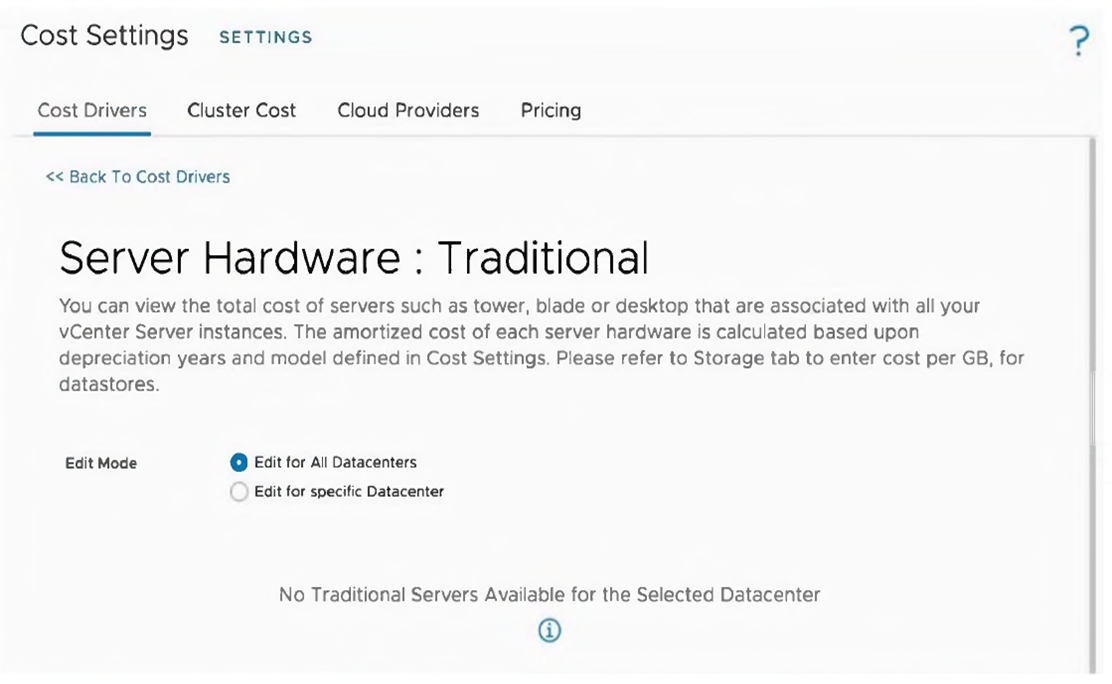
An administrator is tasked to manually upload the cost drivers of all the hosts, to obtain
cost calculations accurate for their datacenter. However, when the administrator tries to
update the cost drivers, the message displayed on the exhibit is shown.
What is the cause of this message?
A. All hosts are in vSAN enabled clusters.
B. Reference database is being used.
C. Cost drivers must be established on a per Datacenter basis.
D. Cost calculation process is running at this moment.
Explanation:
The message "No Traditional Servers Available for the Selected Datacenter" appears because vRealize Operations categorizes server hardware into two distinct types: Traditional and Hyper-Converged (HCI) .
Traditional Servers are standard tower, blade, or rack servers where compute and storage are separate components. Hyper-Converged Servers include vSAN-enabled hosts and solutions like VxRail, where compute and storage are integrated .
When an administrator attempts to update cost drivers under the "Server Hardware: Traditional" section, the system only displays traditional servers. If all hosts in the environment are part of vSAN-enabled clusters, they are classified as HCI servers, not traditional servers. Therefore, no traditional servers appear for cost driver configuration .
Why Other Options Are Incorrect
B. Reference database is being used
– vRealize Operations uses a reference cost database by default to provide initial cost estimates, but this does not prevent traditional servers from appearing . The reference database is used for cost calculations, not for hiding server categories.
C. Cost drivers must be established on a per Datacenter basis
– While cost drivers can be configured per datacenter using the "Edit for specific Datacenter" option, this is not the cause of the "No Traditional Servers" message. The message appears regardless of whether editing for all datacenters or a specific one .
D. Cost calculation process is running at this moment
– The cost calculation process running does not prevent traditional servers from being displayed in the configuration interface. The message indicates absence of traditional servers in the inventory, not a processing delay.
Reference
VMware vRealize Operations 8.x Documentation: "Server Hardware: Traditional vs. Hyper-Converged" – vSAN-enabled servers are classified under Hyper-Converged Infrastructure, not Traditional servers
Exam 2V0-32.24 Discussion – Confirms that "No Traditional Servers Available" indicates all hosts are in HCI/vSAN clusters
An administrator would like to monitor third-party storage array metrics in vRealize Operations.
Which three steps should the administrator take to complete this objective? (Choose three.)
A. Download the Content Pack from VMware Marketplace
B. Download the Management Pack from the VMware Marketplace to the local system
C. Install and configure the Management Pack
D. All Management Packs are installed & configured by default when installingthe vRealize Operations
E. Download the PPK file from VMware Marketplace
F. Verity that the Management Pack is supported for the specific vRealize Operations version/edition from the VMware Compatibility Guide
Explanation:
To monitor third-party storage array metrics in vRealize Operations, the administrator must install a Management Pack specifically designed for that storage vendor (e.g., Dell, NetApp, Pure Storage). Management Packs are adapters that enable vRealize Operations to connect to external data sources and collect metrics, alerts, and inventory . The correct three steps are:
F. Verify that the Management Pack is supported for the specific vRealize Operations version/edition from the VMware Compatibility Guide – Before downloading, verify compatibility to ensure the Management Pack works with the deployed vRealize Operations version. This prevents installation failures .
B. Download the Management Pack from the VMware Marketplace to the local system – After verification, download the appropriate Management Pack (as a .pak file) from VMware Marketplace or the vendor's support site .
C. Install and configure the Management Pack– Upload the .pak file via Administration > Repository > Add, accept the license, complete installation, then configure by adding the storage array credentials under Other Accounts .
Why Other Options Are Incorrect
A. Download the Content Pack from VMware Marketplace – Content Packs provide dashboards and views for log data (vRealize Log Insight), not metrics collection from storage arrays. Management Packs are required for third-party metric monitoring .
D. All Management Packs are installed & configured by default when installing vRealize Operations – False. Only built-in packs like vSphere and vSAN are included. Third-party storage Management Packs must be manually downloaded, installed, and configured .
E. Download the PPK file from VMware Marketplace – .ppk files are not used for Management Pack installation. Management Packs use .pak files .
Reference
VMware Docs: "Verbinden von vRealize Operations mit Datenquellen" – Management Packs extend monitoring to external data sources; download from VMware Marketplace
Dell Tutorial: "Dell Storage Management Pack for vRealize Operations" – Install by uploading .pak file, then configure credentials
An administrator has been tasked with analyzing the impact of deploying a new application. The current infrastructure is using an external storage array.
What vRealize Operations What-If Analysis should the administrator perform to get this information?
A. Infrastructure Planning: Hyperconverged
B. Workload Planning: Hyperconverged
C. Workload Planning: Traditional
D. Infrastructure Planning: Traditional
Explanation:
The administrator needs to analyze the impact of deploying a new application on an infrastructure using an external storage array. Since the environment uses external storage (traditional SAN/NAS) rather than vSAN hyperconverged infrastructure, the correct what-if analysis type is Workload Planning: Traditional.
Why Other Options Are Incorrect
A. Infrastructure Planning: Hyperconverged – This is used for adding or removing vSAN ReadyNodes in vSAN-enabled clusters, not for analyzing new application workloads on traditional storage arrays.
B. Workload Planning: Hyperconverged – This is specifically for planning VM deployments on hyperconverged infrastructure (vSAN clusters). The question explicitly states the environment uses an external storage array, not vSAN.
D. Infrastructure Planning: Traditional – This is used for adding or removing physical servers (hosts) to increase cluster capacity, not for analyzing a new application deployment. It answers "what if I add more hardware?" rather than "does my current hardware support this new app?".
Reference
VMware Docs: Workload Planning: Traditional – Adding Virtual Machines
VMware Docs: What-If Analysis – Infrastructure Planning: Traditional
VMware Blog: vRealize Operations Capacity Optimization – Resource Planning
Which three deployment architectures are valid for vRealize Log Insight listed below? (Choose three.)
A. Single node deployment with an external load balancer
B. Two node deployment with the integrated load balancer
C. Three node deployment with an external load balancer
D. Single node deployment with no load balancer
E. Single node deployment with the integrated load balancer
F. Ten node deployment with the integrated load balancer
Explanation:
vRealize Log Insight supports several valid deployment architectures based on VMware official documentation. The three valid options are:
Option A (Single node with external load balancer) – Valid. While VMware best practice is to use the Integrated Load Balancer (ILB), external load balancers are technically supported for production deployments, though not the recommended configuration . A single-node architecture can be deployed for non-production or small-scale environments.
Option D (Single node with no load balancer) – Valid. Single node deployments represent the most basic vRealize Log Insight configuration. For non-production environments or small-scale deployments, you can deploy a single vRealize Log Insight node without any load balancer. However, VMware recommends against using single nodes for production environments as a best practice .
Option F (Ten node deployment with integrated load balancer) – Valid. vRealize Log Insight supports clusters ranging from three to eighteen nodes. The Integrated Load Balancer (ILB) is designed specifically for cluster deployments. A ten-node cluster is well within the supported range of 3-18 nodes .
Why Other Options Are Incorrect
Option B (Two node deployment with integrated load balancer) – Invalid. vRealize Log Insight clusters require a minimum of three nodes. A two-node cluster does not provide proper quorum or high availability and is not supported .
Option C (Three node deployment with external load balancer) – Invalid. VMware official documentation explicitly states that external load balancers are not supported for use with vRealize Log Insight clusters, including three-node clusters . The Integrated Load Balancer must be used for cluster deployments.
Option E (Single node deployment with integrated load balancer) – Invalid. The Integrated Load Balancer is designed for multi-node clusters with three or more nodes. Single node deployments cannot utilize ILB functionality, which requires multiple nodes to distribute traffic .
Reference
Broadcom TechDocs: "Deployment Model for vRealize Log Insight" - Specifies three-node cluster with integrated load balancer
VMware Docs: "vRealize Log Insight Deployment Planning" - Single node deployments and cluster requirements
| Page 1 out of 8 Pages |
| 123 |