
Last Updated On : 12-Oct-2026
An administrator has been tasked with determining the type of VMware Horizon
deployment for their organization.
These requirements have been provided to the administrator:
• It must support Windows 10 Enterprise multi-session desktops.
• It must support App Volumes.
• It must support centralized brokering.
• It must automatically route end-users to the most appropriate virtual workspace.
Which deployment solution meets the requirements?
A. VMware vSphere Desktop Edition
B. VMware Workspace ONE Unified Endpoint Management
C. VMware Horizon On-Premises
D. VMware Horizon Cloud on Microsoft Azure
Explanation:
The question lists four specific requirements. Here is how Horizon Cloud on Microsoft Azure addresses each one:
Windows 10 Enterprise multi-session desktops: This is a unique operating system exclusive to the Azure cloud platform. Unlike standard Windows 10 or Windows Server, it allows multiple concurrent user sessions on a single virtual machine. Horizon Cloud on Microsoft Azure is an approved Azure Virtual Desktop provider and fully supports this OS type.
Supports App Volumes: This requirement is explicitly met. VMware documentation confirms that you can integrate App Volumes with Windows 10/11 Enterprise multi-session images for application delivery in this environment.
Centralized brokering: The solution utilizes the VMware Horizon Control Plane, a SaaS-based management layer that provides unified, centralized connection brokering for the entire environment.
Automatic routing of end-users: The platform includes intelligent routing features that direct users to the most appropriate virtual workspace based on defined policies and user profiles.
❌ Why Other Options Are Incorrect
A. VMware vSphere Desktop Edition:
This is a virtualization platform, not a Horizon deployment solution. It lacks the connection brokering and end-user routing capabilities required.
B. Workspace ONE UEM:
This is an endpoint management solution for devices, not a VDI platform for delivering virtual desktops.
C. Horizon On-Premises:
While it supports App Volumes and centralized brokering, it does not support Windows 10 Enterprise multi-session operating systems. On-premises Horizon relies on Windows Server for session-based desktops.
📖 References
VMware Horizon Cloud Service Documentation confirms Win 10/11 Enterprise multi-session support and App Volumes integration
VMware Official Blog: "Horizon Cloud on Microsoft Azure Support for Windows Virtual Desktop"
End-users are complaining that they are frequently being asked for credentials when opening additional apps. Which step should the administrator take to resolve the issue?
A. Configure SSO Timeout by modifying the Global Settings in Horizon Administrator
B. Configure a time limit by modifying the Horizon GPO.
C. Configure Desktop Timeout by modifying the Pool Settings in Horizon Administrator.
D. Configure Session Timeout by modifying the Client Settings in Horizon Client.
✅ Explanation
End-users being prompted for credentials when launching additional applications indicates that the Application SSO Timeout setting is too aggressive. After initial authentication, Horizon caches user credentials for launching subsequent resources. If this cache expires before users launch their second or third application, the system requires re-authentication.
The solution is to modify the Application SSO Timeout value in Horizon Console's Global Settings. Navigate to Settings > Global Settings and increase the timeout period (default is 30 minutes). This setting controls how many minutes can elapse after authentication before SSO credentials are locked. The policy can be set to DISABLED_AFTER to disable SSO after the specified timeout, ENABLED for no timeout, or DISABLED to turn off SSO entirely.
❌ Why Other Options Are Incorrect
B. Configure a time limit by modifying the Horizon GPO
— Group Policy Objects affect agent-side configurations on individual VMs, not the central Connection Server SSO token timeout for brokering additional applications. GPOs cannot resolve this specific issue.
C. Configure Desktop Timeout by modifying the Pool Settings
— This controls how long a connected desktop session remains active before disconnection or logoff, not the SSO credential lifespan for launching applications.
D. Configure Session Timeout by modifying Client Settings
— Client-side idle session timeouts affect connection persistence on the endpoint device, not server-side Application SSO credential validity.
📖 References
VMware API Documentation:application_sso_timeout_minutes controls "time allowed to elapse after a user has authenticated before the application SSO credentials are locked"
VMware Horizon Administration: SSO settings are configured under Global Settings in Horizon Console
What is the default URL used to access the Horizon Console?
A. https://
B. https://
C. https://
D. https://
✅ Explanation:
The default URL to access the Horizon administrative console (Horizon Console) uses the /admin path appended to the Connection Server's fully qualified domain name (FQDN) or IP address. VMware documentation across multiple languages consistently specifies the format as https://server/admin, where "server" represents the Connection Server hostname. This is the dedicated web interface where administrators perform desktop pool creation, session monitoring, license management, and policy configuration.
❌ Why Other Options Are Incorrect
A. https://
— This is not a valid administrative endpoint. The /default path is not used for Horizon Console access. The end-user web portal page for client downloads uses a different configuration and is not the administrative interface.
C. https://
— While the IP address can technically be used when the hostname cannot be resolved, the correct path is /admin, not /administrator. VMware recommends using FQDN rather than IP address to avoid TLS certificate mismatches.
D. https://
— This path is incorrect for Horizon Console. The /login endpoint is not the standard administrative console URL. The correct access point uses the /admin path.
📖 References
VMware Horizon Documentation: "Open your web browser and enter the following URL, where server is the host name of the Connection Server instance: https://server/admin"
Technical Blog: "Access Horizon Console from a web browser at https://
An administrator wants to deploy a RDS farm which can be patched in a rolling process with zero downtime. Which of the following statements is true in this scenario?
A. This cannot be done as updating a Farm always incurs downtime.
B. Create an instant-clone RDS desktop farm.
C. Create a manual RDS desktop farm.
D. Nothing needs to be done. All RDS farms can be patched in a rolling process with zero downtime.
✅ Explanation
To achieve zero-downtime patching for an RDS farm, the administrator must deploy an instant-clone RDS desktop farm. This is because instant-clone farms utilize a rolling image update process (push-image) that replaces RDS hosts without service interruption.
❌ Why Other Options Are Incorrect
A. This cannot be done as updating a Farm always incurs downtime.
This is false. Instant-clone technology was specifically introduced to enable patching with near-zero downtime. Only manual farms (which you patch by hand) or legacy farms would incur downtime.
C. Create a manual RDS desktop farm.
A manual farm is created from existing physical or virtual machines that you manage manually. You would need to patch each RDS host individually (usually requiring reboots or manual logoffs), which makes zero-downtime rolling patching impossible.
D. Nothing needs to be done. All RDS farms can be patched in a rolling process with zero downtime.
Only instant-clone farms support the native automated rolling patch process described in option B. Standard RDS farms (manual or full-clone automated) do not have this feature.
📖 References
VMware Documentation: "Patching an Instant-Clone Desktop Pool" describes the push-image operation for rolling patching with zero downtime.
VMware Blog:"Instant cloning makes desktop and Remote Desktop Services (RDS) server patching a cinch... This rolling update approach can reduce the maintenance window to near zero".
What is the effect of changing any VMware Blast policy that cannot be changed in real time?
A. Horizon Client detects the change and prompts the user to reboot once every 480 seconds.
B. VMware Tools services is restarted by Microsoft GPO Update service.
C. VMware Tools detects the change and immediately applies the new setting within 480 seconds.
D. Microsoft GPO update rules apply and GPOs are updated manually or by restarting the Horizon Agent.
✅ Explanation:
VMware Blast policies are configured via Group Policy Objects (GPOs) using the VMware Blast ADMX template file (vdm_blast.admx) . When an administrator changes a Blast policy, the behavior depends on which specific setting is modified:
Real-time policies (e.g., H264, Audio Playback, Bandwidth limits, Max Frame Rate, Image Quality) take effect immediately when changed during a client session .
Non-real-time policies (all other VMware Blast settings) follow standard Microsoft GPO update rules . This means the new policy settings are not applied until one of the following events occurs:
The Horizon Agent service is restarted on the remote desktop or RDS host
The remote desktop or RDS host is rebooted
The Group Policy refresh interval is reached (default is 90 minutes for domain members)
There is no automated real-time application for these settings—administrators must manually trigger the update or wait for the next GPO refresh cycle.
❌ Why Other Options Are Incorrect
— VMware Tools is not involved in applying Blast GPO changes. The Horizon Agent service, not VMware Tools, is the relevant service for Blast policy updates .
B. VMware Tools detects the change and immediately applies the new setting within 480 seconds
— No VMware documentation supports a "480-second" automatic application window. Non-real-time policies do not auto-apply at any interval—they require GPO refresh, service restart, or reboot .
C. Horizon Client detects the change and prompts the user to reboot once every 480 seconds
— While Horizon Client detects real-time policy changes, it does not prompt for reboots on non-real-time policies. Non-real-time policies follow GPO rules, not client-side reboot prompts .
📖 References
VMware Horizon Documentation: "For all other VMware Blast policies, Microsoft GPO update rules apply. GPOs can be updated manually or by restarting the Horizon Agent machine"
Exam4Training: Confirms non-real-time Blast policy changes require Horizon Agent restart, reboot, or GPO refresh interval
Which two of the following are features of VMware Horizon Agent for Linux? (Choose two.)
A. USB redirection
B. location based printing
C. display protocol PCoIP
D. installation registration requirement
E. session collaboration
Explanation:
The VMware Horizon Agent for Linux brings enterprise-grade virtual desktop features to Linux distributions (such as Ubuntu, RHEL, and CentOS), mirroring many capabilities traditionally found in the Windows agent.
A (USB Redirection):
Horizon Agent for Linux supports the redirection of USB devices from the client machine to the remote Linux desktop. This allows users to interact with local USB storage, smart cards, and other peripherals directly within their Linux session.
E (Session Collaboration):
Linux desktops support the Session Collaboration feature. This allows an authenticated user to invite other peers to join their active desktop session, enabling real-time collaborative troubleshooting, code reviews, or co-working within the same Linux environment.
Why Other Options Are Incorrect
B is incorrect:
Location-Based Printing (LBP) maps printers to a virtual desktop based on the client device's network location, client name, or user group. This specific management feature is supported exclusively on Horizon Agent for Windows desktops.
C is incorrect:
Modern versions of the Horizon Agent for Linux rely on the VMware Blast Extreme display protocol as their primary and default protocol. Native PCoIP support has been deprecated and phased out for Linux desktop deployment in recent releases.
D is incorrect:
Unlike some enterprise software agents that require a strict pre-registration key or handshake token with a cloud portal during the command-line install phase, the Horizon Linux Agent relies on standard command parameters to point to the Connection Server, and handles broker communication dynamically via the underlying pairing architecture.
References
VMware Horizon Guide to Desktops and Applications in Horizon (Horizon Agent for Linux): "Features Supported on Linux Desktops," which explicitly outlines the availability of USB Redirection and Session Collaboration, while noting the platform exclusions for Windows-only features like Location-Based Printing.
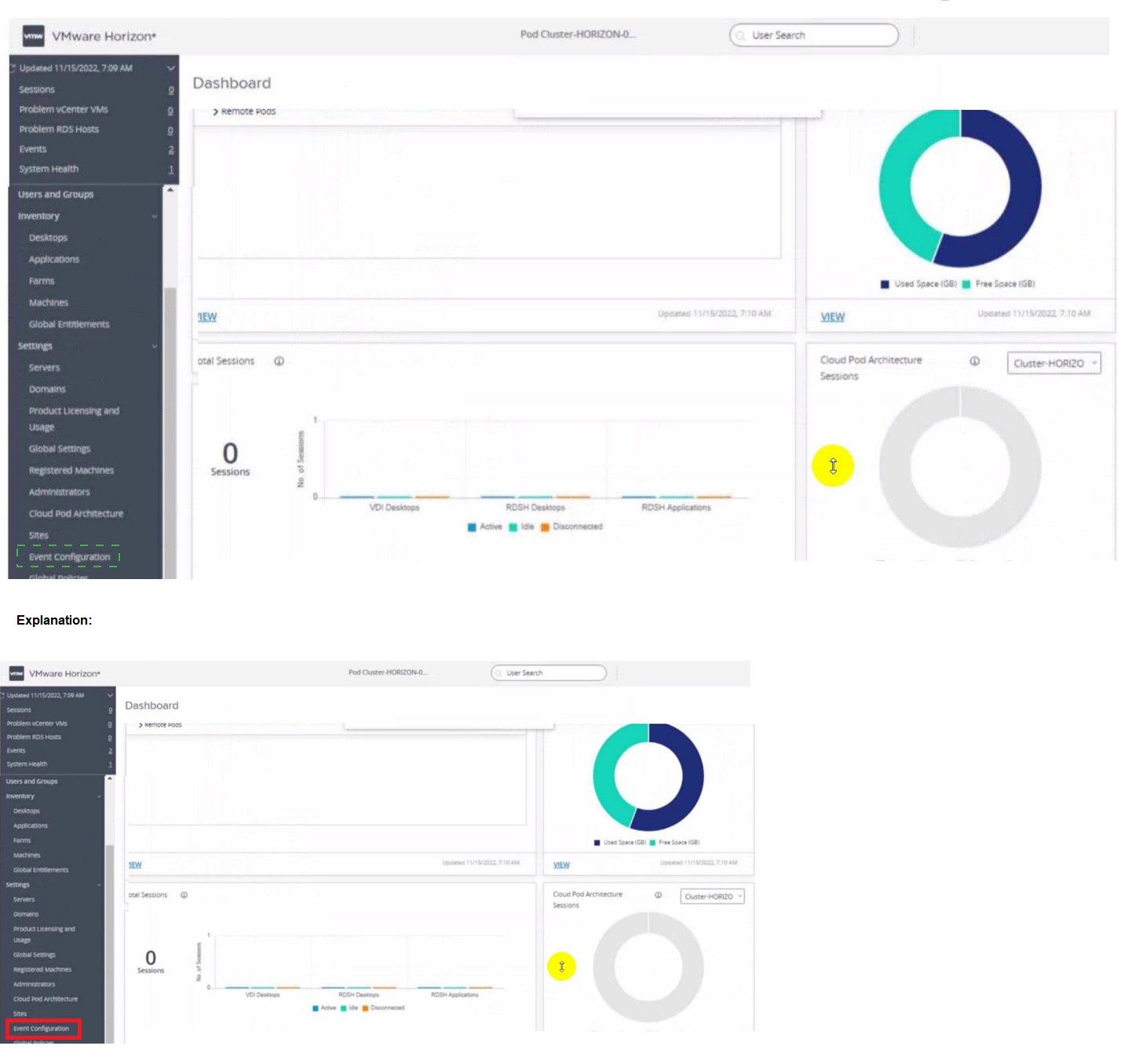
Refer to the exhibit.
An administrator wants to configure a central SYSLOG server.
Mark the correct menu option by clicking on it.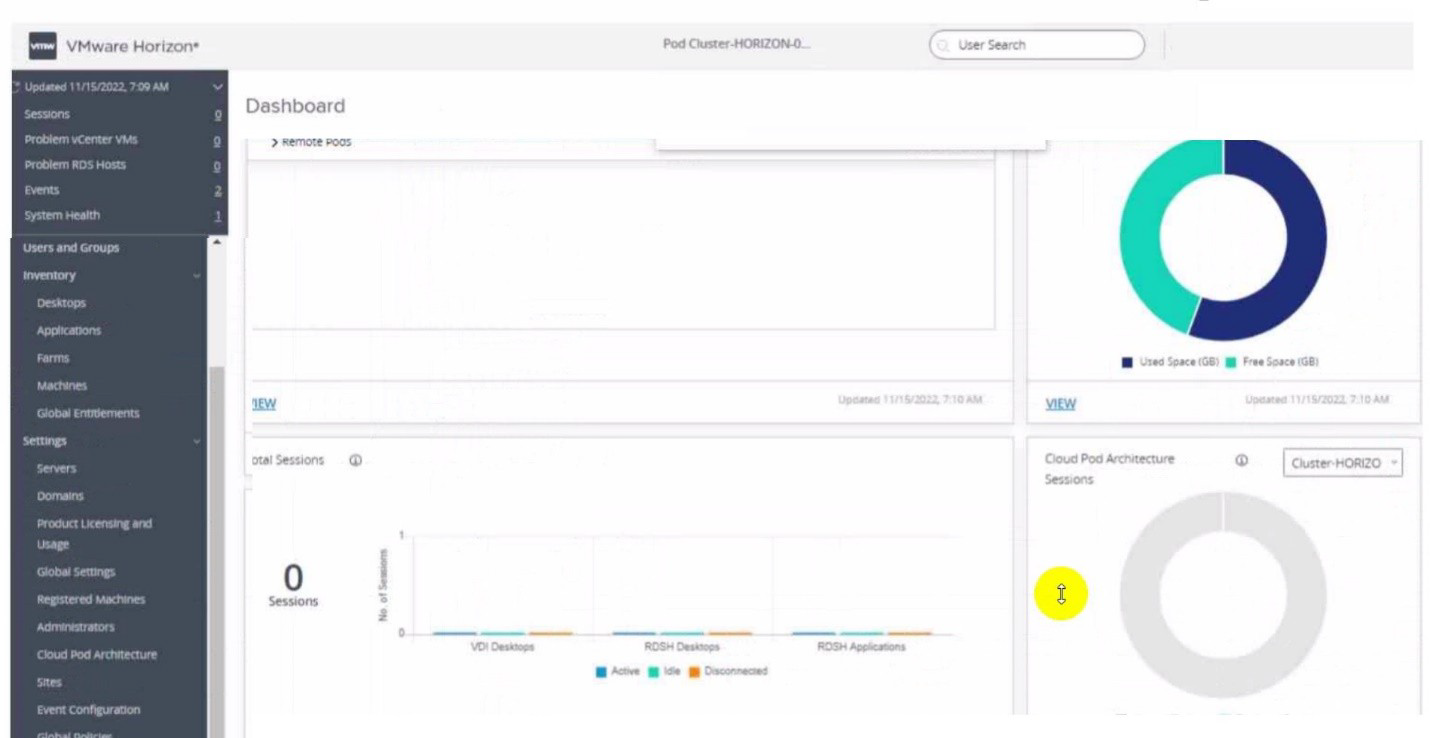
Which of the following statements are true about Application Profiler?
A. Application Profiler is installed using VMware Dynamic Environment Manager Enterprise Setup Wizard and explicitly selecting local drive installation.
B. VMware Dynamic Environment Manager Agent and the Application Profiler cannot be installed on the same machine.
C. Application Profiler is installed automatically when installing VMware Dynamic Environment Manager FlexEngine.
D. Application Profiler is installed automatically when installing Dynamic Environment Manager Management Console.
Explanation:
The VMware Dynamic Environment Manager (DEM) Application Profiler is a standalone tool used by administrators to analyze application behavior (file and registry changes) and automatically generate DEM configuration files (.ini files).
To install it, you must run the main VMware Dynamic Environment Manager Enterprise Setup Wizard (the MSI installer). By default, the Application Profiler component is not selected. You must expand the feature tree within the custom setup screen and explicitly choose to install it on the local hard drive.
Why Other Options Are Incorrect
B is incorrect:
It is actually standard practice and a common requirement to install the DEM Agent (FlexEngine) and the Application Profiler on the same reference or staging virtual machine. The profiler hooks into applications as they run to see what the agent needs to capture.
C and D are incorrect:
The Application Profiler is never installed automatically. Both the FlexEngine (Agent) and the Management Console installers treat the Application Profiler as an optional, advanced component that requires manual selection during a custom installation layout.
References
VMware Dynamic Environment Manager Administration Guide: "Installing and Configuring the Application Profiler Component," which outlines launching the enterprise installer and manually enabling the feature for local installation.
| Page 3 out of 11 Pages |
| 1234 |
| 2V0-51.23 Practice Test Home |