
Last Updated On : 12-Oct-2026
Stop guessing. Start passing. Our 2V0-51.23 practice test questions gives you the exact question types, timed conditions, and real-world scenarios you'll face on exam day. No fluff just up-to-date questions that mirror the official VMware Horizon 8.x Professional exam. Whether you're new to VMware or leveling up, this is your shortcut to get "certified." Try a Free 2V0-51.23 exam questions now and feel the difference.
✅ Trusted by 500+ IT pros | Updated for 2026 | Real style questions | 30–40% higher pass rate
What are two Cloud Pod Architecture feature limitations? (Choose two.)
A. Cloud Pod Architecture does not support Active Directory two-way trusts between domains.
B. Cloud Pod Architecture is not supported with Unified Access Gateway appliances.
C. Kiosk mode clients are not supported unless a workaround has been implemented.
D. Cloud Pod Architecture cannot span multiple sites and data centers simultaneously.
E. The Cloud Pod Architecture feature is not supported in an IPv6 environment.
Explanations:
Option C: Kiosk mode clients are not supported unless a workaround has been implemented.
This is a documented limitation. In a Cloud Pod Architecture environment, standard Kiosk mode clients do not function correctly without specific modifications. VMware explicitly notes that Kiosk mode is not supported "unless you implement a workaround" (detailed in VMware KB article 2148888).
Option E: The Cloud Pod Architecture feature is not supported in an IPv6 environment.
This is a direct and absolute restriction. According to multiple VMware documentation sources, the Cloud Pod Architecture feature is not supported in an IPv6-only environment. Deployments utilizing CPA must be configured on an IPv4 network.
❌ Incorrect Answers
A. Cloud Pod Architecture does not support Active Directory two-way trusts between domains.
This is incorrect. CPA relies on standard Active Directory trust relationships to function across domains. In fact, for cross-site or cross-domain functionality, AD trusts (including two-way trusts) are a prerequisite for users to authenticate and be authorized for Global Entitlements.
B. Cloud Pod Architecture is not supported with Unified Access Gateway appliances.
This is incorrect. Unified Access Gateway (UAG) appliances are fully supported and commonly used with Cloud Pod Architecture. UAGs provide secure external access and can be integrated with CPA features like Global Server Load Balancing (GSLB) and "Home Site" redirection.
D. Cloud Pod Architecture cannot span multiple sites and data centers simultaneously.
This is incorrect. The primary purpose of Cloud Pod Architecture is specifically to span multiple sites and data centers. CPA creates a "Pod Federation" that allows users to connect to resources regardless of whether they are located in different physical data centers, geographies, or cloud regions.
Reference
Official VMware Limitation Documentation: Confirms IPv6 restriction and Kiosk mode limitation.
Architecture Overview: Confirms the ability to span multiple data centers (debunking option D).
Security/Network Design: Standard AD and UAG requirements support options A and B
Adobe Acrobat 11 has been assigned to a user. VM25 already has Adobe Acrobat 11 and is natively installed. What happens when the user logs on to VM25?
A. The App Volume package does not get attached because the natively installed application has priority.
B. The user-assigned application is attached to VM25. When the user clicks on the application shortcut, the App Volume package for Adobe Acrobat 11is opened.
C. Although a shortcut to the App Volume package is created on the user desktop, the application does not get attached to VM25.
D. A shortcut to the user-assigned application is created on the user desktop, and when they click on the shortcut, the application gets attached to VM25.
Explanation:
When a user logs into a Horizon virtual machine, the VMware App Volumes Agent evaluates the application packages assigned to that user. A core design principle of App Volumes layer merging is that the local base image always takes precedence over attached volumes (Appins/Packages).
If an application is already natively installed in the base OS image (VM25), the file system and registry paths are already occupied. To prevent driver conflicts, registry corruption, or application instability, the App Volumes Agent identifies this conflict and suppresses the attachment of the duplicate virtual package. The natively installed application remains the sole active instance for the user.
Why Other Options Are Incorrect
B is incorrect:
The package will not successfully attach and overlay its shortcuts over the native installation. The system defaults to the native layer to maintain environment stability, preventing the virtualized shortcut from redirecting to the package.
C is incorrect:
Shortcuts are managed as part of the package delivery process. Because the application attachment is blocked due to the native priority rule, the App Volumes Agent will not create the virtual application shortcuts on the user's desktop.
D is incorrect:
App Volumes packages are block-level VMDK/VHD volumes that attach at user login or computer startup. They do not use a "demand-delivery" model where clicking a desktop shortcut triggers a dynamic volume mount.
References
VMware App Volumes Architecture and Technical Overview: Sections detailing "Layering Order and Precedence," which state that the base image file system and registry always have priority over attached application packages.
Users need to be able to log into VMware Workspace ONE Access and connect to remote desktops and applications without having to provide Active Directory credentials. Which VMware Horizon component needs to be deployed to allow this functionality?
A. Replica Server
B. Security Server
C. Enrollment Server
D. vCenter Server
Explanation:
The Enrollment Server is the specific component required to enable True Single Sign-On (True SSO) . True SSO allows users to authenticate once to VMware Workspace ONE Access and then access their Horizon desktops and applications without being prompted for Active Directory credentials again . The Enrollment Server works by requesting and retrieving short-lived user certificates from a Microsoft Enterprise Certificate Authority (CA) on behalf of the Horizon Connection Server, which then uses these certificates to automatically log users into their virtual desktops .
Why other options are incorrect:
A. Replica Server -
This is simply an additional Horizon Connection Server that provides high availability and load balancing within a pod. It replicates configuration from the primary Connection Server but does not handle certificate enrollment for True SSO .
B. Security Server -
Deployed in the DMZ to provide secure external access from the internet. This component is actually deprecated in Horizon 8.x and replaced by Unified Access Gateway (UAG). It does not perform certificate enrollment services .
D. vCenter Server -
Manages the virtual infrastructure (VMs, hosts, clusters) but plays no role in user authentication or certificate-based single sign-on functionality .
Reference:
VMware Horizon 8.x Documentation on True SSO Deployment confirms the Enrollment Server is required as the "last step of configuring the infrastructure for true single sign-on" .
A junior-level Horizon administrator is not able to see all RDS farms. Where would a high-level administrator need to make changes to correct the issue?
A. Category Folder
B. Access Groups
C. Global Entitlements
D. Global Policies
✅ Explanation
By default, RDS farms are created within the Root (/) Access Group . However, a high-level administrator can create custom Access Groups to delegate limited permissions to junior staff. If the junior administrator has only been assigned a role (e.g., "Inventory Administrator") on a specific Access Group (e.g., "Marketing_Farms"), they will only see RDS farms located inside that specific group. They will be invisible to farms in other groups or the Root group .
To fix this, the high-level administrator must either:
Move the junior administrator's role to the Root Access Group to grant visibility to all farms.
Or, if the scope is specific, add the missing RDS farms to the Access Group the junior already has permissions to .
❌ Why other options are incorrect
A. Category Folder
- Category Folders are for organizing published applications in Horizon Console or Workspace ONE, not for restricting administrative visibility to RDS farm inventory.
C. Global Entitlements
- These allow users to access resources across multiple pods in a Cloud Pod Architecture environment. They do not control which farms an administrator sees in the management console .
D. Global Policies
- These define site-specific rules (e.g., home site, client restrictions) for end-user connections, not administrator permissions.
📖 Reference
VMware Documentation: "Using Access Groups to Delegate Administration of Pools and Farms in Horizon Console" confirms that administrators can only view resources within Access Groups where they have been assigned a role .
An administrator is creating an instant clone desktop pool and needs to enable NVIDIA Grid 3D Rendering. NVIDIA GRID vGPU and drivers are installed on the physical ESXi hosts. In Horizon Console, when creating an instant-clone pool, the NVIDIA GRID vGPU option is not available in the 3D Render field. Which two of the following could be the reason for the issue? (Choose two.)
A. Horizon 8 does not have an explicit 3D renderer option for instant clone. Select Manage Using vSphere Client in the 3D Render field. Instant-clones inherit the settings configured in the vSphere Client for the golden image.
B. In Horizon Console, when an instant-clone pool is created, the golden image and snapshot that the administrator selected has not been configured for NVIDIA GRID vGPU.
C. The administrator has selected Shared when editing the Host Graphics Settings for the ESXi host in the vCenter Server.
D. Instant-clone pools do not support NVIDIA GRID vGPU.
E. The administrator has selected Shared Direct when editing the Host Graphics Settings for the ESXi host in the vCenter Server.
✅ Explanation
B. In Horizon Console, when an instant-clone pool is created, the golden image and snapshot that the administrator selected has not been configured for NVIDIA GRID vGPU.
The NVIDIA GRID vGPU option will not appear unless the golden image VM itself has been properly configured with a vGPU profile. In vSphere Client, you must add a Shared PCI Device to the VM and select an appropriate vGPU profile (e.g., M10-4Q, T4-4Q) before taking the snapshot. The administrator must use this specially configured golden image and snapshot when creating the pool in Horizon Console .
D. The administrator has selected Shared when editing the Host Graphics Settings for the ESXi host in the vCenter Server.
For NVIDIA GRID vGPU to function, each ESXi host must have its Host Graphics Settings configured to Shared Direct (Vendor shared pass-through graphics). If the administrator selects Shared (VMware shared virtual graphics) instead, the NVIDIA GRID vGPU option will not appear in Horizon Console when creating an instant-clone pool .
❌ Why Other Options Are Incorrect
A. Horizon 8 does not have an explicit 3D renderer option for instant clone.
While it is true that Horizon 8 does not directly control 3D settings for instant clones and inherits them from the golden image , this statement describes how the feature works rather than explaining why the NVIDIA GRID vGPU option is missing. The option should appear automatically when both the golden image and ESXi host graphics settings are configured correctly .
C. The administrator has selected Shared when editing the Host Graphics Settings. This is actually Option D, not C. Option C states "Shared" (incorrect)
, while Option D correctly states "Shared Direct" (required). The search results confirm that selecting "Shared" is the incorrect configuration .
E. Instant-clone pools do not support NVIDIA GRID vGPU.
This is completely false. VMware Horizon 8 explicitly supports NVIDIA GRID vGPU for instant-clone desktop pools and RDS farms .
📖 References
VMware Horizon Documentation: *"Configuring 3D Rendering Options for Instant-Clone Desktop Pools"* - Confirms that NVIDIA GRID vGPU is supported and requires (1) Shared Direct host graphics setting and (2) vGPU configured on golden image
In a load balanced Horizon POD with three Connection Servers, there are 450 active Blast sessions connected. What happens if one of these Connection Servers runs into an unplanned outage?
A. All 450 active sessions are disconnected, and have to re-connect again by the end-user.
B. All active sessions will stay connected, because HTTPS Secure Tunnel and Blast Secure Gateway are disabled.
C. All 450 active session are logged off immediately.
D. Only the active sessions from the failed Connection Server are disconnected, because HTTPS Secure Tunnel is disabled.
📖 Explanation:
In a Horizon POD with load‑balanced Connection Servers, if HTTPS Secure Tunnel and Blast Secure Gateway are disabled, active Blast sessions connect directly to the desktop agents. Therefore, when one Connection Server fails, only the sessions brokered through that server are impacted, while others remain connected seamlessly.
❌ Why Other Options Are Incorrect
A. All 450 active sessions are disconnected
→ Incorrect because Horizon sessions are not tied to a single Connection Server once established. Disabling HTTPS Secure Tunnel ensures sessions bypass the Connection Server after brokering.
B. All active sessions will stay connected
→ Too broad. While most sessions remain unaffected, those tied to the failed server are disconnected.
C. All 450 active sessions are logged off immediately
→ False. Horizon does not force logoff of all sessions due to one server outage.
D. Correct
→ Only sessions brokered through the failed server are disconnected, since HTTPS Secure Tunnel is disabled, preventing dependency on the Connection Server for ongoing traffic.
🔗 References
VMware Docs – Horizon 8 Connection Server and Blast Secure Gateway (docs.vmware.com in Bing) (bing.com in Bing)
Which vCenter privileges are required only for instant clones VMs with a Trusted Platform Module (vTPM) device?
A. Upgrade virtual machine compatibility
B. Manage KM5
C. Configure Host USB device
D. Manage custom attributes
✅ Explanation
The vCenter privilege Manage KMS is required specifically when using instant clone VMs with a virtual Trusted Platform Module (vTPM) device . The vTPM requires encryption services to function, which are managed through the Key Management Server (KMS) infrastructure. Without the Manage KMS privilege, the vCenter user cannot perform cryptographic operations necessary for vTPM-enabled instant clones.
According to VMware documentation, when using instant clone VMs with a vTPM device, the following Cryptographic Operations privileges must be enabled :
Clone
Decrypt
Direct Access
Encrypt
Manage KMS ✓
Migrate
Register Host
❌ Why Other Options Are Incorrect
A. Upgrade virtual machine compatibility
- This privilege relates to upgrading VM hardware versions (e.g., from version 14 to 19) for compatibility with newer ESXi hosts . It is not in the Cryptographic Operations group and is not required specifically for vTPM-enabled instant clones.
C. Configure Host USB device
- This privilege falls under the Virtual Machine > Configuration group and controls USB device passthrough to VMs . It has no relation to vTPM or cryptographic operations.
D. Manage custom attributes
- This is a Global privilege that allows managing metadata tags on vCenter objects . While it is required for standard instant clone operations, it is not specific to vTPM-enabled VMs.
📖 References
VMware Horizon Documentation: "Privileges required for the vCenter Server user with Instant Clones" – Lists Cryptographic Operations privileges needed for vTPM-enabled instant clones
VMware vSphere Security Documentation: "Trusted Infrastructure Administrator Privileges" – Explains KMS management for encryption services
Refer to the exhibit.
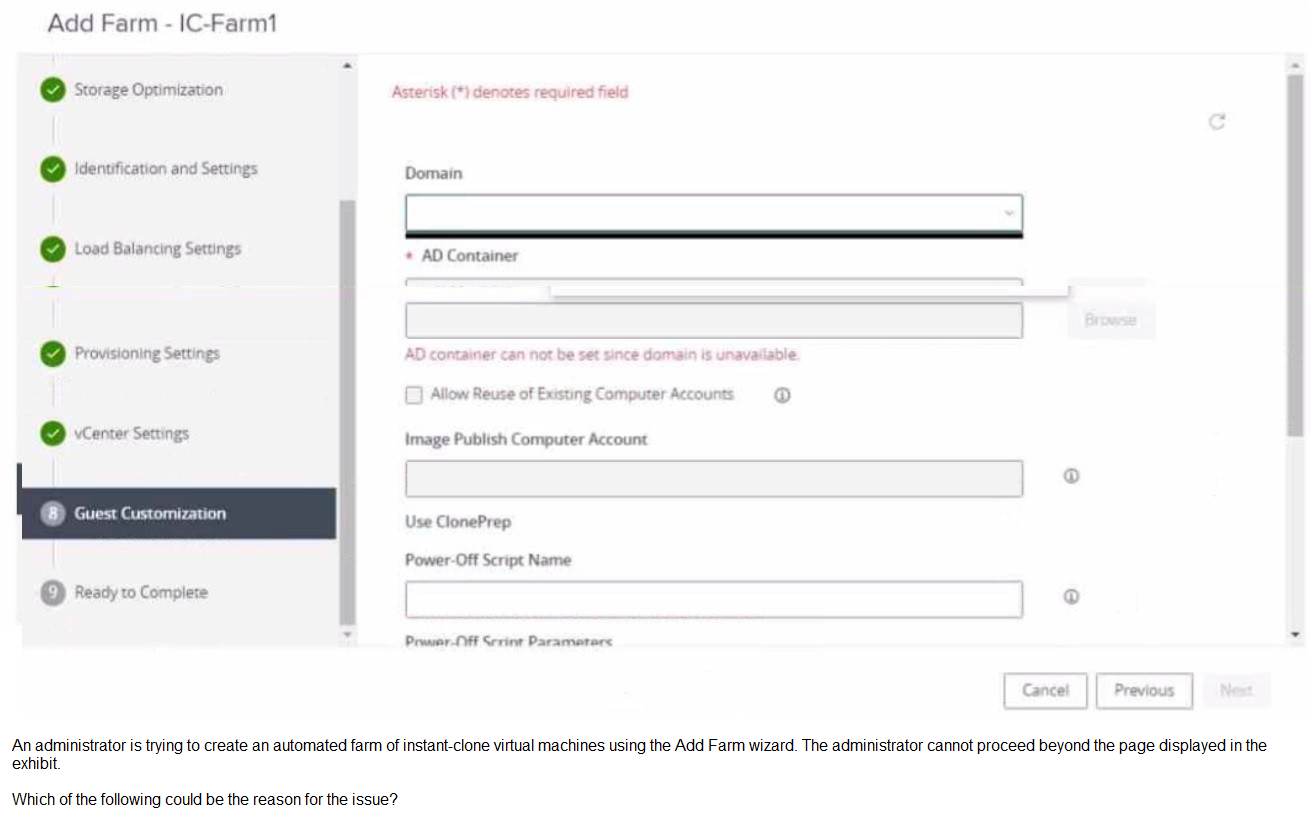
A. In the Add Farm wizard, the administrator may not have selected Automated Farm as farm type.
B. The administrator may not have added an instant clone domain administrator to VMware Horizon.
C. The administrator did not prepare a RDSH golden image snapshot
D. The administrator did not add the RDSH golden image to the correct domain.
Explanation:
The exhibit shows an error message stating: "AD container can not be set since domain is unavailable." In the Guest Customization step of creating an automated Instant-Clone farm, VMware Horizon must communicate directly with Active Directory to browse and select an Organizational Unit (OU) / AD Container for the new computer accounts.
For the Domain drop-down menu to populate and for the domain to be available, Horizon Console must have predefined domain credentials. If an administrator has not yet configured an Instant Clone Domain Administrator (service account credentials) within the Horizon Console settings under Settings > Domains, the Connection Server cannot authenticate or query Active Directory. Consequently, the domain list remains empty, blocking the deployment wizard from moving forward.
Why Other Options Are Incorrect
A is incorrect: The wizard in the exhibit is specifically showing "Use ClonePrep," which is exclusive to Automated Farms. If an Automated Farm hadn't been selected, the administrator wouldn't even be looking at this Instant-Clone-specific guest customization screen.
C is incorrect: Missing a golden image snapshot would cause an error or a blank selection field earlier in the wizard during the "Provisioning Settings" or "vCenter Settings" stages, not a domain communication failure under Guest Customization.
D is incorrect: Whether or not the golden image is joined to the correct domain does not prevent the Horizon Connection Server itself from pulling the configured Active Directory domain list into this wizard UI field.
References
VMware Horizon 8 Administration Guide: "Add an Instant-Clone Domain Administrator" under the initial configuration steps, which notes that these credentials are required for the Connection Server to perform Active Directory operations such as provisioning computer accounts in AD containers.
| Page 1 out of 11 Pages |
| 1234 |